
Find and replace in Civil 3D labels - the text in the label styles and the text overrides on single labels - without opening each label's Text Component Editor. Fields and formatting are never touched.
What it searches
- Label styles: every Text, Reference Text and Text For Each component of every label style, child styles included. A change shows on every label using the style. Narrow to one label type (Pipe, Structure, Alignment ...).
- Text overrides: text typed into one label (or one label of a station / band group). Every label in model space and on every layout, or picked labels.
- Protected: property fields (
<[Pipe Slope(...)]>), AutoCAD fields, MText codes (font, height, color, stacking,\P),%%d/%%c/%%p. A find for "Slope" edits the typed word SLOPE, never the field. - Wildcards:
*/?,[*]/[?]literal; replacement wildcards carry the match; match case, whole word.\Pin the replacement starts a new line.
Review, write & output
- Find All lists every match before and after, readable (
<Pipe Slope>, line breaks as/). Nothing is written until Replace All. - One transaction: each item re-read, replaced, written and read back; a child style already following its changed parent is not edited twice. One U reverses the run.
- Labels on a locked layer are skipped and listed. Xref labels are not searched.
- Output: count report +
<drawing> - Label Find and Replace.csvunder VDC Reports (readable and raw text before / after, result, position). - Settings
%APPDATA%\VDC\LabelReplace\settings.json(envVDC_LABELREPLACE_SETTINGS), schema-tolerant.
Dialog
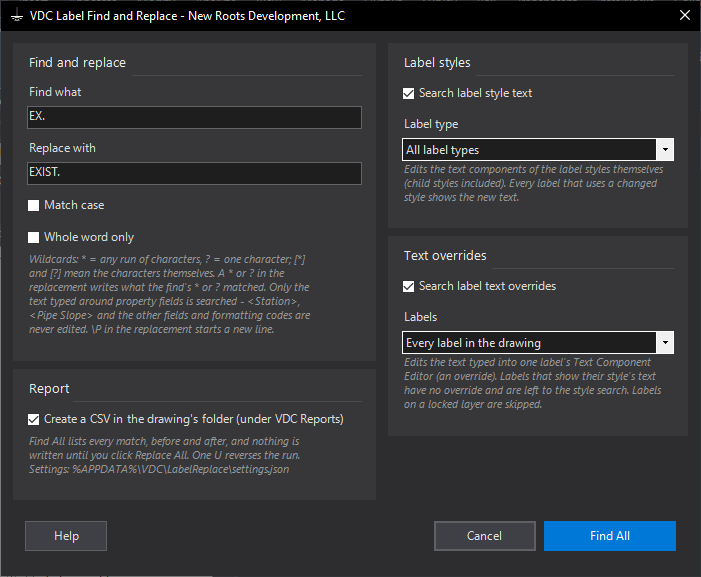
VDCLABELREPLACE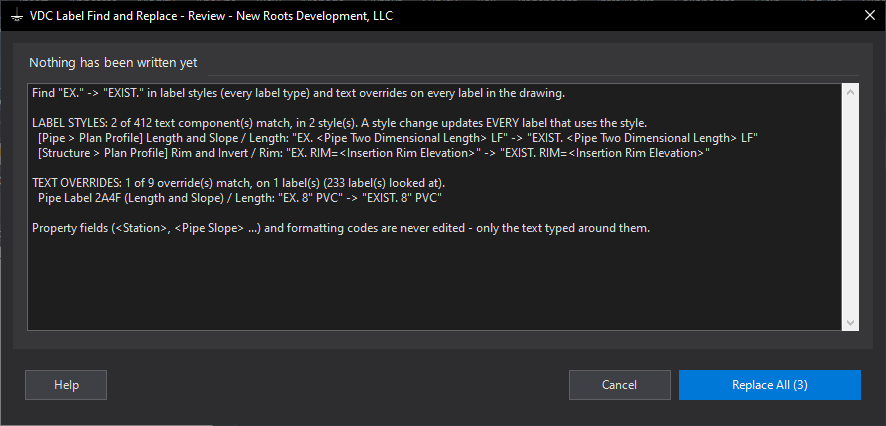
VDCLABELREPLACEWhen to use it
- A label style says EX. and the office standard is now EXIST. - change it once for every label.
- A dozen pipe labels were overridden by hand with an old note and need the same fix.
- Changing the wording typed around a field (SLOPE to GRADE) without touching the field itself.
How to run it
- Run VDCLABELREPLACE; type the text to find and the replacement.
- Tick Label styles (and pick a label type, or leave All) and/or Text overrides (every label or picked).
- Click Find All and read the review list - every match, before and after.
- Click Replace All, or Cancel to leave the drawing as it was.
- Read the count report; the CSV in VDC Reports lists every change.
Options
- Label type: limits the style search to one branch - Pipe, Structure, Alignment, Profile ...
- Picked labels: select or window labels on screen after the dialog; other objects are ignored.
- Whole word only: matches only where the hit is not joined to another letter or digit.
- \P in the replacement: starts a new line in the label.
Watch out for
- A style change shows on every label using that style - narrow the label type if only one kind should change.
- Field values (a station, a pipe size from the part) are not text and are never matched.
- Labels on a locked layer and labels inside xrefs are not changed.
Related: Point Find and Replace · Label QC · Font Swap