Finds overlapping labels as they actually plot: projecting every model-space annotation through each layout viewport's twist & scale into paper space, then flagging pairs whose plotted boxes overlap by more than a minimum area.
Model candidate / viewport frame
Twist + scale projection
Projected boxes & flagged overlap
Paper space
What it does
- Gather once: collects MText, single-line text, multileaders, and any entity on the configured label layers from model space.
- Project per viewport: pushes each candidate's model extents through the viewport's twist + scale into paper space via the shared
ViewportIntrospector, keeping those inside the viewport. - Test overlap: compares the projected paper-space boxes within each layout+viewport; flags pairs overlapping by more than the threshold (paper units, typically sq in).
- Per-viewport by design: a label's plotted size/orientation depends on scale + twist, so two labels clear in model space can collide on a rotated sheet, and vice-versa.
- Read-only: one command audits the whole drawing; nothing is moved.
Settings & outputs
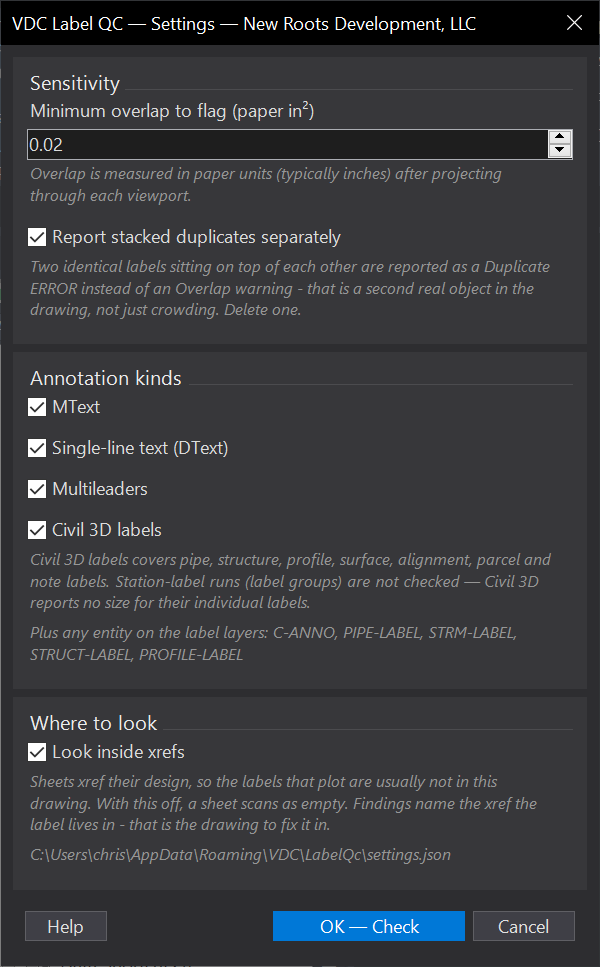
- Minimum overlap: paper-space area (default
0.02sq in) below which hairline touches are ignored. - Include types: MText, Text (DText), and multileader each toggle on/off (all on by default).
- Label layers: extra layers always included regardless of type (edited in
settings.json). - Settings: env var
VDC_LABELQC_SETTINGS, default%APPDATA%\VDC\LabelQc\settings.json; schema-tolerant load; report cap (default 300). - Output:
<drawing> - Label QC.csvplus the findings palette, double-click to zoom to the clash. - Scope: projection is plan-view (plan-readable reorientation not modeled); field-verify against rotated match-line sheets.
Dialog
VDCLABELQCWhen to use it
- Catching label collisions on the plotted sheet before pen-up / final QC.
How to run it
- Run VDCLABELQC; set the minimum overlap area and which annotation types / label layers to include.
- Click OK; the tool projects each viewport's annotation into paper space and tests for overlaps.
- Review the overlapping-label findings in the palette; double-click to zoom to the pair.
Options
- Minimum overlap: paper-space overlap area (default 0.02 sq in) below which collisions are ignored.
- Include types: MText, Text (DText), and multileaders are each toggleable (all on by default).
- Label layers: extra layers whose entities are always included, regardless of type (edited in settings.json).
Watch out for
- Overlap is measured per viewport after projecting through its twist + scale - the same pair may collide in one viewport but not another.
- Labels on different sheets / viewports are never compared, so there are no cross-sheet false positives.
- The finding count is capped (default 300); reduce annotation or raise the minimum overlap if you hit the cap.
Related: Sheet Index · Standards QC · QC Status