Read-only audit of every paper-space viewport and page setup for plot-production readiness: unlocked viewports, annotation-scale ÷ viewport-zoom mismatch, off/orbited views, per-viewport layer overrides, and each layout's plot device, CTB, and paper size.
Passing viewport (locked, scale matched)
ERROR (annoscale mismatch / orbited)
WARNING (unlocked / off / override / CTB)
INFO row (vp freezes) + palette/CSV
What it checks
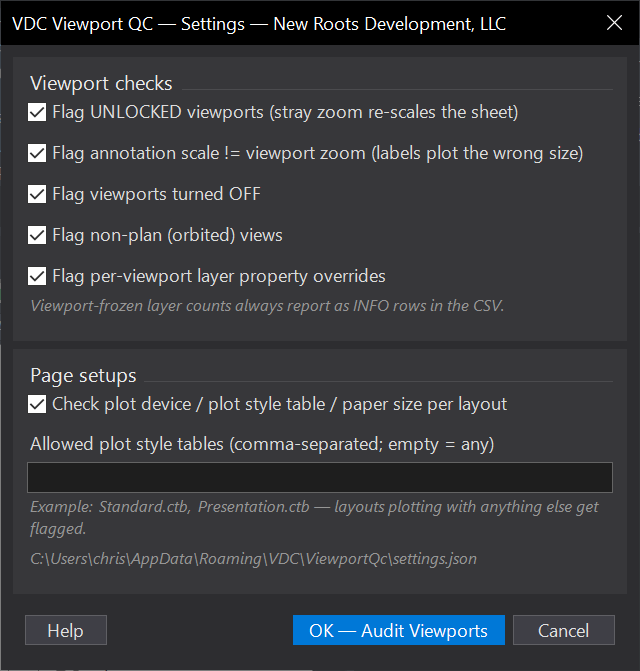
- Per viewport: display not locked (WARN), annotation scale ≠ viewport zoom (ERROR), turned off (WARN), orbited non-plan view (ERROR).
- Layer state: per-viewport color/linetype/lineweight/plot-style/transparency overrides (WARN); layers frozen in this vp only (INFO count).
- Page setup: layout has no plot device (WARN, suppresses CTB/paper checks), no CTB/STB or one outside the allowed list (WARN), paper size straying from the set's dominant size (WARN).
- Safe: read-only, whole-drawing, runs in seconds; the annoscale check skips off viewports and any whose scale can't be read (never guesses).
- Findings double-click to the viewport's model-space view center, lands correctly even on twisted views.
Settings & outputs
- Each viewport check toggles individually; page-setup checks toggle as a group.
- Allowed plot style tables: comma-separated list (e.g.
Standard.ctb, Presentation.ctb); empty = accept any non-empty CTB. - Persisted at
%APPDATA%\VDC\ViewportQc\settings.json; office-wide override viaVDC_VIEWPORTQC_SETTINGS. - Outputs the findings palette plus a CSV in the drawing's VDC Reports folder carrying every row, including the INFO freezes.
- Completes the plan-production trio with
VDCSHEETINDEX(numbering / scale / twist / match-lines) andVDCLABELQC(plotted collisions), no overlap.
Dialog
VDCVIEWPORTQCWhen to use it
- Right before a submittal plot batch - it's read-only and takes seconds.
- After borrowing sheets from another project, to catch foreign page setups and CTBs.
- When a plotted sheet came out with wrong-size labels - the annotation-scale check finds which viewport drifted.
How to run it
- Run VDCVIEWPORTQC; toggle the checks you want and set the allowed CTB list (empty accepts any non-empty CTB); click OK.
- The tool scans every layout: viewport lock/on/scale/annotation-scale/view state, per-viewport layer overrides + freezes, and each layout's plot device / CTB / paper size.
- Work the palette top-down (double-click zooms to the viewport's model area); the CSV in the drawing's VDC Reports folder carries the full list including the INFO rows.
Options
- Viewport checks: unlocked, annotation-scale mismatch, off, non-plan (orbited), layer overrides - each toggles individually.
- Page setups: plot device present, CTB/STB assigned, paper size consistent across the set.
- Allowed plot style tables: comma-separated names; layouts plotting with anything else get flagged. Empty = any non-empty CTB passes.
Watch out for
- Annotation-scale mismatch is fixed from the STATUS BAR viewport scale control (or re-lock at the standard scale) - zooming inside the viewport is what caused it.
- Per-viewport layer overrides aren't wrong by themselves - the flag exists because they make the sheet plot differently than the model shows; confirm each is deliberate.
- Scale standardness, twist, and match-line continuity are Sheet Index's checks (VDCSHEETINDEX) - run both before issuing.
Related: Sheet Index · Label QC · Standards QC