Inventories every revision cloud and delta triangle across model space and every layout, pairs each cloud with its delta tag, and flags the clouds nobody wants to miss at resubmittal: orphans with no delta and stale clouds left over from a prior round.
Paired cloud (has delta)
Orphaned cloud
Stale cloud
Stray delta (INFO)
Title block
What it does
- Recognizes clouds: closed polylines that are nearly all arcs (≥8 vertices, ≥80% arc, the
REVCLOUDsignature) on any layer, plus anything on the cloud layer wildcard (default*REV*). - Recognizes deltas: block inserts matching the name wildcards; rev number read from the first matching attribute (
REV/NO/NUM…) with a numeric fallback. - Pairs a delta to a cloud when it falls in the cloud's bounding box expanded by the pairing reach (default 2 units, per space).
- Flags orphans (no delta in reach, WARNING) and stale clouds (tagged older than the current rev, WARNING); stray deltas are INFO.
- Scans model space and every layout; read-only except the optional table.
Settings & outputs
- Current revision:
0auto-detects the highest numeric delta; set explicitly mid-revision. Letter revs (A, B) never flag stale. - Dialog keys: cloud layer pattern, delta block patterns, pairing reach, current rev, table toggle; attribute tag lists in
settings.jsonat%APPDATA%\VDC\RevTable\. - CSV per run, findings plus one INFO summary row per space (cloud/delta counts, rev numbers present, descriptions).
- Findings palette zooms to each cloud/delta; paper-space hits note their layout in Location.
- Optional table: one row per sheet/space (clouds, deltas, rev numbers, descriptions) at a picked point, drawing's current table style, current space.
- Blind spot: clouds drawn as splines or exploded linework are invisible, use
REVCLOUDor the rev layer.
Dialog
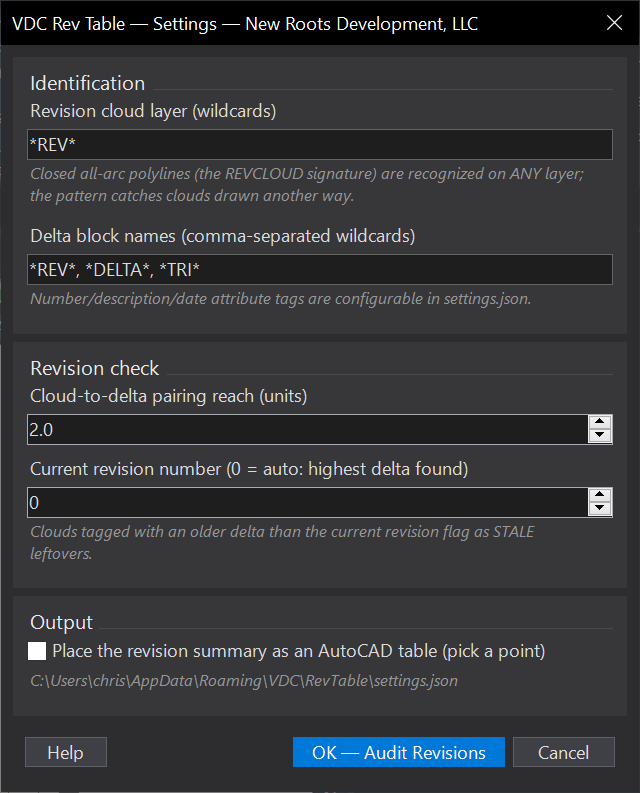
VDCREVTABLEWhen to use it
- Before every resubmittal - stale clouds from the last round are the classic reviewer catch.
- Building the per-sheet revision summary without walking every layout tab.
How to run it
- Run VDCREVTABLE; confirm the cloud layer pattern, delta block patterns, pairing reach, and the current revision (0 = auto: highest delta found); click OK.
- The tool scans model space + every layout, pairs clouds with deltas, and reports orphans / stale clouds to the palette and CSV.
- With the table option on, pick a point - one row per sheet: clouds, deltas, rev numbers, descriptions.
Options
- Cloud layer (wildcards): catches clouds drawn without REVCLOUD; the all-arcs signature is recognized on any layer regardless.
- Delta block names: comma-separated wildcards (default *REV*, *DELTA*, *TRI*); number/desc/date attribute tags configurable in settings.json.
- Pairing reach: how far outside the cloud's box a delta still counts as its tag (in that space's units).
- Current revision: 0 auto-detects the highest numeric delta; set it explicitly when the set is mid-revision.
Watch out for
- Letter revisions (A, B) never flag stale - only numeric deltas participate in the current-rev comparison.
- A stray delta with no cloud is only INFO - the title-block revision history triangles land there by design.
- Clouds drawn as splines or exploded linework are invisible to the scan - use REVCLOUD or keep clouds on the rev layer.
Related: Sheet Index · Viewport QC · Label QC