Extracts construction quantities scan-then-pick: one discovery scan of the host drawing and its xrefs finds every layer of linework (incl. feature lines, LF), every hatch and closed-polyline layer (SF), every block name (EA, water/sewer services), every alignment, and every gravity and pressure pipe network, then check boxes decide what lands in the takeoff CSV. Rows sharing an item name sum together; picks are remembered and pre-check the next run; the scan funnel always prints.
Gravity pipe (LF by size)
Structure count (EA)
Linear item (LF)
Area item (SF)
What it does, per run
- Discovery scan of the host drawing + one level of xrefs: linework layers (feature lines included) → LF, hatch + closed-polyline layers → SF / LF, block names → EA, alignments, gravity AND pressure networks (pipe LF + part counts by part description, the parts-list / template text such as 15 RCP or CI-H; catalog size name when blank).
- Pick grid: check a row, name the item (rows sharing a name sum), choose LF or SF for closed shapes; picks are remembered across drawings.
- Depth list (1.108.0): gravity pipe LF per size per depth band from the DEEPEST point of each pipe between its structures (rim − invert; reference-surface cover as the fallback) and structure EA per band (rim − sump). Bands 0–6 ft, then every 2 ft to 20 ft, then over, editable. Additional to the plain totals; unreadable depths land under "depth unknown".
- Services as singles / doubles (1.108.0): block-name token DBL = double, LT / RT = single, each on its own line plus a "lots served" line (singles + 2 × doubles).
- Pipe length is center-to-center 2D plan length (straight); a curved pressure run measures slightly short.
Outputs & scope
<drawing> - Quantities.csvin the drawing's VDC Reports folder, plus a command-line summary grouped by category.- Dialog toggles: gravity networks, pressure networks, the depth list (+ its three band numbers), the single / double service split; then the pick grid and OK.
- Layer→item maps live in
settings.json(VDC_QTO_SETTINGS, default%APPDATA%\VDC\Qto\settings.json); schema-tolerant load. - The funnel always prints: what was scanned (host + each xref) and what discovery found, before the dialog opens.
Dialog
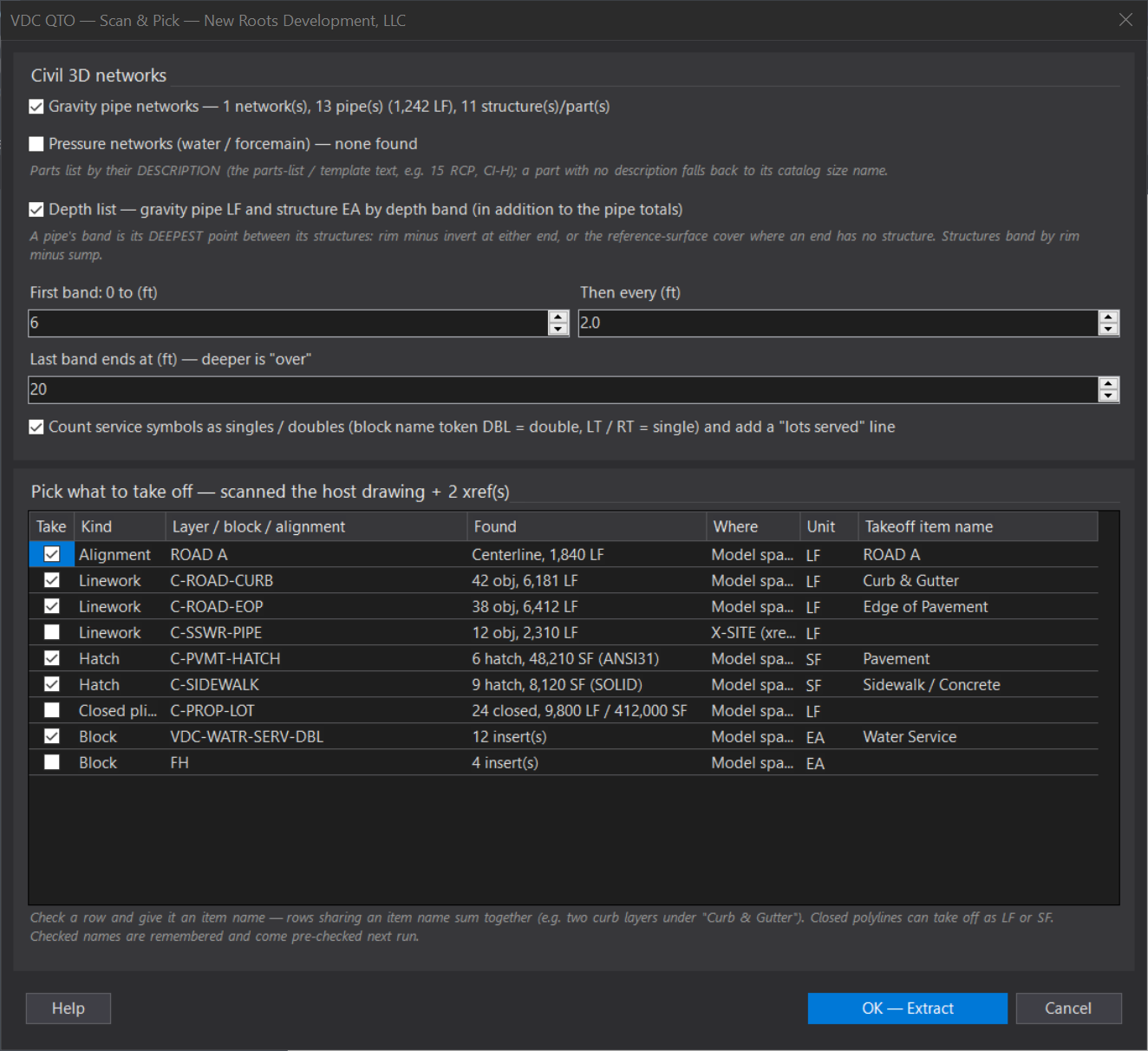
VDCQTOWhen to use it
- Producing a first-pass quantity takeoff from a Civil 3D drawing for estimating or a quantities sheet.
How to run it
- Run VDCQTO - the discovery scan runs first and prints what it scanned (host + each xref) and found.
- In the grid, CHECK each row to take off; give it a takeoff item name (rows sharing a name sum together).
- For a closed-polyline layer choose LF (perimeter) or SF (area) in the Unit column.
- Leave the gravity / pressure network check boxes on to include pipe LF by size + part counts; the depth list and the single / double service split are their own check boxes.
- Click OK - Extract; read the category summary and open the Quantities CSV in the VDC Reports folder.
Options
- Civil networks: gravity AND pressure (water / force-main) - pipe LF and structure / fitting / appurtenance counts by part DESCRIPTION (the parts-list / template text, e.g. 15 RCP, CI-H; the catalog size name when a part has no description).
- Alignments: one LF line per alignment; Centerline types come pre-checked.
- Blocks: insert counts (EA) - the VDC-WATR-SERV / VDC-SSWR-SERV service symbols come pre-mapped.
- Services as singles / doubles: on by default - a service block whose name carries DBL (or DOUBLE) counts as a double, LT / RT (or SGL / SINGLE) as a single, each on its own line, plus a 'lots served' line (singles + 2 x doubles).
- Depth list: on by default - gravity pipe LF per size per depth band from the DEEPEST point of each pipe between its structures (rim minus invert at either end; reference-surface cover as the fallback), and structure EA per depth band (rim minus sump). Bands: 0-6 ft, then every 2 ft to 20 ft, then over - all three numbers editable. Additional to the plain pipe totals.
- Memory: checked names persist across drawings and projects; unchecking a matched row retires its mapping.
Watch out for
- Xrefs are scanned one level deep - an xref inside an xref is not walked.
- Pipe lengths are 2D center-to-center; a horizontally curved pressure run measures slightly short.
- A block counts as ONE each - its internal linework is never measured as LF.
- Depth needs rims: a pipe end with no connected structure falls back to the network reference surface; with neither, its LF lands under 'depth unknown' so nothing is silently dropped.
Related: Earthwork Haul · Lot Table · Pipe QC