Pulls pipe network structure labels (and pressure fitting/appurtenance labels: hydrants, tees, bends, valves) off the road into the lots, the way a drafter drags them one by one after auto-labeling a network. Moving the label puts it in dragged state, so the leader and stacked text come straight from the label style, nothing converted, nothing replaced, and rEset snaps everything back.
Structure labels → own side
Centerline MH → parcel-aware lot side
Pressure fittings, shorter drag
Leader & stacked text from the label style
What it does
- Direction: perpendicular to the part's
RefAlignmentId(assign withVDCPIPEREF) or the nearest alignment that resolves the anchor; the target is computed in station/offset space, so it's exact on curves. - Side: off-center structures (paired curb inlets) go to their own side, the usual plan convention; centerline structures go to whichever side lands in a lot parcel (ROW-named parcels excluded).
- Dragged state does the rest: leader, stacked text, and appearance come from the label style.
- Skip-already-dragged (default on): re-running after a new phase leaves hand-placed labels alone.
- rEset mode: snaps every dragged structure/fitting label back onto its feature.
- Funnel after every run: found / moved / each skip with its reason.
Settings & options
- Distances (model feet, per kind): storm
50, sanitary70(mid-road manholes cross a whole lane), other gravity45, pressure fittings25. - Lot centers (optional): structure labels snap to the centroid of the lot they land in; fittings keep the fixed distance.
- Scope: check the gravity networks to touch; pressure fitting labels one toggle.
- Parcel-aware side pick can be turned off (falls back to pure own-side/right rules).
- Pipe labels are never moved, they ride their pipes.
- Known limitation: some pressure labels return nothing from any API accessor and are skipped (the funnel says which), drag those few by hand.
- Placement is a strong first pass, expect to nudge a few labels at intersections.
- Dialog values persist at
%APPDATA%\VDC\LabelDrag\settings.json(env overrideVDC_LABELDRAG_SETTINGS). - Ribbon: VDC Lots tab → Labels → Label Drag.
Dialog
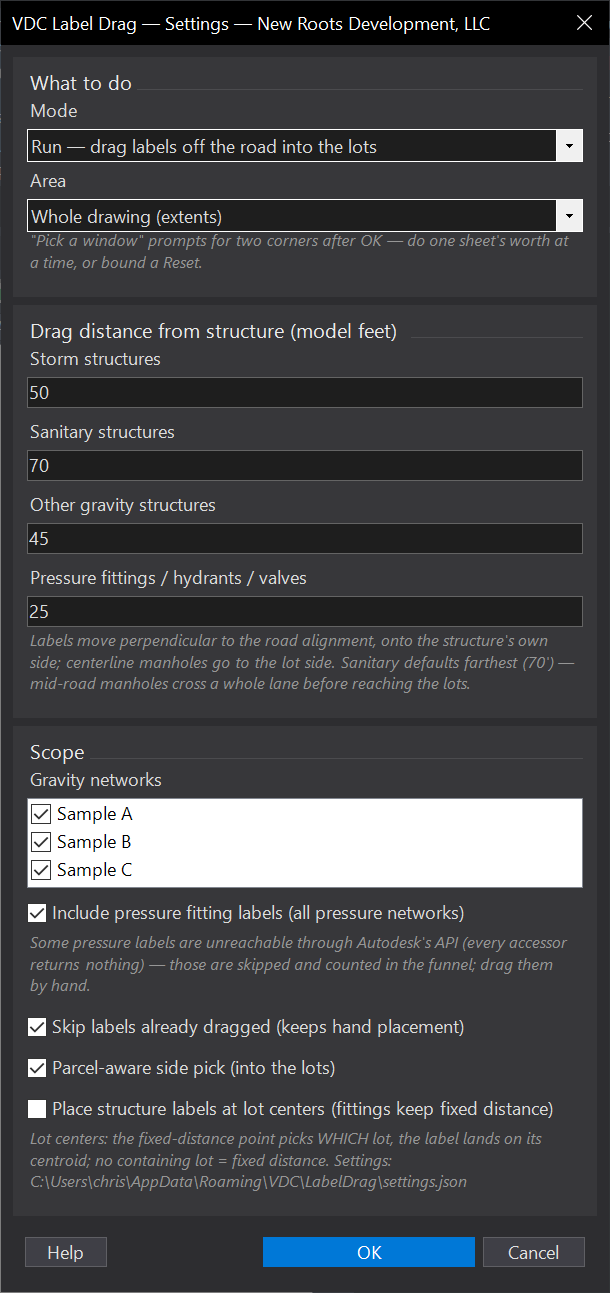
VDCLABELDRAGWhen to use it
- Right after auto-labeling a network, when every structure label sits on its structure.
- After adding a phase's structures and labeling them - already-dragged labels are skipped.
How to run it
- Label the network first (Annotate > Add Labels), and run VDCPIPEREF so parts know their alignment.
- Run VDCLABELDRAG - the dialog carries the mode (Run / Reset) and the area choice (whole drawing, or a window picked after OK - e.g. one sheet at a time).
- Check the per-kind drag distances (storm / sanitary / fittings), the network list, and OK.
- Read the funnel on the command line - found / moved / skipped counts per reason.
Options
- Run: drag every eligible label; hand-dragged labels are skipped by default.
- rEset: snap the dragged structure/fitting labels IN SCOPE back onto their features for a clean re-run - if you picked a window, labels elsewhere stay dragged, and the command says so.
- Distances: model feet from structure to label, per kind - sanitary defaults farthest (70') because mid-road manholes cross a whole lane; storm 50', fittings 25'.
- Lot centers: optional - structure labels snap to the centroid of the lot they land in; fittings keep the fixed distance.
- Parcel-aware: candidate points are tested against lot parcels so labels land in lots, not ponds or the far ROW.
Watch out for
- Placement is a strong first pass, not a finished sheet - expect to nudge a few at intersections.
- Some pressure labels are unreachable through Autodesk's API and are skipped (funnel says which) - drag those few by hand.
- Labels with no resolvable alignment (no VDCPIPEREF assignment and out of range of every alignment) are skipped and counted.
- Pipe labels are left alone on purpose - they belong on their pipes.
- By default every eligible label in the drawing is dragged; pick a Window to limit it to one area. Lots and alignments just outside a window are still read, so an edge label can still find the lot it lands in.
Related: Pipe Ref · Label QC · Pipe Crossings