Assigns a reference alignment to each gravity pipe run: grouping connected pipes and structures, projecting the run onto every alignment, and setting
RefAlignmentId on the lowest-mean-offset qualifier so station-based labels stop reading ??+??.
Gravity run (pipes + structures)
Winning alignment
StationOffset projection
Disqualified crossing road
What it does
- Group: connected pipes + structures form runs via union-find over the network graph, two pipes join when they share a structure; a branch keeps the whole tree in one run.
- Score: every run is projected onto every alignment (
StationOffsetat each pipe's start / mid / end). - Qualify: an alignment wins only when most of the run's points project onto it, a crossing road touching one pipe never qualifies.
- Assign: the lowest mean absolute offset qualifier within reach wins;
RefAlignmentIdis set on every pipe (and structure, optional) in the run. - Runs with no qualifier flag as WARNINGs, assign by hand or raise the reach.
Modes & settings
- Preview (default): reports each run's winner + mean offset to the palette + CSV; writes nothing.
- Assign: applies winners; parts already on the winner are untouched, a different existing ref survives unless overwrite is checked.
- Max mean offset (reach): default 100 ft; a run farther than this from every alignment stays unassigned and flags.
- Also assign structures: on by default. Overwrite existing: off by default.
- Gravity networks only, pressure networks carry their own alignment association.
- Settings at
%APPDATA%\VDC\PipeRef\settings.json(envVDC_PIPEREF_SETTINGS).
Dialog
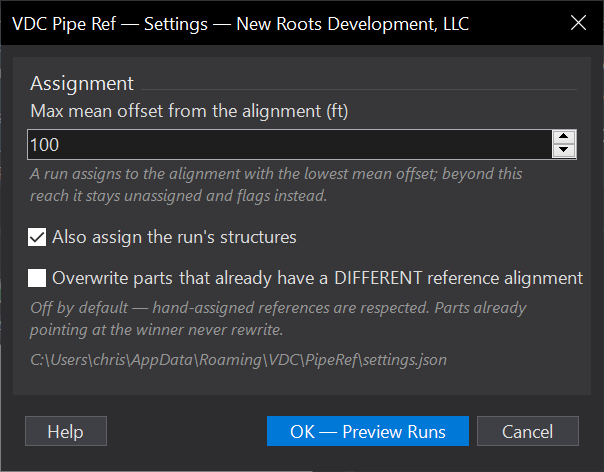
VDCPIPEREFWhen to use it
- Right after building or importing a network, before styling station-based labels.
- When structure labels read ??+?? because parts have no reference alignment.
How to run it
- Run VDCPIPEREF and press Enter for Preview; set the reach (max mean offset), structures on/off, and overwrite; click OK.
- Read the report: each run shows its winning alignment and mean offset; runs with no qualifier flag as WARNINGS.
- Run again -> Assign to apply. Parts already pointing at the winner never rewrite; different existing refs only change with overwrite checked.
Options
- Max mean offset (ft): the assignment reach (default 100); a run farther than this from every alignment stays unassigned and flags.
- Also assign structures: on by default - the run's structures get the same alignment.
- Overwrite existing: off by default - hand-assigned references are respected.
Watch out for
- Always Preview first on a drawing with hand-assigned references - the report shows exactly what Assign would change.
- Gravity networks only; pressure networks follow alignments by design and carry their own association.
- A run that straddles two roads scores against both - if the wrong one wins, split the network at the junction or assign that run by hand.
Related: Pipe QC · Pipe Table · Station Offset Table