Auto-names gravity structures and pipes by run: the longest run is A, its structures A1, A2, A3, its pipes A1-A2, sewer gets the dash format (A-1, A-2), from configurable templates, with an old→new preview before anything is renamed.
Run A (longest)
Branch run B
Collisions & cautions
How it names
- Same run walker as Pipe Views: through interior structures, straight through junctions (≤ 45°); storm and sewer each deal their own sequence.
- Lettering order: longest-first (default) · by system, trunk to the pond is A, branches B, C, D in tee-off order along it, next system continues at E · or pick runs on screen in order. Start-at letter continues a prior phase (H, J, K…).
- Numbering from the downstream (outfall) end by default, untick to start upstream. Tokens:
{run} {n} {n:00} {network} {from} {to}; unknown tokens stay literal so typos show in the preview. - Pick mode: first part + last part → the connected path is named as one run, numbered from the FIRST pick, junctions included.
Guardrails
- Gravity networks only; Project Explorer "Pipe Runs" have no public API, run membership lives in the names.
- More options: keep structures already matching the pattern (new parts fill the gaps) · number continuously through a system (A1–A4 then B5, B6) ·
{type}/{tn}type-based schemes (CB-1, MH-1) · CSV rename log beside the drawing. - Wanted name already in use elsewhere → " (2)" suffix + a note in the preview.
- Labels showing part names update automatically. Settings:
%APPDATA%\VDC\PipeNames\settings.json(VDC_PIPENAMES_SETTINGS).
Dialog
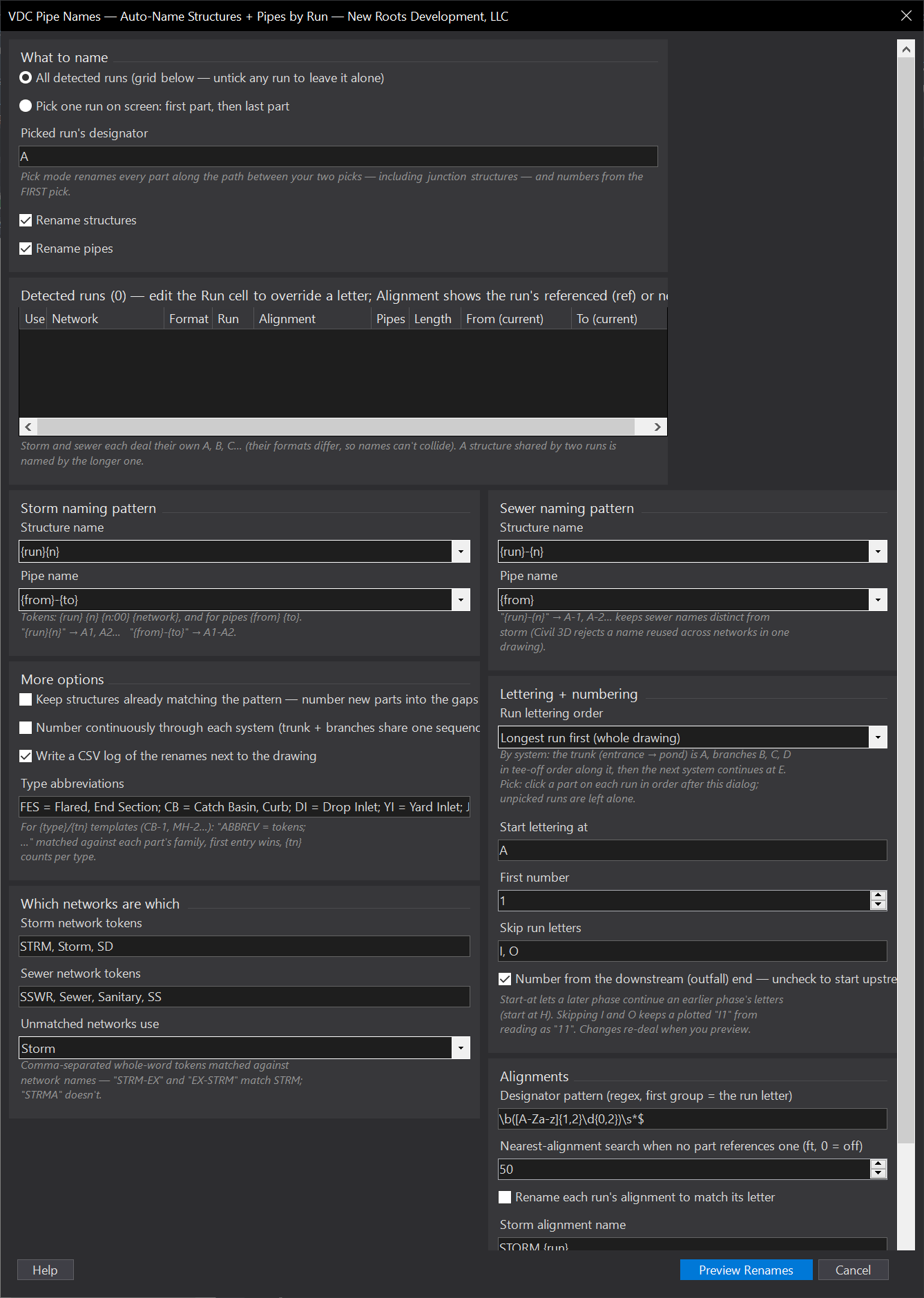
VDCPIPENAMES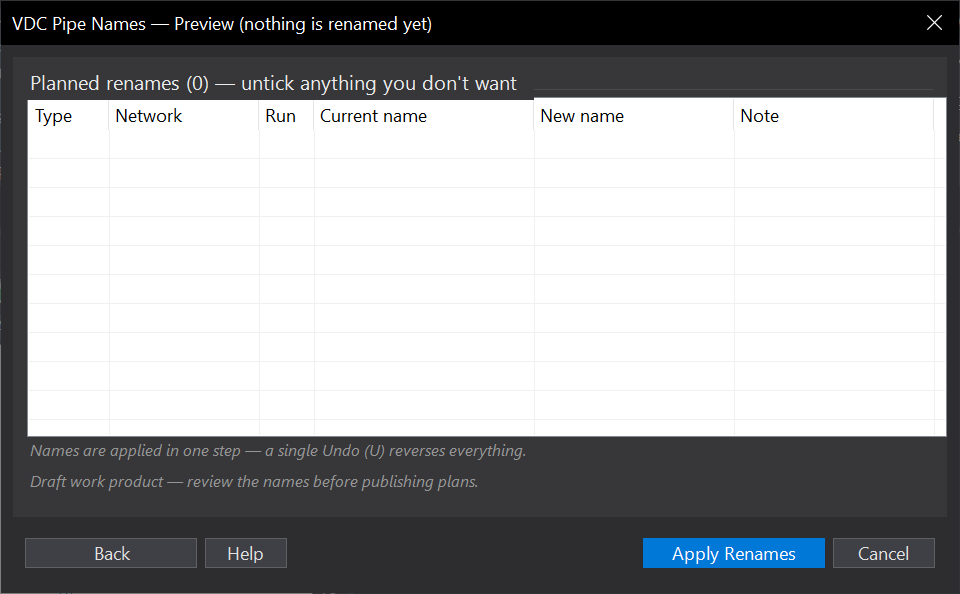
VDCPIPENAMESWhen to use it
- A laid-out network still carries factory names (Structure - (23), Pipe - (41)) and the schedules, profiles, and labels need real run names.
- After a re-route renumbers half a run: pick mode renames just that run without touching the rest.
- Standardizing a drawing that arrived with someone else's naming convention.
How to run it
- Run VDCPIPENAMES. The grid lists every detected run with its dealt letter, pipe count, length, and end structures - longest run is A.
- Untick runs to leave alone; edit a Run cell to override a letter; the Alignment column shows each run's referenced (ref) or nearest (near) alignment; adjust the storm/sewer patterns if the office convention differs.
- Preview Renames - review old name -> new name, per-row checkboxes, collision notes.
- Apply. Labels showing part names update automatically; one Undo reverses everything.
Options
- Patterns: storm {run}{n} / {from}-{to} -> A1, A1-A2; sewer {run}-{n} / {from} -> A-1. Tokens {run} {n} {n:00} {network} {from} {to}; unknown tokens stay literal so typos show in the preview.
- Lettering order: Longest-first (default); By system - the trunk to the pond is A, branches B, C, D in tee-off order along it, next system continues at E; Pick runs on screen in order (Undo/Done on the command line, unpicked runs left alone); or From each run's alignment name - the reference alignment its parts carry (else the nearest within the search distance), STORM A -> A via an editable pattern, runs sharing an alignment numbered continuously along it, the rest dealt longest-first around the letters in use.
- Alignments: Rename each run's alignment to match its letter (any lettering order): STORM {run} / SEWER {run} templates, one rename per alignment, a name another alignment holds is reported and skipped. Alignment renames preview as their own rows and apply in the same Undo step.
- Letters: I and O skipped by default (a plotted I1 reads as 11); list editable; any run's letter can be overridden in the grid. Start lettering at H to continue an earlier phase's letters.
- Direction: numbering starts at the downstream (outfall) end by default; untick to start upstream. Pick mode numbers from the FIRST pick.
- Classification: networks match storm/sewer by whole-word tokens in the network name (STRM, Storm, SD / SSWR, Sewer, Sanitary, SS); unmatched networks use the format you choose.
- More options: Keep structures already matching the pattern (new parts number into the gaps); number continuously through each system (trunk A1-A4, branch B5, B6); {type}/{tn} tokens for type-based schemes (CB-1, MH-1, editable family map); CSV rename log beside the drawing (default on).
Watch out for
- Gravity networks only - pressure networks have no structure-to-structure connectivity to walk.
- Project Explorer's 'Pipe Runs' have no public creation API, so the tool cannot define them - run membership lives in the names themselves.
- A junction structure shared by two runs is named ONCE, by the longer run; the branch's numbering continues past it (A2 -> B1). Pick mode renames junctions too, because you said the path is the run.
- A wanted name held by a part outside the rename gets ' (2)' and a note - resolve it by renaming the other part or overriding the letter.
Related: Pipe Views · Pipe Ref · Pipe Table · Renumber Tags