Audits every alignment's profile views for pipes that cross the alignment but aren't drawn in the view (or aren't on the crossing style), and can auto-draw each missing crossing into its correct profile view: the missed utility that otherwise becomes a field conflict.
Alignment / profile view
Crossing drawn (pass)
Missing crossing (ERROR)
Along-alignment main (screened out)
Ground profile
What it does
- Snapshot: every pipe, gravity + pressure; curved pressure mains sampled along their true horizontal arc.
- Crossing test: a pipe counts only when its offset flips sign and it runs transverse (across-ness test), screening out the longitudinal main.
- Projections past the alignment ends are round-trip-validated so no phantom
STA 0+00crossings. - Compare: against
PipeOverrides(gravity) /GetPressurePipeOverrides(pressure) per view. - Report: Missing (crosses, not drawn, ERROR) or Wrong style (drawn, not on crossing style, WARNING).
- Auto-draw: each missing crossing drawn via
AddToProfileView; whole run is one Undo.
Settings & options
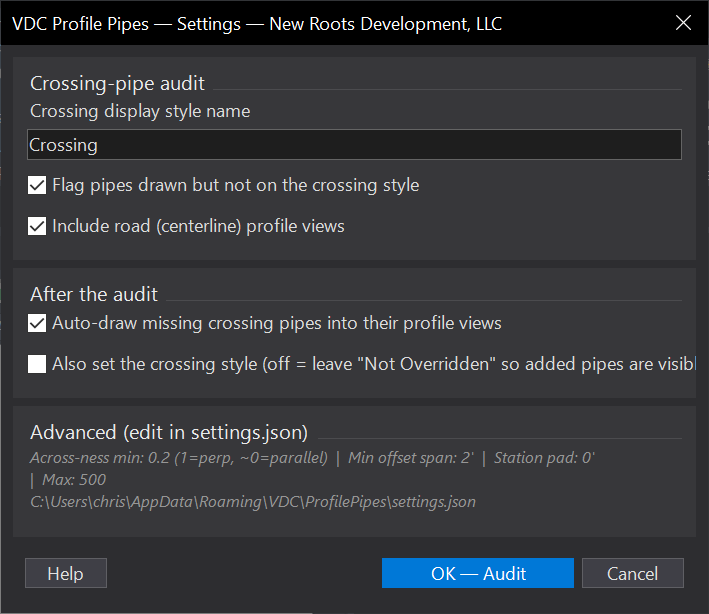
- Crossing style name: the profile display style for the sliced-pipe ellipse (default
Crossing). - Auto-draw missing pipes: on by default; draws each crossing into its correct view.
- Also set crossing style: off by default, leaving added pipes
Not Overriddenshows what the tool added. When on, run twice (Civil materializes the override only after the draw commits). - Include road profile views: on by default, centerline-alignment views audited too.
- Across-ness ratio / min offset span in
settings.jsontune crossing vs main. - Output:
<drawing> - Profile Pipes.csv+ findings palette (double-click to zoom);VDC_PROFILEPIPES_SETTINGSenv override.
Dialog
VDCPROFXINGSettings file:
%APPDATA%\VDC\ProfilePipes\settings.jsonWhen to use it
- Before issuing profiles - making sure every crossing utility actually shows in the profile views.
How to run it
- Run VDCPROFXING; confirm the crossing style name ("Crossing") and whether to auto-draw the missing pipes.
- Click OK; the tool finds every transverse pipe that crosses each alignment within its profile-view station range and compares against what's drawn.
- Review the missing / wrong-style findings in the palette (double-click to zoom); with auto-draw on, the missing crossings are drawn into their views. Undo (U) reverses the whole run.
Options
- Crossing display style name: the pipe style whose profile display draws the sliced-pipe ellipse (default "Crossing").
- Auto-draw missing pipes: on by default - draws each missing crossing into its correct profile view (gravity + pressure).
- Also set the crossing style: off by default - leaving added pipes 'Not Overridden' shows which crossings the tool added. When on, run twice (first draws, second styles).
- Include road profile views: on by default - road (centerline-alignment) profile views are audited too.
Watch out for
- A pipe is a 'crossing' only when it runs across the alignment (transverse), not the main running along it - tuned by the across-ness ratio in settings.json.
- Setting the crossing style needs a second run: Civil only materializes a freshly-drawn pipe's override after the draw commits.
- Auto-draw modifies the drawing (one Undo reverses it) - save first if you want a clean fallback.
Related: Pipe Crossings · Pipe Clash · Pipe QC