Keynotes as a managed system, not loose leaders.
What it does
- Place: pick a note from the library, then click arrow → number, repeatedly. The same note reuses its number on that sheet.
- Rebuild legend: regenerates the sheet legend from what is actually placed; Compact renumbers 1..N and rewrites every leader.
- QC: notes not in the library, number collisions (one number, two notes, CRITICAL), split numbering.
Good to know
- Numbering is per sheet; library keys are stable across the firm.
- Use an MLeader style with a hexagon block frame if that is your standard.
- Ribbon: VDC Lots → Labels → Keynotes.
Dialog
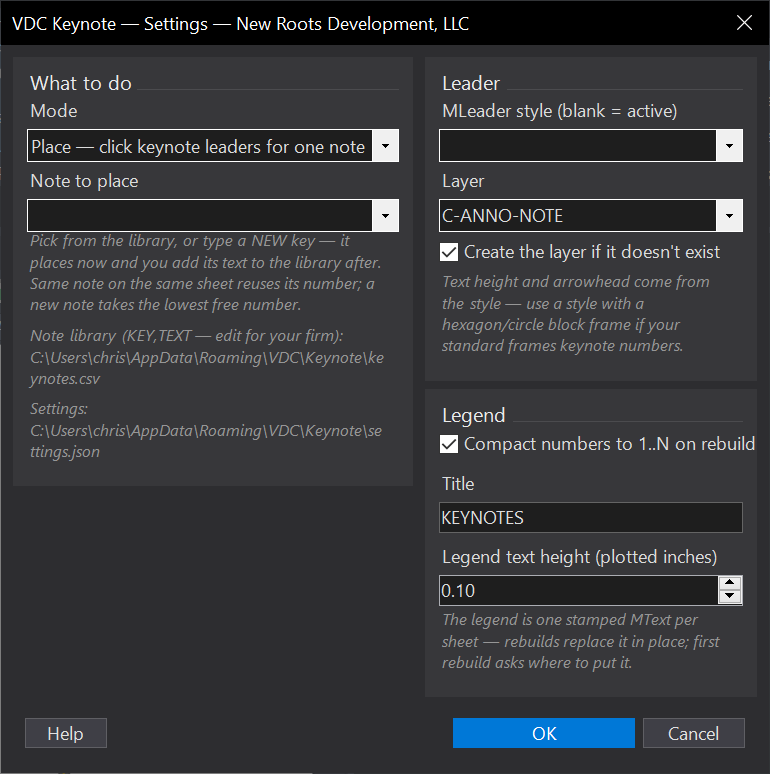
VDCKEYNOTESettings file:
%APPDATA%\VDC\Keynote\settings.jsonWhen to use it
- Any sheet using keynotes - the numbering stays right as notes come and go.
- Inheriting a sheet whose keynotes drifted out of step with its legend.
How to run it
- Run VDCKEYNOTE; pick a note from the library (or type a NEW key and add its text after).
- Click arrow point, then number location - repeat for every occurrence.
- Rebuild legend when the sheet is done; Compact renumbers 1..N and rewrites every leader.
Options
- Note library: %APPDATA%\VDC\Keynote\keynotes.csv (KEY,NOTE TEXT) - generic sample on first run.
- MLeader style: use a style with a hexagon block frame if that is your standard.
Watch out for
- Number collisions - one number pointing at two different notes - are the lie a reader cannot detect from the sheet. The QC pass flags them CRITICAL; run it before issue.
- Numbering is per sheet by design: the same library note is 3 on one sheet and 7 on another.
- Compact rewrites every leader on the sheet - do it before the set is checked, not after.
Related: Legend Audit + Generator · MText to Leader · Code Leaders