Finds every pad feature line that
VDCGRADELOTS stamped and labels it with the lot name, the pad elevation, and an optional minimum-FF line: no picking. v1.34+: the label is a native surface spot-elevation label on the graded surface (default style Pad), so the elevation is LIVE, it updates by itself after every regrade.
Lot boundary / label box
Pad FL
C-TOPO-FEAT-PADS
Corner-average anchor
Live pad elevation
Min FF line
What it does
- No picking: walks model space for
VDC_AUTOGRADELOTSext-dict Xrecord stamps with role Pad (optionally one layer, defaultC-TOPO-FEAT-PADS). - Reads the stamp: lot name + four lot-corner XYs; the label anchors at their average.
- LIVE elevation: the label is a surface spot-elevation label on the graded surface, regrade and the plotted number changes by itself, no refresh pass.
- Lot + min-FF lines: static per-label text overrides (FF only changes on regrade, when Run/reFresh re-stamps it).
- Matching: by lot name first, anchor proximity (5 ft default) as fallback; user-dragged labels keep position.
- Sticky: labels the user deleted stay deleted on reFresh (like
VDCPIPELABEL).
Modes & output
- Run: settings dialog (graded surface + style
Paddropdowns), then match-or-insert, existing labels update, old MText labels convert to native, new pads get labels, orphans (pad FL gone) are removed. - reFresh (
F): update-only, no dialog / inserts / deletes, refreshes lot/FF override text and follows moved pads. The elevation needs no refresh. - Clear: removes every VDC pad label (native + legacy MText).
- Content:
LOT 16(toggle, override) /PAD 24.65(from the label style, LIVE) /MIN FF 25.15(pad + offset; 0 = line off). - XData
VDC_PADLABELon0-NPLT(auto-created); appearance from the label style + annotation scale. Settings:VDC_PADLABEL_SETTINGS.
Dialog
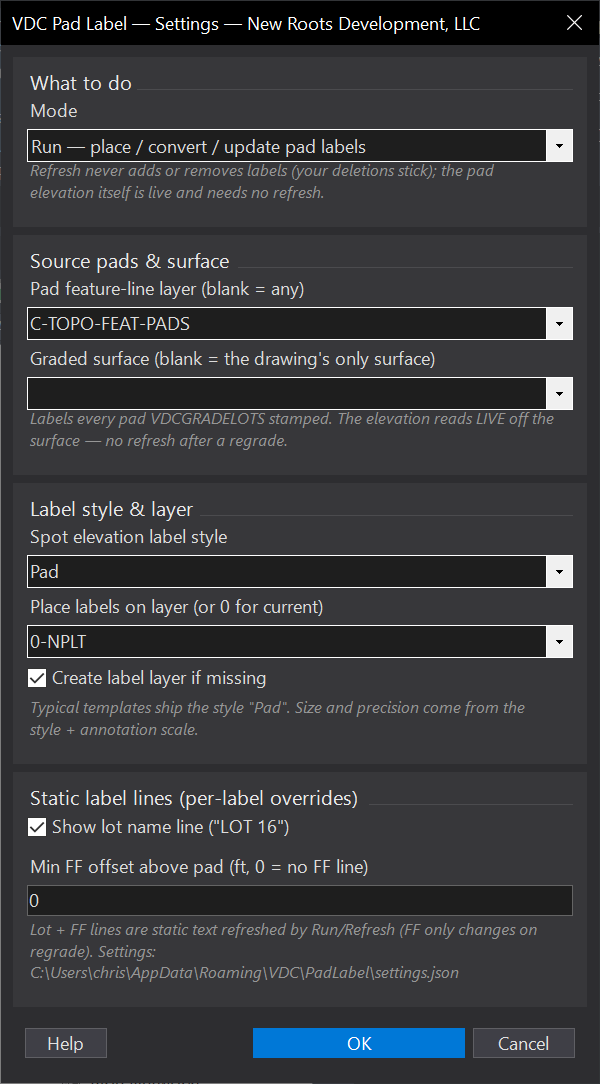
VDCPADLABELSettings file:
%APPDATA%\VDC\PadLabel\settings.jsonWhen to use it
- After Auto-Grade Lots, to annotate pads for the grading plan.
- After re-grading, ONLY if lot names or the min-FF offset changed (the elevation is live).
How to run it
- Grade the lots with VDCGRADELOTS first.
- Run VDCPADLABEL - the dialog opens with the mode dropdown (Run / Refresh / Clear) and every option.
- Pick the graded surface and the spot-elevation label style (defaults: the drawing's only surface, style "Pad").
- That is it - Run and reFresh process every graded pad in the drawing; there is no window step.
Options
- Run: place/convert pad labels across the whole drawing (old MText pad labels become native labels).
- Refresh: update the static lot / min-FF lines and follow moved pads, across the whole drawing.
- Clear: remove pad labels - like Run and Refresh it works drawing-wide, cleaning up everything the tool ever placed.
Watch out for
- Pad Label reads Auto-Grade Lots stamps - label only lots that have been graded.
- The elevation reads the SURFACE at the pad center - keep the pads baked into the graded surface.
- Every graded pad in the drawing is processed in one pass - nothing is left behind for sitting outside a window.
Related: Auto-Grade Lots · Refresh All · Label Feature Lines