The QC-then-auto-clear combo: Label QC's plotted-collision scan finds the pileups, Label Drag's engine drags the colliding network labels clear, a re-check reports what's left for hand cleanup.
Collisions / hand list
Cleared labels
Auto-drag leader
What it does
- One command instead of two: the Label QC report that would just be followed by Label Drag anyway becomes scan → fix → re-scan in one pass.
- Repeat offenders escalate: a colliding label that was already dragged (by hand or a previous run) gets pushed a further nudge along its perpendicular, each re-run adds another.
- Honest remainder: everything the engine can't move is reported, never silently left,
<drawing> - Label Fix.csv+ the palette (double-click to zoom).
Settings & options
- Overlap threshold (in² on paper) overridable here; annotation kinds / label layers / xrefs from
VDCLABELQC's file; drag distances + parcel-aware side fromVDCLABELDRAG's. - Own file:
%APPDATA%\VDC\LabelDrag\labelfix.json(VDC_LABELFIX_SETTINGS), the nudge + re-check toggle. - Needs paper-space layouts with viewports, run on the SHEET drawing. API-dead pressure labels (the known Label Drag limitation) stay put and are reported.
Dialog
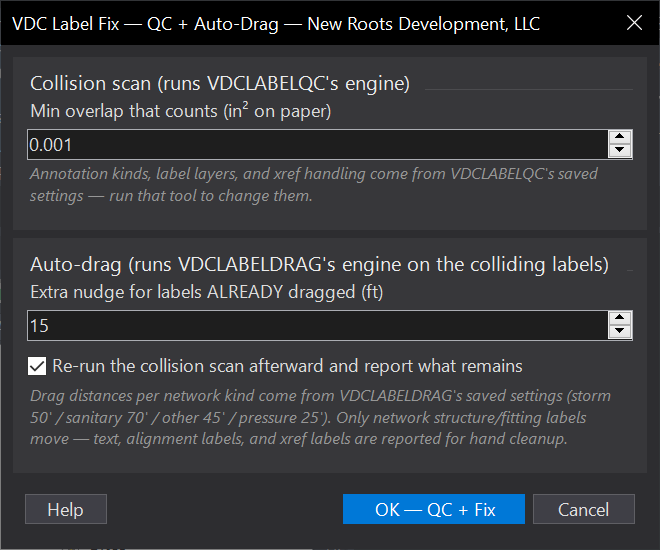
VDCLABELFIXWhen to use it
- Sheet cleanup before a submittal: clear the label pileups in one pass instead of QC-then-drag as two tools.
- After a big network edit re-anchored labels into each other.
- Anytime VDCLABELQC's report would just be followed by VDCLABELDRAG anyway.
How to run it
- Run VDCLABELFIX. Check the overlap threshold and the nudge; OK - QC + Fix.
- Read the summary: collisions found, labels moved (and how many were repeat offenders pushed further), collisions remaining.
- Fix the remainder by hand from the palette/CSV - text, alignment labels, and xref labels don't auto-move.
- Re-run to push repeat offenders a further nudge if two labels still contest the same spot.
Options
- Scan settings: annotation kinds, label layers, and xref handling come from VDCLABELQC's saved settings - run that tool to change them; only the overlap threshold can be overridden here.
- Drag distances: per network kind from VDCLABELDRAG's saved settings (parcel-aware side pick included).
- Nudge: the extra push for colliding labels that were ALREADY dragged - each re-run moves repeat offenders another nudge.
- Re-check: on by default; turn off to skip the second scan on huge drawings.
Watch out for
- Only network structure/fitting labels move - everything else is reported, not touched.
- Labels living in XREFS can collide on this sheet but can only be fixed in their own drawing.
- The scan needs paper-space layouts with viewports - run it on the sheet drawing, not the bare design model.
- API-dead pressure labels (the known Label Drag limitation) stay put and are reported.
Related: Label QC · Drag Network Labels · Sheet Index · MText to Leader