Curb return radius call-outs on plain polylines and arcs (curbs that are not feature lines): one
R=25.00' per arc at the arc midpoint, pushed outward so it clears the curb. Plain AutoCAD throughout, the vanilla seats get it too.
Curb linework (polyline / arc)
Radius label at the arc midpoint
Other linework, untouched
What it does
- Pick curb polylines and arcs after the dialog; every arc segment (polyline bulge or Arc) is labeled once.
- Label: MText
R=25.00', prefix, suffix and decimals from the dialog, at the arc midpoint pushed outward (away from the center) by the plotted offset. - Sizing: plotted height (0.10") and offset (0.15") converted through the current annotation scale at placement.
- Stamped per curb: XData
VDC_CURBRADIIcarries the curb's handle, so re-picking the same curbs replaces exactly their labels and other curbs keep theirs. - A minimum radius skips tiny fillets; the summary counts labeled / skipped / replaced.
Modes & settings
- Run: dialog, then select linework, Enter. Clear: erases every label the tool placed.
- Layer
C-ANNO-RADI(auto-created), text style blank = current. - Plain text, not live, re-pick a curb after editing it. Feature-line curve radii are labeled live by
VDCFLLABEL's Label curve radii option. - Plain AutoCAD: no Civil 3D API anywhere, registered in
VDC.Acad.bundlefor the landscape seats. - Settings
%APPDATA%\VDC\LabelFeatureLines\curbradii.json(envVDC_CURBRADII_SETTINGS), schema-tolerant.
Dialog
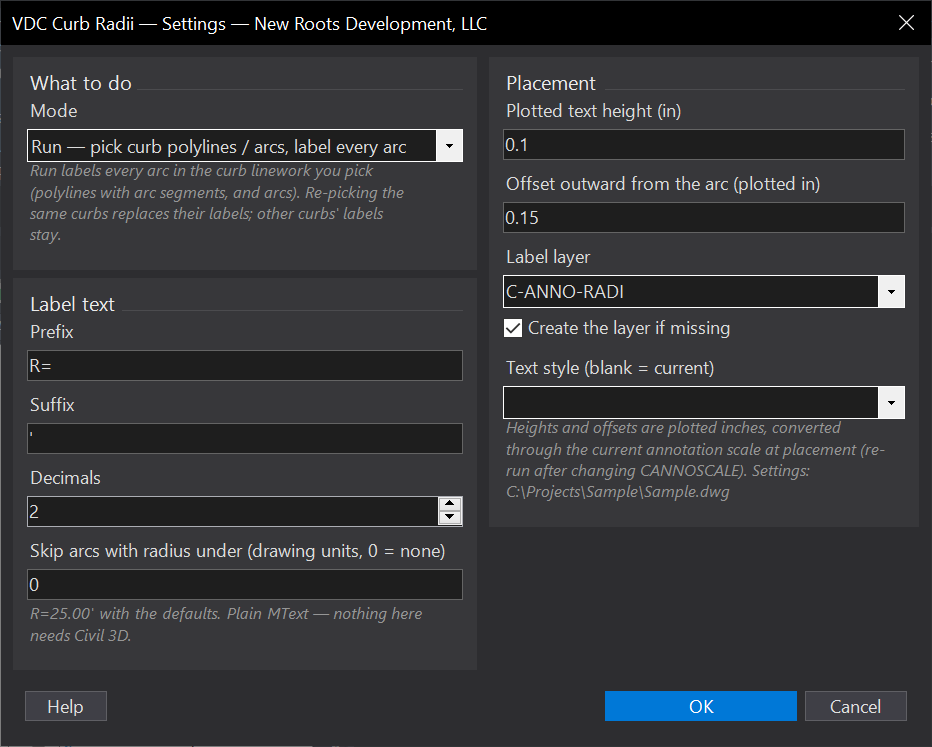
VDCCURBRADIIWhen to use it
- Site plans and grading plans that call out every curb return radius.
- After curb geometry changes - re-pick the edited curbs and the labels refresh.
How to run it
- Run VDCCURBRADII - the dialog opens with the mode (Run / Clear) and the text and placement options.
- OK, then select the curb polylines / arcs and press Enter.
- Read the summary: arcs labeled, arcs skipped under the minimum radius, previous labels replaced.
- Clear mode erases every radius label the tool placed in the drawing.
Options
- Label text: prefix (default R=), suffix (default the foot mark), decimals (default 2), and a minimum radius under which arcs are skipped (0 = label all).
- Placement: plotted text height (0.10 in) and outward offset (0.15 in), both converted through the current annotation scale; label layer (C-ANNO-RADI, auto-created) and text style.
Watch out for
- Text is sized at placement - re-run after changing the annotation scale.
- Only polylines and arcs are picked; a feature line is labeled by VDCFLLABEL's curve radius option instead.
- Labels are plain text, not live: an edited radius needs a re-pick of that curb.
Related: Label Feature Lines · Keynotes