
Spell check Civil 3D labels - the words typed into label styles and label overrides, which AutoCAD's SPELL never reads. Pick the corrections; fields and formatting are never touched.
What it checks, and against what
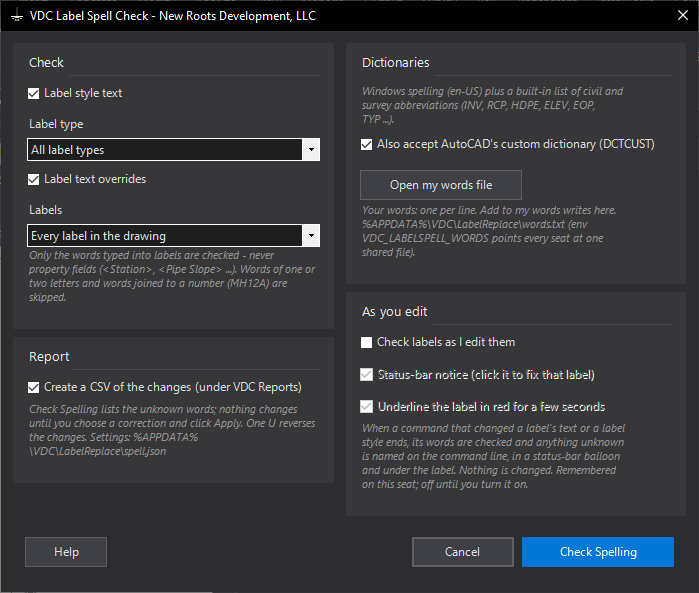
- Label style text (all label types or one) and text overrides (every label or picked).
- Typed words only: property fields, AutoCAD fields and formatting codes are not words. One- and two-letter words (EX, MH) and words joined to a number (MH12A) are skipped.
- Windows spelling (built into Windows, offline; checked lowercase because Windows skips capitals) + a built-in civil / survey list (INV, RCP, HDPE, ELEV, EOP, TYP, riprap ...) + your words file (shareable via
VDC_LABELSPELL_WORDS) + AutoCAD's custom dictionary (DCTCUST).
Fixing & output
- Unknown words listed as written, with count and where; Change to holds suggestions in the word's capitals. Use this / Leave as is / Add to my words; double-click = first suggestion. Every word starts left alone.
- Apply: one transaction, whole word, exact capitals, typed text only; one U reverses. CSV under VDC Reports.
- Check as I edit (off by default): when a command that changed label text ends, unknown words are named on the command line, in a status-bar balloon (its Fix this label link opens the word list for just that label) and with a red underline under the label for a few seconds (1.120.0; both switches, on by default). Never changes anything; each word named once per label per session.
- Settings
%APPDATA%\VDC\LabelReplace\spell.json(envVDC_LABELSPELL_SETTINGS).
Dialog
VDCLABELSPELL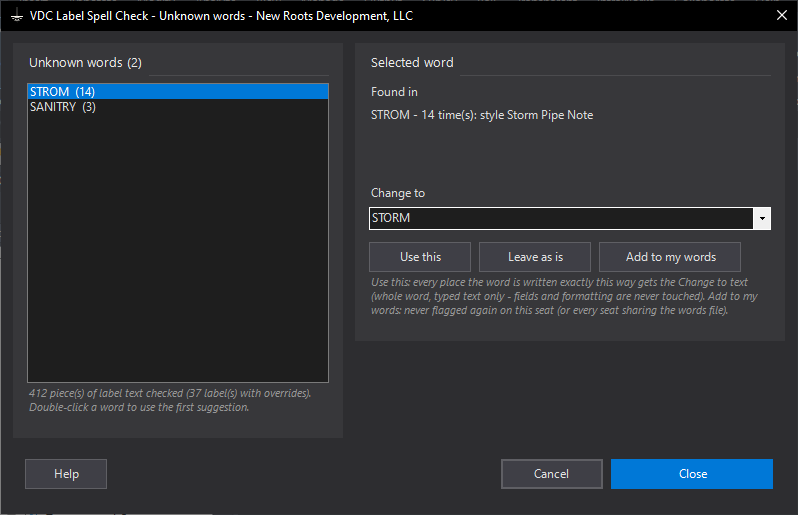
VDCLABELSPELLWhen to use it
- Before a submittal - one pass over every label style and override in the drawing.
- After building or importing label styles, so a typo is not repeated on every label.
- All the time, with Check labels as I edit them turned on.
How to run it
- Run VDCLABELSPELL; tick label style text and/or label text overrides.
- Click Check Spelling.
- For each word: Use this (with the Change to text), Leave as is, or Add to my words.
- Click Apply; read the count report.
Options
- Label type: limits the style check to one branch - Pipe, Structure, Alignment ...
- AutoCAD's custom dictionary: words added in AutoCAD's own SPELL count here too.
- Open my words file: edit the list by hand; VDC_LABELSPELL_WORDS shares one file across seats.
- Check labels as I edit them: a notice when an edited label has an unknown word (off by default): on the command line, in a status-bar balloon whose Fix this label link opens the word list for just that label, and as a red underline under the label for a few seconds (1.120.0). The balloon and the underline are switches, on by default.
Watch out for
- One- and two-letter words and words joined to a number are never checked.
- Field values (a structure name, a description from a key) are checked where they were typed, not in the label.
- A correction changes every place the word is written exactly that way - leave it if one use is right.
Related: Label Find and Replace · Point Find and Replace · Font Swap