Converts text to a target font (default Tahoma) across the current space or a window you pick. The fix side of
VDCSTDQC: the audit finds the non-conforming fonts, this converts them. Font in AutoCAD lives in three places and the tool covers all three, miss any one and the drawing stays mixed.
Where font lives
The bit people miss
Preview / safety
Options
- Redefine text styles, the style-table pass (on).
- Include SHX styles, see above (on).
- Rewrite inline overrides, the entity pass (on).
- Preserve bold/italic, on: an overridden run keeps its bold/italic flags and only the typeface swaps. Off: the override is stripped entirely and the run falls back to its (redefined) style.
- Include block definitions, text and attribute defaults inside blocks (on).
Guidance
- Preview first, always. This is the one fix on a panel of read-only audits, and it is destructive.
- The target must be an installed TrueType font; validated before anything is touched.
- Entities that refuse the edit (locked layer, proxies, merged table-cell secondaries) are skipped and counted, never fatal.
- Complements
VDCSTDQC, which audits conformance and changes nothing. - Draft work product, read the funnel; a style count of zero converted usually means the drawing was already on the target.
- Settings
%APPDATA%\VDC\StandardsQc\fontswap.json(envVDC_FONTSWAP_SETTINGS), schema-tolerant.
Dialog
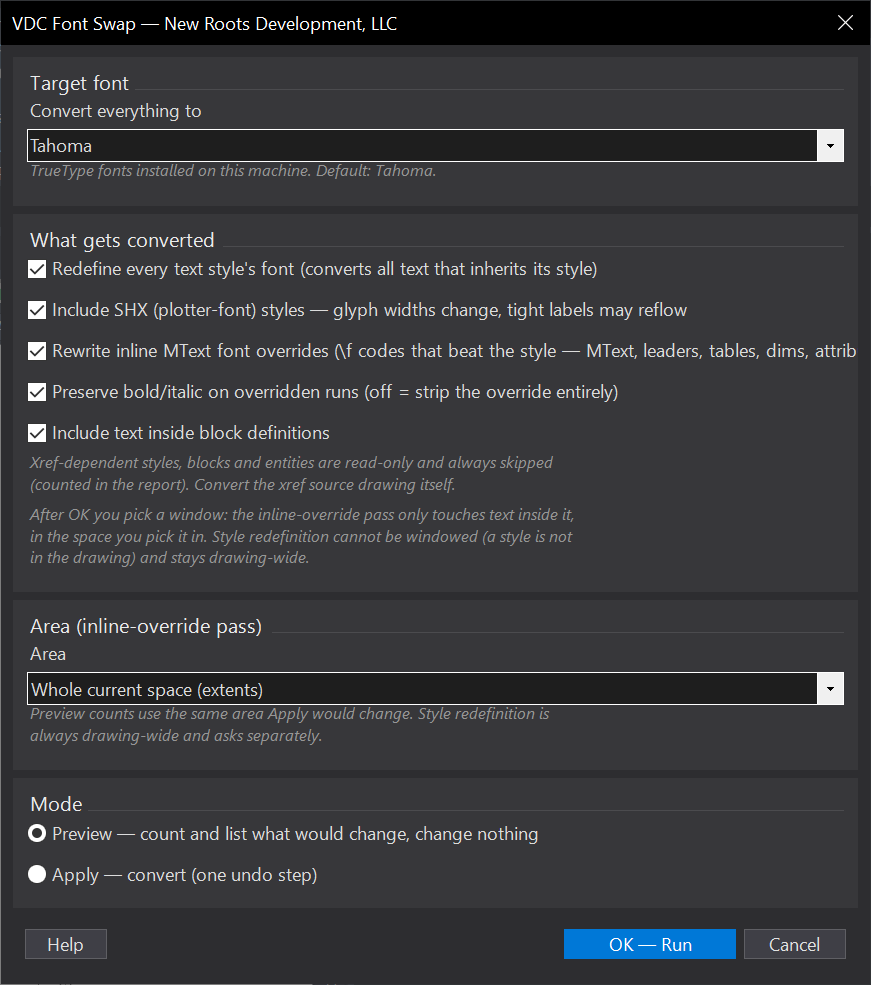
VDCFONTSWAPWhen to use it
- A consultant or legacy drawing arrives in Arial/romans and must match the Tahoma standard.
- Standards QC flagged non-conforming fonts and you want them fixed in one pass, not style by style.
How to run it
- Run VDCFONTSWAP; pick the target font (dropdown of installed TrueType fonts, default Tahoma).
- Leave Preview selected and click OK, then choose scope at the [Extents/Window] prompt - Enter for the whole drawing, or W to pick a window - and read the counts of styles and entities that would change.
- Re-run in Apply mode over the same scope. If style redefinition is on, confirm the drawing-wide prompt. One undo step; the drawing regens in the new font.
- Check the report for skipped xref blocks - convert those source drawings directly.
Options
- Redefine text styles: the style-table pass - converts everything that inherits its font, drawing-wide. A style has no location, so this one is ALWAYS drawing-wide and cannot honor an Extents/Window choice; Apply asks you to confirm it, and the summary labels it DRAWING-WIDE. Untick it to limit the swap to the entity pass, which honors your Extents/Window scope.
- Include SHX styles: plotter fonts convert too; glyph widths change, so tight labels may reflow.
- Rewrite inline overrides: the entity pass - the \f codes that beat the style.
- Preserve bold/italic: overridden runs keep bold/italic and only the typeface swaps; off strips the override entirely.
- Include block definitions: text and attribute defaults inside blocks.
Watch out for
- Xrefs are read-only - xref-dependent styles, blocks and entities are skipped and counted. Open the xref source drawing and run the tool there.
- SHX-to-TrueType changes glyph widths - labels that barely fit may reflow. Run Preview, and spot-check tight callouts after Apply.
- The target must be an installed TrueType font on THIS machine; the tool validates before touching anything.
- Items that refuse the edit (locked layers, proxies, merged table cells) are skipped and counted, never fatal - check the CSV.
- The entity pass covers the CURRENT space only - both Extents and any Window you pick. Text on other layouts is skipped and counted - re-run from that layout to convert it.
- A block DEFINITION has no location either: only definitions with an insert inside your checked area are walked, and editing one changes every insert of that block drawing-wide.
Related: Standards QC · Style QC · MText to Leader