Finds the dimensions whose text lies.
What it does
- Override ≠ measured (CRITICAL): the text was overridden with a number the geometry doesn't support.
- Reads the notations people actually type: decimals, foot/inch marks,
R25', feet-and-inches, DMS angles. - Text replacement ("SEE PLAN", "VARIES"), per-dimension style overrides, zero-length dims, non-approved styles.
Good to know
- An override that merely re-formats the true value does not flag.
- Read-only. Whole drawing or a picked window; CSV + findings palette with the full funnel.
- Ribbon: VDC QC → Drawing QC → Dimension QC.
Dialog
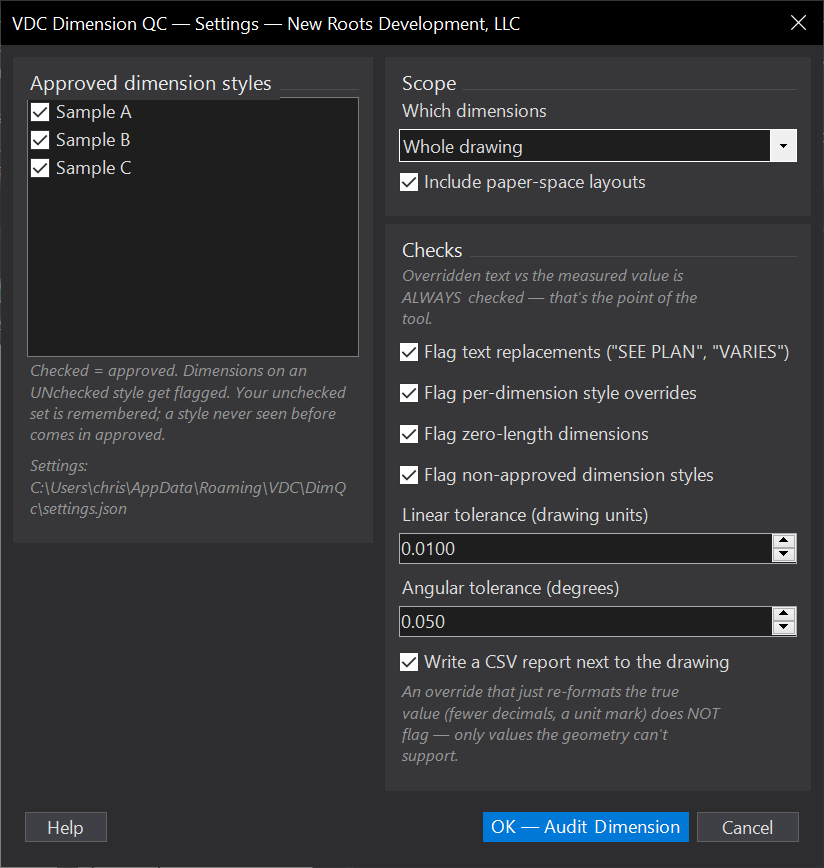
VDCDIMQCSettings file:
%APPDATA%\VDC\DimQc\settings.jsonWhen to use it
- Before any issue - an overridden dimension is the error a contractor builds.
- On drawings inherited from another office, where dimension styles and overrides are unknown.
How to run it
- Run VDCDIMQC; choose whole drawing (model, optionally paper space) or a picked window.
- Tick the dimension styles you approve - unchecked styles flag; your set is remembered.
- Review the palette; double-click a finding to zoom to that dimension.
Options
- Approved styles: check-list, persisted by exception - new styles arrive approved.
- Include paper space: audits layout dimensions as well as model space.
- Write CSV: the findings table lands in the drawing's VDC Reports folder.
Watch out for
- An override that merely re-formats the true value (fewer decimals, a unit mark, <> prefix) does NOT flag - only a value the geometry cannot support does.
- A units-ambiguous override (feet-inches on a decimal drawing) flags only when no reasonable reading matches, so it will not cry wolf on mixed-unit sets.
- Read-only: it finds, it never edits. Fix the dimension yourself.
Related: Standards QC · Label QC · Title Block QC