
Live surface spot elevation labels in bulk: every N ft along picked polylines (optionally offset left / right / both) or on an X by Y grid inside a picked window. They are Civil 3D surface labels, so a regrade moves the numbers. A re-run on the same path or window offers Replace.
Live spot elevation labels
Picked line / surface
Picked window
What it does
- Path mode: select polylines, lines and arcs; labels at 0, N, 2N ... ft, the far end and the vertices on request, pushed off the line left / right / both sides by the offset.
- Grid mode: pick a window; labels from its lower-left corner every X by Y ft (5000 per run at most).
- Live: every label is a Civil 3D surface spot elevation label on the chosen surface, in the chosen spot style, on the chosen layer.
- Replace: labels are stamped with the path handle or the window corners; a re-run on the same path or window asks Yes (replace) / No (add beside) / Cancel.
Notes
- Points off the surface are skipped and counted (switch the skip off to let Civil 3D try anyway).
- A run that places nothing says NOTHING CHANGED and writes nothing.
- Settings under
%APPDATA%\VDC\SpotGrades\(overrideVDC_SPOTGRADES_SETTINGS). Civil 3D only.
Dialog
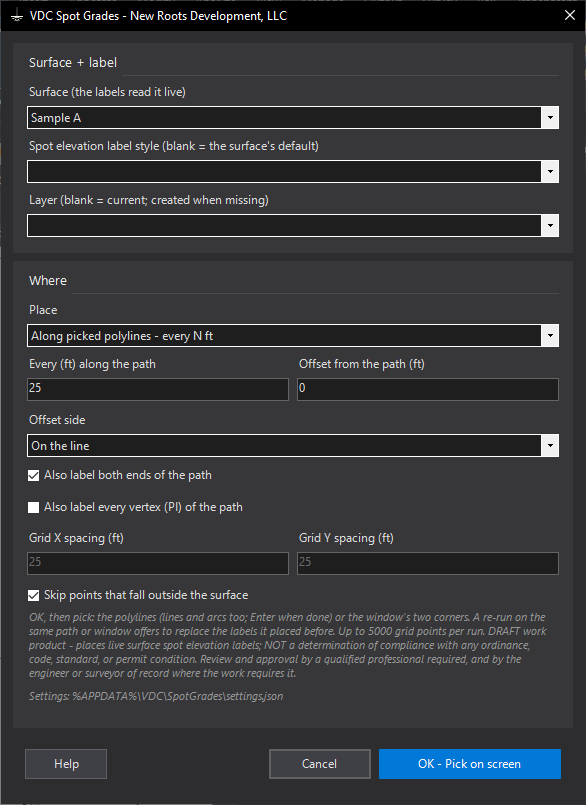
VDCSPOTGRADESWhen to use it
- A grading plan needs spot grades every 25 or 50 ft along the curb lines, swales or pad edges.
- A parking lot or pad wants a grid of elevations and the surface is still moving.
How to run it
- Run VDCSPOTGRADES. Pick the surface and the spot elevation label style; set the layer.
- Choose Along picked polylines (every N ft, offset and side, ends / vertices) or Grid inside a picked window (X by Y ft).
- OK, then select the polylines (Enter when done) or pick the window's two corners.
- Read the summary: labels placed, points skipped off the surface, earlier labels replaced.
Options
- Offset side: left, right or both sides of the pick direction - the label sits beside the line, the elevation is read there.
- Skip off-surface: a station or grid point outside the surface is counted and skipped instead of asking Civil 3D for a label it cannot fill.
- Replace: a re-run on the same path or window asks Yes (replace) / No (add beside) / Cancel.
Watch out for
- The labels read the surface you picked; a surface in an xref cannot be labelled from the host drawing.
- A grid is capped at 5000 points per run - widen the spacing or pick a smaller window.
- The pick direction sets left and right: pick the line from the end you think of as the start, or use Both sides.
Related: TC and BC Labels · Pad Label · Surface QC