
VDCRAMP is part of Stairs - a flight of steps as feature lines from one dialog; the full section follows.
A flight of exterior steps as Civil 3D feature lines from one dialog and a picked nosing line: bottom up, top down (the slab edge is fixed, the walk is still moving) or fit between two lines (the tread is solved to fill the run). Uniform risers under a max height, landings where a flight climbs too far, nose and riser-face lines, stringer edges, plan linework with the UP arrow and riser callout, TOS / BOS labels. Every build is tagged: run it again on any of its lines to rebuild, VDCSTAIRSREFRESH rebuilds all of them after a regrade. VDCRAMP is the same dialog for a ramp.
Stringer edges / profile
Nose feature lines / plan tread lines
Riser base lines, UP arrow, callout
What it does
- Build from: bottom up (pick the bottom nosing line), top down (pick the top landing edge, the flight descends) or fit between (pick both; the tread is solved to fill the run, or kept with the leftover reported as a bottom landing).
- Elevations: typed, from a surface sampled at the line, or from a feature line read at its nearest point; Rebuild re-reads them after a regrade.
- Arithmetic: count = ceil(rise / max riser), riser = rise / count (bump the count to lower it); auto landings when a flight would rise more than 12 ft, or every N risers, or none.
- Draws:
STAIR n R1nose andR1 BASEface lines,EDGE L / Rstringers, optional standard breaklines, plan tread lines + UP arrow +12 R @ 6.00", TOS / BOS leaders. - Update: every object is tagged; run the command on any of them to reopen the dialog with that stair's settings and Rebuild;
VDCSTAIRSREFRESHrebuilds every stair and ramp. - VDCRAMP: 1 in 12, a landing every 30 in of rise, 60 in landings, an edge feature line at every grade break, slope callout, TOR / BOR labels.
Notes
- The code line (riser 4-7 in, tread 11 in, landing 48 in and the stair width, 12 ft between landings; ramp 1:12, 30 in, 60 in, 36 in wide) is advisory: red in the footer and the summary, never a block. The figures are typical IBC / ADA values the designer edits; the tool compares and never determines compliance.
- Feature-line names are unique drawing-wide: a clash is skipped and listed in the summary.
- One U reverses a build; a rebuild erases the earlier set by handle first.
- Settings under
%APPDATA%\VDC\Stairs\(overrideVDC_STAIRS_SETTINGS). Civil 3D only.
Dialog
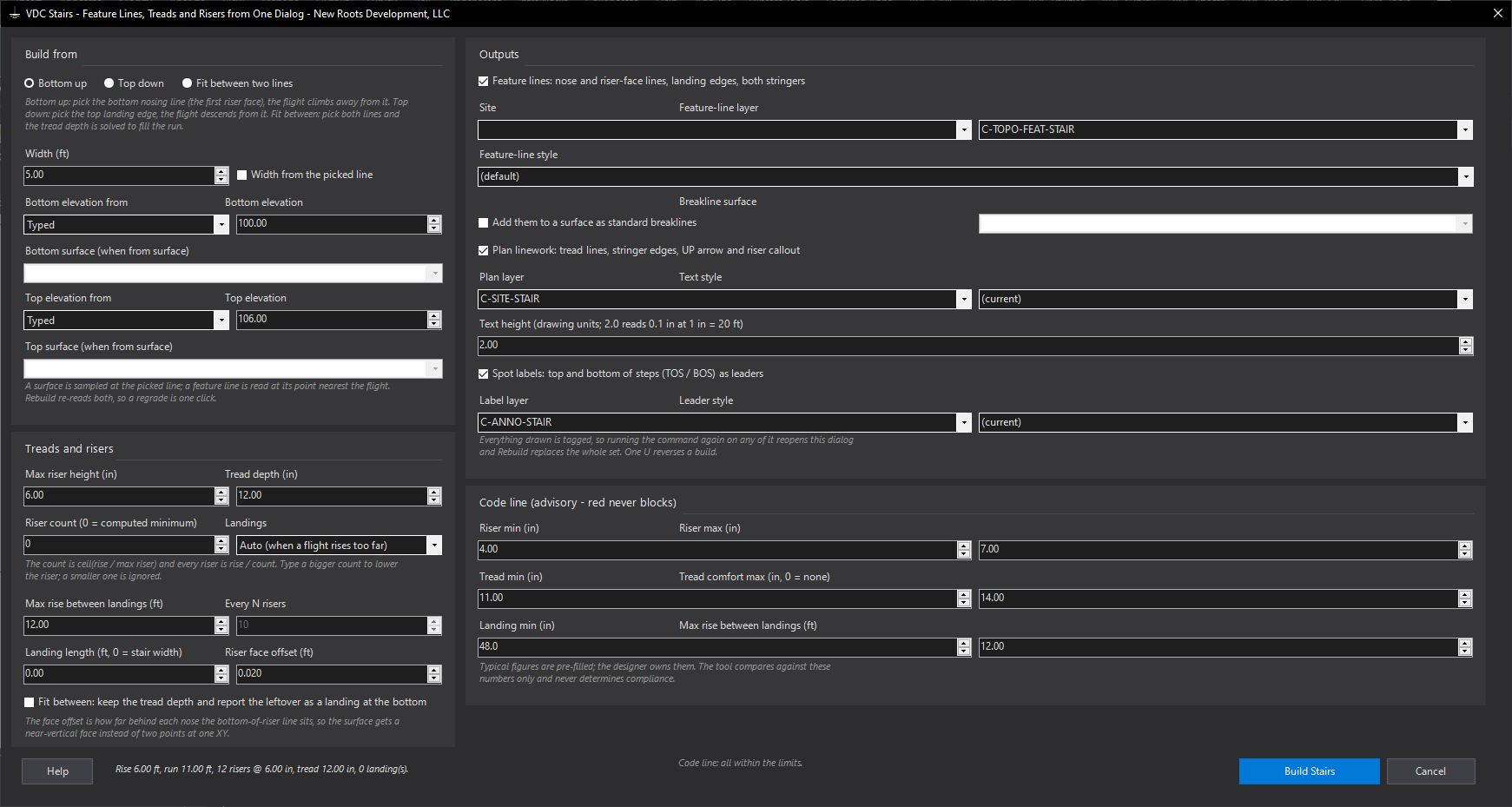
VDCSTAIRS
VDCRAMP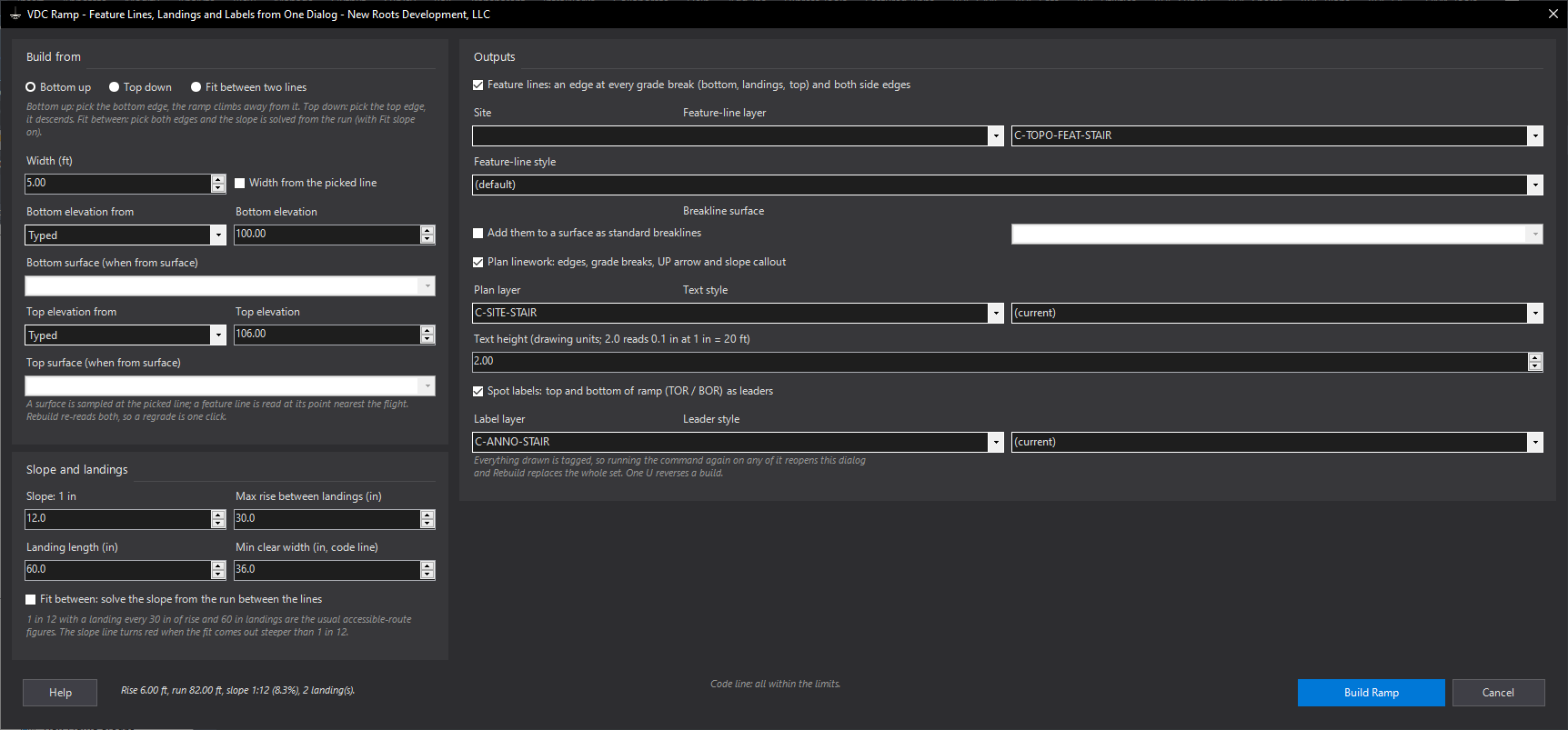
VDCRAMPVDCSTAIRSREFRESH - No dialog - runs on the whole drawing with no prompt.When to use it
- A grading plan needs exterior steps between a walk and a slab, a pad or a terrace, and the surface has to show them.
- The slab elevation is fixed and the walk grade is still moving (top down), or the two edges are both fixed (fit between).
- The grade changed and every flight has to be redone.
How to run it
- Run VDCSTAIRS. Press Enter for a new stair (or pick a line of an existing one to rebuild it).
- In the dialog choose Bottom up, Top down or Fit between; set the width; say where each end elevation comes from.
- Set the max riser (6 in) and tread (12 in); the footer shows the riser count, the actual riser and the code line as you type.
- Choose the outputs: feature lines (site, layer, style), breaklines into a surface, plan linework, spot labels. Build Stairs.
- Pick the nosing line (a line, polyline segment, feature-line segment, or two points), then a point on the side the flight climbs (descends) toward; in Fit between pick the second line instead.
- Read the summary: rise, run, risers, tread, landings, the code line, and what was drawn. One U reverses it.
Options
- Riser count: 0 = the computed minimum (ceil of rise over max riser); a bigger number lowers the riser.
- Landings: Auto (a landing whenever a flight would rise more than 12 ft), every N risers, or none; length 0 = the stair width.
- Riser face offset: 0.02 ft behind each nose for the bottom-of-riser line, so the surface gets a face instead of two points at one XY.
- Fit between, keep the tread: keeps the typed tread and reports the leftover run as a landing at the bottom.
- VDCRAMP: slope 1 in 12, a landing every 30 in of rise, 60 in landings, 36 in min width on the code line; Fit between can solve the slope from the run.
Watch out for
- The code figures are typical IBC / ADA values, not a determination: verify them against the edition in force and change them in the dialog.
- A feature line name must be unique in the drawing: a hand-made STAIR 1 R1 makes the tool skip that line and say so - rename it.
- An elevation from a surface is read at the picked line: a line outside the surface is refused with a message and nothing is built.
- Rebuild erases the earlier set by handle; lines you moved or copied by hand are replaced from the stored picks.
Related: Grade Lots · Spot Grades · FL Elevation Points