Audits a TIN surface for drainage and data problems: computes each triangle's max slope from its plane normal, flags flat triangles (ponding / flat spots) and spike triangles (bad survey points), and reports surface stats.
TIN triangle (passing)
Flat, WARNING
Spike, ERROR
Surface stats
What it does, per run
- Pick: surface dropdown lists every TIN surface in the drawing; set thresholds in the dialog.
- Slope: reads the triangles and computes each triangle's max slope from its plane normal.
- Flat: max slope below
FlatSlopePct(default 0.5%), potential ponding, reported WARNING at the centroid. - Spike: slope over
SteepSlopePct(default 50%, ~2:1) and relief overSpikeReliefFt(default 5 ft), ERROR (both required so graded slopes pass). - Stats: reports triangle count, min/max elevation, and 2D area.
Outputs & settings
<drawing> - Surface QC.csvplus the findings palette; double-click a row to zoom to the triangle.- Each check capped at
MaxReportedPerCheckrows, with a summary line when the cap is hit. - Settings:
VDC_SURFQC_SETTINGS, default%APPDATA%\VDC\SurfaceQc\settings.json, schema-tolerant. - Holds the surface name, the flat/spike thresholds, the per-check cap, and the two check toggles.
- Legit flat areas (ponds, parking, detention bottoms) will flag, tune
FlatSlopePctor toggle the flat check off.
Dialog
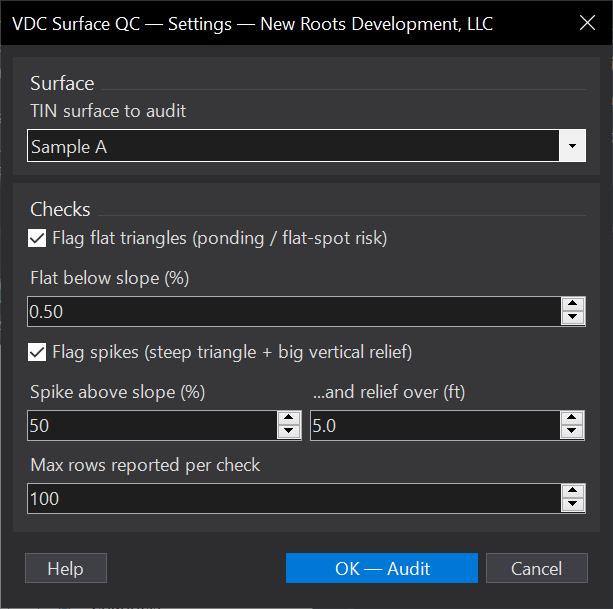
VDCSURFQCWhen to use it
- Sanity-checking a survey or proposed surface for ponding flats and bad-point spikes before using it.
How to run it
- Run VDCSURFQC and pick the TIN surface from the dropdown.
- Set the flat / spike thresholds (or accept the defaults) and click OK.
- Review the surface stats on the command line and the flat/spike findings in the palette; double-click a finding to zoom to it.
Options
- Flat triangles: flagged when the triangle slope is below the flat threshold (default 0.5%).
- Spikes: flagged when the slope is above the spike threshold (default 50%) AND the vertical relief is over the limit (default 5 ft).
Watch out for
- If the surface is renamed after settings are saved, the tool reports it 'not found' - re-run and re-pick.
- The CSV is only written when the drawing is saved to a real path; an unsaved drawing gets palette output only.