Audits selected road alignments and their finished-ground profiles against design-speed-keyed geometric standards: min curve radius, min/max grade, crest/sag K, vertical-curve length, and grade breaks, then flags each failing station red (error) or orange (warning).
Horizontal alignment
FG profile
Error flag
Warning flag
Measurement guide
What it checks
- Design speed: reads each alignment's speed, looks up the AASHTO-keyed row (highest at or below the speed) for radius / K / VC-length minimums.
- Radius: each simple horizontal arc vs the min radius for that speed (error).
- Grade: each profile tangent vs min drainage grade (private 0.70% / public 0.80%) and the max grade (errors).
- Crest / sag K: K = length ÷ algebraic grade change vs the SSD minimum (error).
- VC length vs the speed minimum, and grade breaks with no VC (warnings; Private tolerates up to 3%, Public 1%).
- Threshold
0or a code inDisabledChecksskips that check; a 0.005 display-rounding tolerance prevents at-minimum false flags.
Modes & output
- Run audits + places flags; Clear wipes them.
- Flags = red/orange MText at the offending station on
0-NPLT(auto-created); re-running wipes and re-places. - Findings palette (shared with
VDCLOTQC/VDCPIPEQC): severity, station, check, message, double-click a row to zoom. - Appends to per-folder
VDC-QC-LOG.txtand stampsVDC_QC_STATUS(read byVDCQCSTATUS). - Settings
VDC_ROADQC_SETTINGS; standardsVDC_ROADQC_PRESETS, point workstations at one shared presets file. - v1 scope: simple arcs + symmetric parabolic VCs only; one representative design speed per alignment.
Dialog
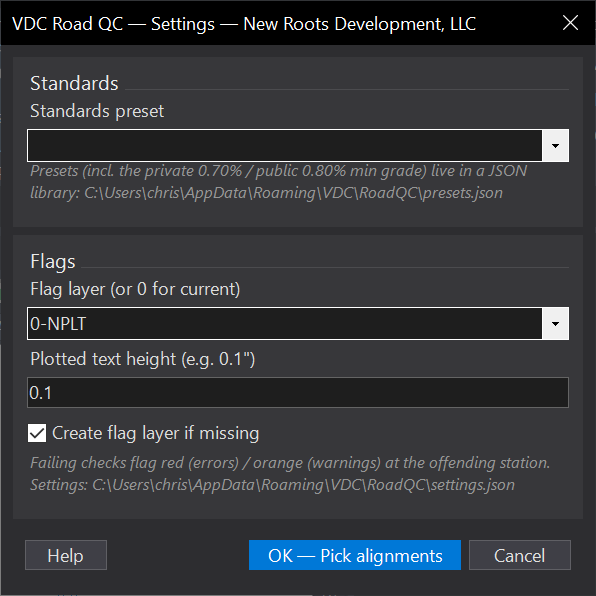
VDCROADQCSettings file:
%APPDATA%\VDC\RoadQC\settings.json | %APPDATA%\VDC\RoadQC\presets.jsonWhen to use it
- QC of road geometry and profiles against the design speed.
How to run it
- Run VDCROADQC and pick the design-speed preset.
- Select the alignment(s) and profile(s) to audit.
- Review findings; double-click to zoom.
Watch out for
- Grade display tolerance matters - very small grades near the minimum can read as false flags if values are rounded.
- Confirm public vs private so the right minimum slope applies.