Draws the revision clouds a drafter draws by hand after a revision.
What it does
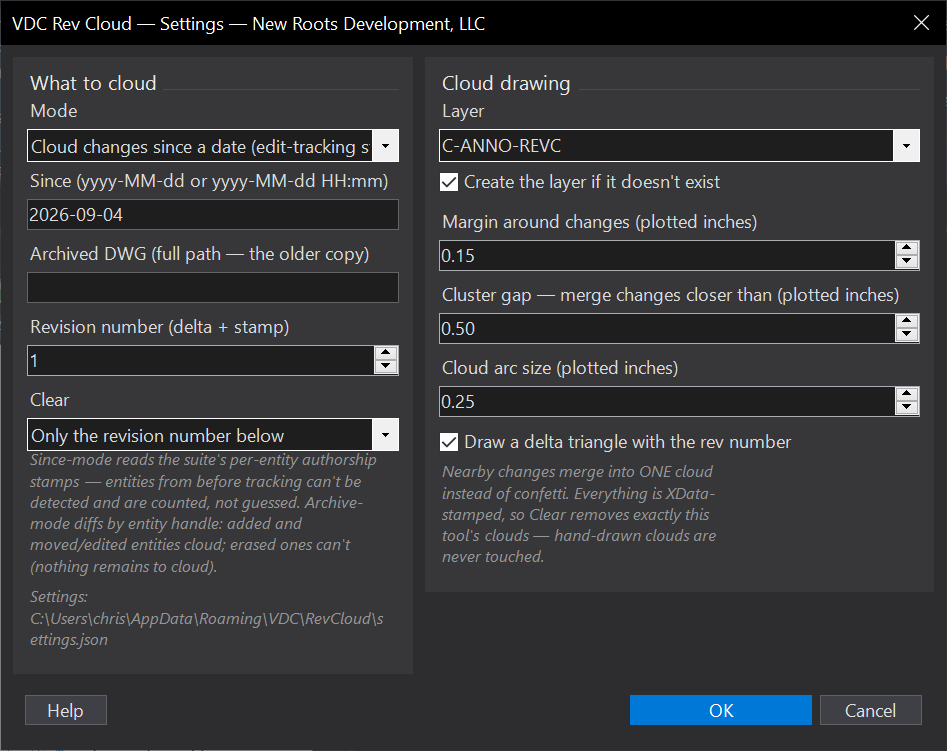
- Since a date: clouds everything modified after the date, read from the per-entity who/when stamps the VDC watcher writes.
- Vs an archive: diffs entity handles against a saved copy of the drawing, what ACTUALLY changed.
- Nearby changes cluster into one cloud; optional delta triangle carries the revision number.
- Clear removes exactly this tool's clouds by revision, hand clouds are never touched.
Worth knowing
- Since-a-date only sees edits from bundle-loaded sessions (the stamps drive it).
- The archive diff needs the copy saved BEFORE the revision started.
- Settings:
%APPDATA%\VDC\RevCloud\(envVDC_REVCLOUD_SETTINGS).
Dialog
VDCREVCLOUDWhen to use it
- After a revision cycle, to cloud the resubmittal without hunting for every change.
- Verifying a returned drawing - what ACTUALLY changed since the archive copy.
How to run it
- Run VDCREVCLOUD and pick the change source: since-a-date (stamps) or vs an archived DWG.
- Set the revision number, clustering distance, and delta triangle option.
- Review the clouds; re-run Clear with the revision number to remove this tool's clouds only.
Options
- Change source: since-a-date uses the per-entity authorship stamps (only bundle-loaded sessions are stamped); vs-archive diffs entity handles against a saved copy.
- Clustering: changes closer than the cluster distance share one cloud instead of confetti.
- Clear: removes this tool's clouds for a chosen revision - hand clouds stay.
Watch out for
- Since-a-date only sees edits made in sessions with the VDC bundle loaded (the stamps drive it).
- The vs-archive diff needs the archived copy saved BEFORE the revision started.
- Clouds are drawn once - further edits after clouding need a re-run.
Related: Rev Table · Who Did It · Plan Review Email