The submittal folder in one run: every layout to a PDF named
<sheet number> - <sheet title>.pdf (sheet set first, title block second, layout name last), one per sheet or one merged set, after a pre-flight that catches the sheet-set / title-block mismatches, duplicate numbers and stale dates before the client does.
PDFs
Settings / log
Pre-flight ERROR (unchecked by default)
What it does
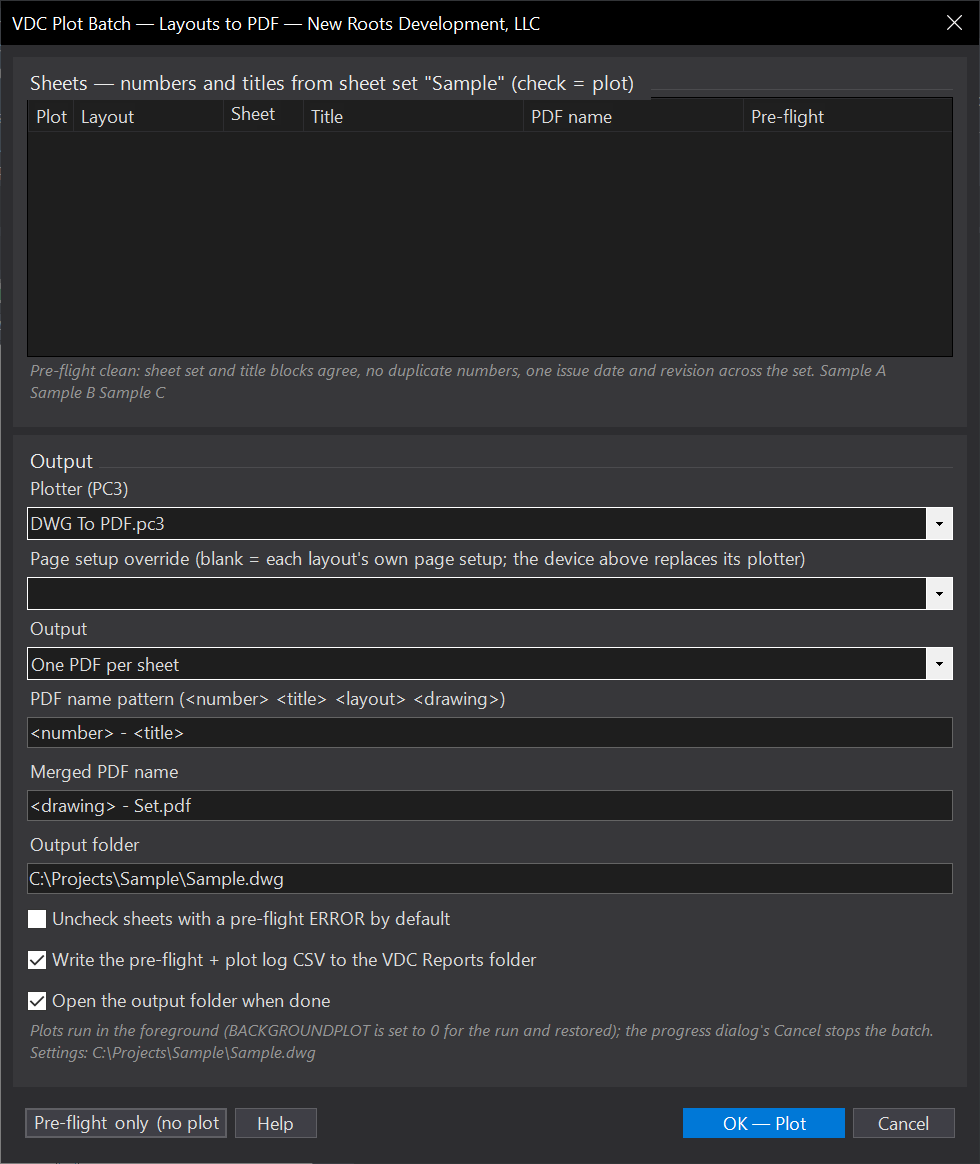
- Lists every layout with its number, title, the PDF name it will get and its pre-flight result; sheet-set order first, then tab order.
- Pre-flight only (aux button) writes the checks to the CSV without plotting.
- One PDF per sheet (pattern
<number> - <title>, tokens <layout> <drawing>, duplicates get (2)) or one merged multi-page PDF in order. - Log CSV: layout, number, title, severity, check, message, PDF; opens the folder when done.
Watch for
- An out-of-date DST names the files wrong, the pre-flight shows where it disagrees with the title block; fix it in the SSM or with VDCSHEETNUM.
- The PC3 must exist on the seat; media comes from each layout's page setup.
- Plain AutoCAD throughout. Settings
%APPDATA%\VDC\PlotBatch\settings.json.
Dialog
VDCPLOTBATCHWhen to use it
- Every submittal: a folder of correctly named PDFs in sheet order, without renaming files by hand.
- Catching the sheet whose title block still says last month's date before the client does.
How to run it
- Open the sheet set in the Sheet Set Manager if the project has one (numbers and titles then come from it).
- Run VDCPLOTBATCH - review the sheet list and the pre-flight column; uncheck what should not plot.
- Pick the plotter (PC3), a page-setup override if the layouts need one, output mode, name pattern, folder; OK - Plot.
- Read the summary; the folder opens when done; the CSV log carries the pre-flight and what plotted.
Options
- Names: pattern with <number> <title> <layout> <drawing> tokens; illegal characters become dashes; duplicates get (2), (3).
- Page setup override: blank = each layout keeps its own page setup with only the plotter swapped to the chosen PC3; a named setup replaces it for every sheet.
- Merged set: one multi-page PDF in sheet order (name pattern with <drawing>).
- Pre-flight only: the aux button runs the checks and writes the CSV without plotting.
- Skip mismatched: sheets with a pre-flight ERROR start unchecked.
Watch out for
- Numbers come from the SHEET SET first - an out-of-date DST names the files wrong; the pre-flight says where it disagrees with the title block.
- BACKGROUNDPLOT is forced to 0 for the run (plots are foreground) and restored; the progress dialog's Cancel stops the batch.
- The PC3 must exist on the seat; DWG To PDF.pc3 ships with AutoCAD, office PC3s must be on the plotter path.
- Media comes from each layout's page setup; a layout with no page setup plots at the PC3's default size.
Related: Title Block QC · Sheet Set Paths · Sheet Numbers · Plan Email