One master set of sheet frames per project, shared by every discipline drawing through a project frame file: so sheet N covers the same ground on the grading plan, utility plan, and E&S plan.
VDCFRAMEDEF computes the fewest sheets (north-up preferred, bounded rotation); VDCSHEETGEN generates each drawing's layouts by aiming the template's existing viewports, never touching their per-sheet-type layer overrides.
What it does
VDCFRAMEDEF(once, master drawing): frame size = viewport width/height × plan scale, the dialog's size fields are the authority (auto-read fills them from the template layout's largest on-sheet viewport, oversized strays rejected; default 31.5"×23"). Tiles a picked boundary polyline (or extents), drops frames that miss the boundary. Rotation source: Optimize (searches the discipline window for the fewest sheets, north straight up wins every tie; Design ±30°, Survey ±2°, or Custom), align to a picked object (the segment you pick: a polyline segment's direction, an alignment element's tangent bearing or curve chord), or align point to point (two rubber-band picks). Boundary and align-object picks see through xrefs and blocks, the project limits and road geometry usually live in the base xref. Transient preview, then frames + name text land onV-SHEET-FRAME(re-runs replace) andVDC-SheetFrames.jsonis written beside the drawing.VDCSHEETGEN(each discipline drawing): clones the drawing's own template layout per frame and sets ONLY the viewport's view, theALIGNSPACEmath, automated. Viewport layer overrides (frozen / no-plot / color per sheet type) are never touched.- Layer state (optional): restores a saved layer state into each aimed viewport, on top of the template's own overrides; unrecorded layers are left alone.
- Alternates: frames-only output, bare-viewport creation, or Map 3D Map Book, the frames feed Map Book as custom (manual) tiles for its key map + adjacent-arrow navigation.
- Re-runs re-aim; a hand-tweaked sheet is protected by the
VDC_SHEETGENskip flag in the layout's extension dictionary.
Workflow
- Master drawing:
VDCFRAMEDEF, template layout, scale, overlap, discipline. Pick the boundary; choose Rotated vs North-up if rotation saves sheets; Keep. - Each plan drawing:
VDCSHEETGEN, point at the frame file, pick that drawing's template layout, prefix + start number, optional layer state. OK, Generate. - Read the summary: layouts created, viewports aimed, skips with reasons.
- Project limits change? Re-run
VDCFRAMEDEF, thenVDCSHEETGENper drawing, every set moves together.
Settings
%APPDATA%\VDC\SheetGen\settings.json(envVDC_SHEETGEN_SETTINGS). The frame set itself lives in the project frame file, beside the master drawing.
Dialog
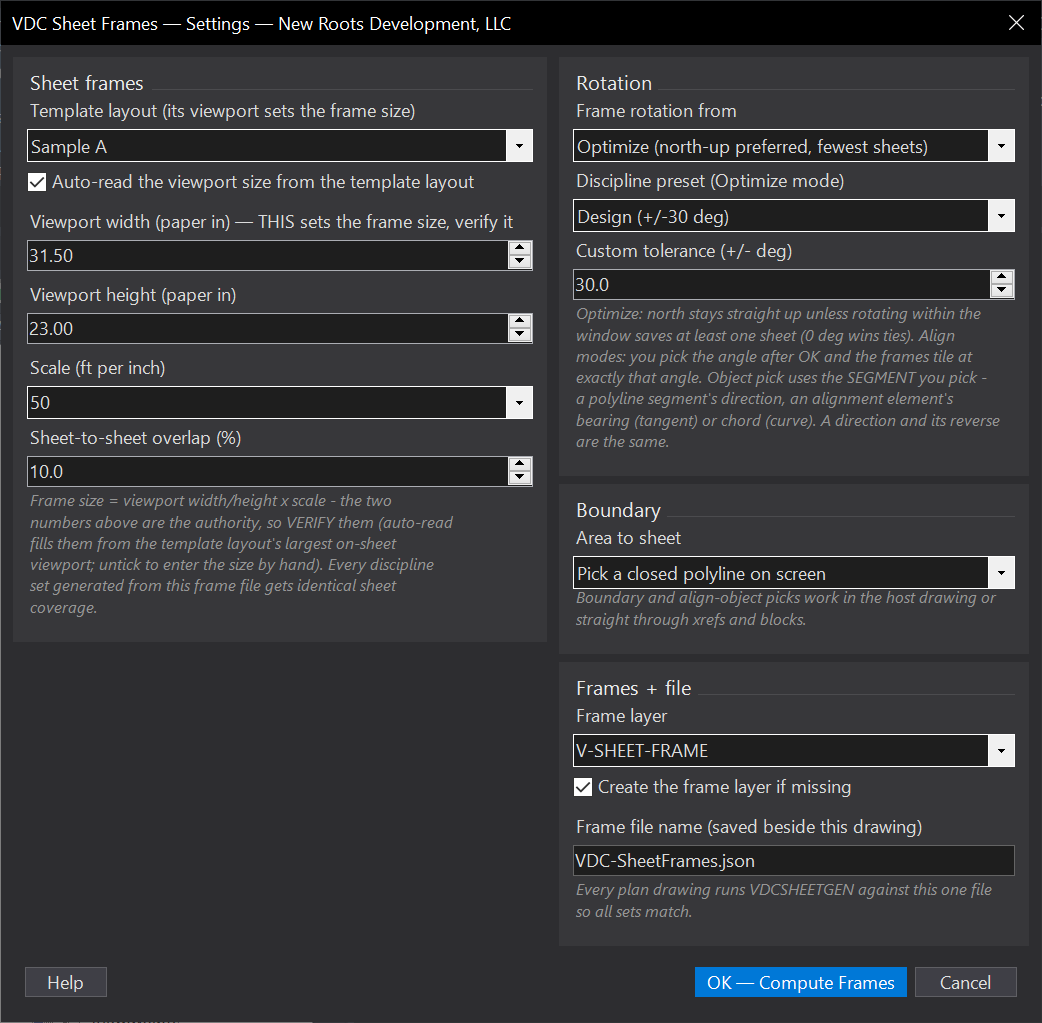
VDCFRAMEDEF
VDCSHEETGENWhen to use it
- Starting sheet production on a project whose plan sets must match sheet-for-sheet.
- The native Create View Frames wizard can't share frames across drawings or trade rotation against sheet count.
- The project limits changed and every set's sheeting needs to move together.
How to run it
- Open the master drawing (the one that owns the project limits) and run VDCFRAMEDEF.
- Pick the template layout, scale, overlap, rotation source, and discipline preset. OK - Compute Frames.
- Pick the boundary polyline (or extents ran automatically if you chose that).
- Align modes: pick the object segment (or the two points) that sets the angle. Optimize mode: if rotating saves sheets, choose Rotated vs North-up in the dialog.
- Review the cyan preview - Keep draws the frames and writes the frame file.
Options
- Rotation source: Optimize (north-up preferred, fewest sheets), Align to a picked object (line / polyline / alignment, host or xref - the SEGMENT you pick sets the angle; an alignment element gives its tangent bearing or curve chord), or Align point to point (draw the direction with two picks).
- Discipline preset: Optimize mode only - Design +/-30 deg (normal for civil plans), Survey +/-2 deg (plats hold north tight), or Custom.
- Overlap %: match-line lap built into the tiling (default 10%).
- Viewport size: the dialog's width/height fields are the AUTHORITY - verify them. Auto-read fills them from the template layout's largest on-sheet viewport (oversized strays and the paper-space pseudo viewport are rejected); untick auto-read to type the size. Default 31.5 x 23 (a common standard civil viewport).
- Frame layer: default V-SHEET-FRAME; re-runs REPLACE the tagged frames instead of stacking.
Watch out for
- If frames come out the wrong size, look at the viewport width/height numbers in the dialog FIRST - they are what tiles, and a wrong auto-read is visible right there.
- Drawing-extents boundaries inherit stale extents - a forgotten object a mile out inflates the sheet count. Pick a boundary polyline when in doubt.
- The frame file lands beside the DRAWING - keep the master drawing in the project folder so every discipline drawing resolves the same file.
- The frames are tagged polylines + the JSON file, NOT Civil View Frame Group objects - they will not appear under Data Shortcuts > View Frame Groups. The frame file IS the share; point VDCSHEETGEN at it in each drawing.
- Changing scale or template viewport later means re-running VDCFRAMEDEF and re-generating every set.
Related: Sheet Gen (Layouts from Frames) · Sheet Index QC · Label QC