VDCCLEANDWG is part of Drawing Scan (issue scanner); the full section follows.
The cleanup macro as real commands: duplicates + zero-length erased (native MAPCLEAN-action implementations, Civil 3D objects never candidates), audit with fix-errors on, ACA data purge (
AECCPURGEACANODOBJECTS), empty text erase, full purge, regapps purge, orphaned-data purge. Super Clean adds the Civil 3D styles purge first (×3 back-to-back) and repeats the full purge until a pass stops removing things.
Clean DWG pass
Super Clean only
Preview / safety
What the entity passes catch
- Exact duplicates: same type + layer + text payload (text string / block name) + geometry within tolerance (default 0.001). Reversed lines match. The oldest copy survives.
- Zero-length curves: length below tolerance, the invisible fragments that break osnaps and selections.
- Whitelist: lines, arcs, circles, polylines (2D/3D), splines, ellipses, points, text, mtext, plain block inserts. Never: Civil 3D objects, hatches, dimensions, leaders.
- Locked-layer entities are skipped and counted. Model space only.
- Exact duplicates only, partially overlapping / collinear geometry is never merged (that is OVERKILL's job, deliberately not chained into a one-click tool).
Guidance
- Triage with the scanner first:
VDCSCANDWGruns every detector read-only, current drawing or a whole folder off disk, grades each file CLEAN / REVIEW / NEEDS CLEANING, names the fixing command, and can hand the flagged files to a Super Clean batch. - Preview first on drawings you did not author, then Apply.
- Style purging is aggressive by design: every unreferenced style goes. If a template's spare styles matter, skip VDCSUPERCLEAN on that file or purge a copy.
- The purge repeats itself (1.99.0):
-PURGEpeels one nesting level per pass, so Super Clean runs it until a pass removes nothing. Full-purge passes (default 5) is only a ceiling, and the report distinguishes “nothing more came off” from “ceiling reached”, so the second case is a prompt to raise it, not a shrug. If items keep resurrecting across runs, something is regenerating them; look at what. - Empty text objects (1.99.0) are erased before the purge on purpose: they are invisible on screen and on the plot, so nobody has ever deleted them, and each one pins a text style and a layer against the purge. Layouts + model space only, never block definitions, ATTDEFs, or attribute references.
- Orphaned data (1.99.0) is
-PURGE's own option and “All” does not include it; the PURGE dialog ships with its checkbox off, so on a drawing that came from somebody else it has almost certainly never run. It goes LAST, so on a release whose prompt differs the pass reports itself unfinished and nothing else is affected. - The ACA data purge (
AECCPURGEACANODOBJECTS) deletes only orphaned toolset objects from the Named Objects Dictionary; its purged count prints to the command line. Civil-only, plain AutoCAD seats report it skipped. - Draft work product, verify the drawing before saving; U reverses pass-by-pass.
- Settings
%APPDATA%\VDC\CleanDwg\settings.json(envVDC_CLEANDWG_SETTINGS), shared by both commands, schema-tolerant.
Dialog
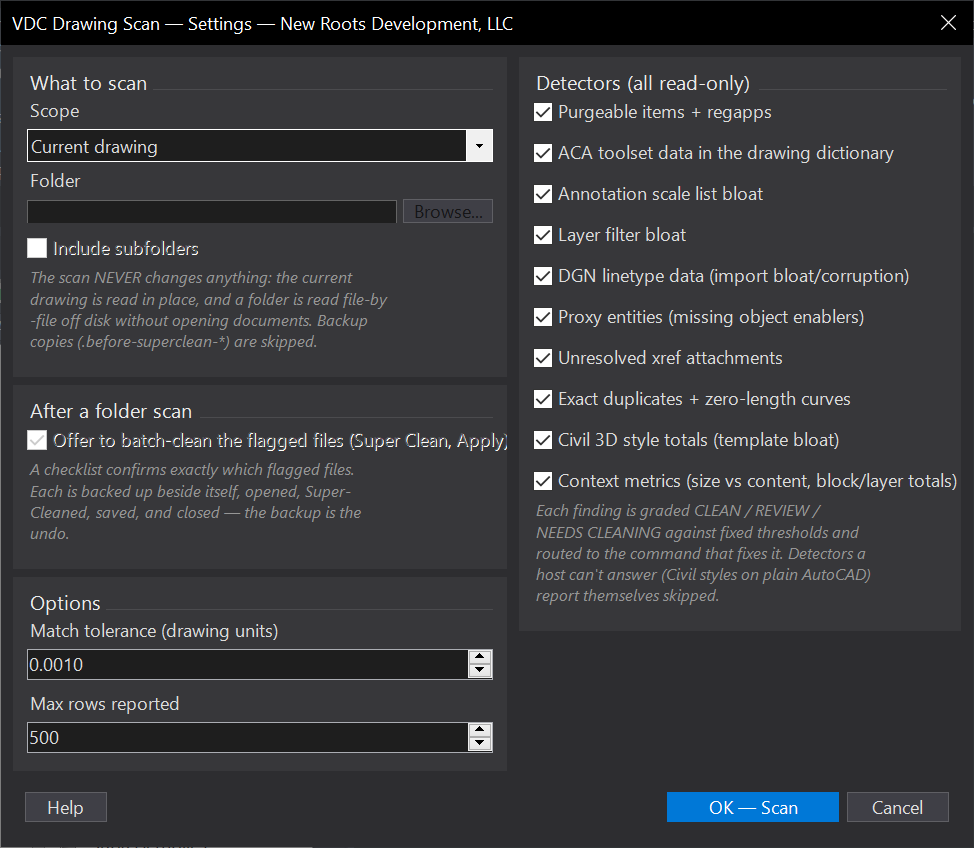
VDCSCANDWG
VDCSCANDWG
VDCCLEANDWG
VDCCLEANDWG
VDCCLEANDWGVDCSUPERCLEAN, No dialog, the full purge preset on the whole drawing, confirmation only.When to use it
- Triage a received or legacy project: which drawings are sick, and with what?
- Before issuing: sweep the deliverable folder for bloat, proxies, and broken xrefs.
- A drawing is slow or huge and you want to know WHY before running the cleanup.
- Monthly project hygiene - scan, batch-clean the flagged files, re-scan for the after picture.
How to run it
- Run VDCSCANDWG; pick Current drawing or a folder (subfolders optional).
- Read the verdicts - every finding names the command that fixes it.
- Folder mode: review the CSV in VDC Reports (worst files first).
- Optionally check flagged files on the batch-clean checklist - each is backed up, cleaned, saved, closed.
- Re-run the scan for the after picture.
Options
- Scope: current drawing, or every DWG in a folder (side-database, read-only).
- Detectors: each of the ten toggles independently; all on by default.
- Batch clean: offer the flagged files to a Super Clean batch after a folder scan.
- Thresholds: fixed by design - a scan with tunable definitions of 'sick' grades nothing consistently.
Watch out for
- The scan itself NEVER changes a file - only the optional batch clean writes, and it backs up every file first (the backup is the undo).
- The ACA data count is the whole population, not just orphans - a little AEC scaffolding is normal and graded as such.
- A LOCK FILE row means a .dwl sidecar was present - often a stale crash/batch leftover, not a live session. Such rows start unchecked but are safe to check: the batch re-checks every lock at clean time and skips any file genuinely open, naming who.
- Backup copies (.before-superclean-*) are skipped by design - scan results reflect the live files.
- UNREADABLE means the file couldn't even be read - open it directly and RECOVER it; the scan can't say more.
Related: Clean DWG · Super Clean · Xref Repath Fixer · QC Status · Standards QC