LAYTRANS, batch-grade, with the mapping as per-client data.
What it does
- One mapping CSV per client standard:
FROM,TO[,COLOR[,LINETYPE]], exact names beating prefix wildcards with tail carry-over. - Current drawing or every DWG in a folder; entities re-layer in every layout and optionally inside block definitions.
- Optional purge of emptied source layers, failing safely when one is still referenced.
Good to know
- Layer 0, Defpoints and xref contents never move.
- Unmapped layers are reported as strays, never guessed at, the stray list is how the mapping file grows to done.
- Ribbon: VDC Utilities → Drawing Tools → Layer Map.
Dialog
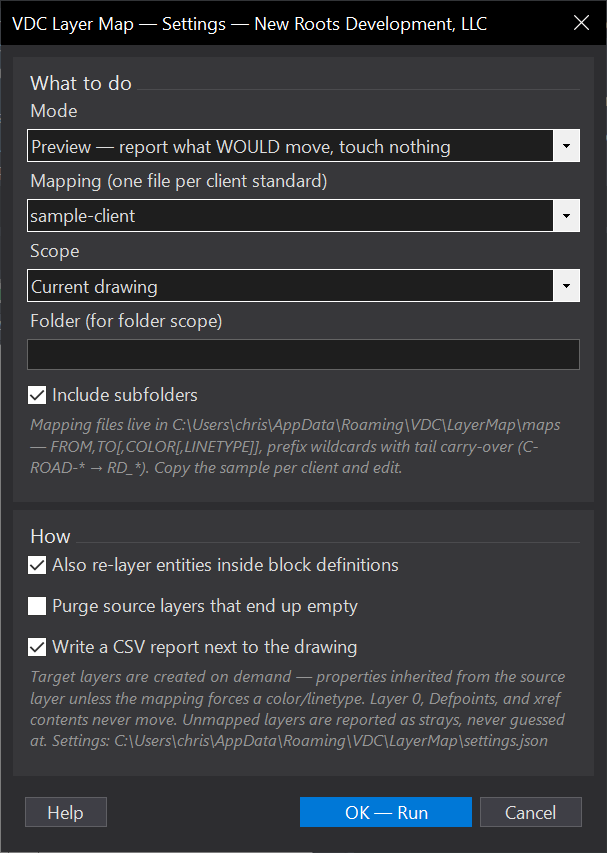
VDCLAYERMAPSettings file:
%APPDATA%\VDC\LayerMap\settings.jsonWhen to use it
- Deliverable prep - the client who requires their own layer standard.
- Absorbing a drawing from another office into your standard.
How to run it
- Run VDCLAYERMAP; choose the client mapping file (maps folder) and the scope.
- Preview - read the mapping list and, more importantly, the stray list.
- Apply; optionally purge the emptied source layers.
Options
- Maps folder: %APPDATA%\VDC\LayerMap\maps\ - or point VDC_LAYERMAP_MAPS at a shared office folder.
- Inside blocks: re-layers entities within block definitions as well as model and layouts.
- Purge emptied: removes source layers left empty; fails safely when still referenced.
Watch out for
- Unmapped layers are reported as strays and never guessed at - the stray list is how the mapping file grows to done. Do not treat a clean-looking run with 40 strays as finished.
- Layer 0, Defpoints and xref contents never move.
- Forced colour/linetype land on the TARGET layer; otherwise it inherits from the source.
Related: Xref Repath Fixer · Standards QC · Export CAD