Window an area: the vertices inside it go away. The window-based version of picking vertices off one at a time in the grip editor: set the scope once, then window areas one after another; each pass is one undo step.
VDCDELVERTS edits polylines (lightweight / heavy 2D / 3D, plain AutoCAD too); VDCFLDELVERTS deletes feature line PI and/or elevation points (Civil 3D).
What it does
- Repeat windows: two corners per pass, ENTER/ESC finishes; each pass is one transaction, so U steps back one window at a time.
- Every polyline flavor: lightweight, heavy 2D, and 3D. Curve/spline-fit heavies are skipped and reported (PEDIT Decurve first); locked layers are skipped and counted.
- Degenerate handling: a polyline that would be left with fewer than 2 vertices (3 closed) is erased (default) or left untouched + reported.
- Feature lines are never erased:
VDCFLDELVERTSkeeps each line's minimum PI count and reports any windowed PIs it kept; elevation points inside the window always all delete. Elevation points are deleted first, from pre-edit positions. - Arc segments next to a removed vertex re-span between the remaining vertices, check curved stretches after heavy trims.
Workflow
- Type
VDCDELVERTS(polylines) orVDCFLDELVERTS(feature lines). - Pick the scope, picked-first (safe default) or all-in-window, and the per-command options. OK.
- Picked-first: pick the objects one after another, ENTER to finish.
- Window areas one after another; each pass reports its counts. ENTER/ESC finishes; read the summary.
Settings
%APPDATA%\VDC\VertexDelete\settings.json(envVDC_VERTEXDELETE_SETTINGS). Both commands share the file.
Dialog
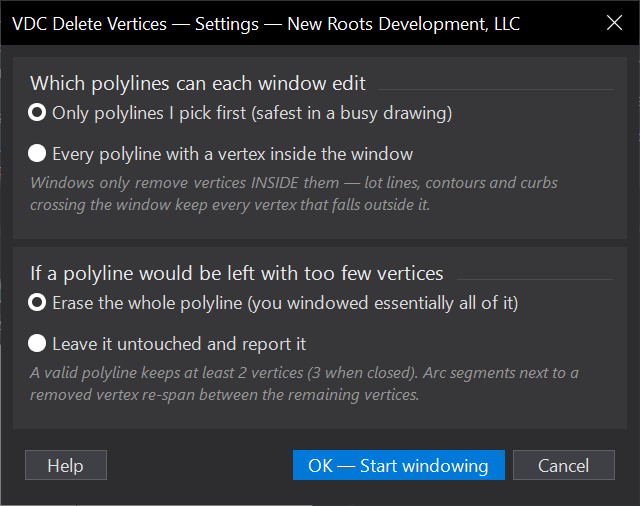
VDCDELVERTS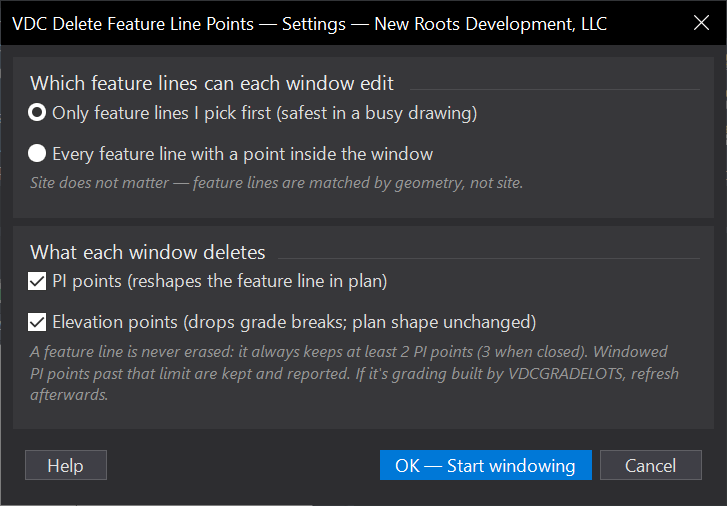
VDCFLDELVERTSWhen to use it
- A digitized boundary or lidar-traced contour came in over-noded and needs whole regions of vertices gone.
- Survey linework imported with vertex clusters at every shot - clean a stretch in one window instead of one grip at a time.
- A polyline detail was absorbed by a design change and the extra vertices now fight offsets and labels.
How to run it
- Run VDCDELVERTS; pick the scope (picked-first is the safe default in a busy drawing) and the too-few-vertices handling; click OK.
- If scoped to picked polylines, pick them one after another; ENTER to finish picking.
- Window the area - two corners; the vertices inside are deleted and the pass is reported. Keep windowing; ENTER or ESC to finish.
- Review the summary (vertices removed, polylines edited / erased / skipped). U undoes one window at a time.
Options
- Scope: only polylines picked first (default), or every polyline with a vertex inside each window.
- Too few vertices left: erase the whole polyline (default - you windowed essentially all of it) or leave it untouched and report it.
Watch out for
- All-in-window scope edits EVERY polyline the window touches - lot lines, contours, curbs included. Use picked-first unless the area really is all cleanup.
- Arc segments next to a removed vertex re-span between the remaining vertices - check curved stretches after heavy trims.
- Curve-fit / spline-fit heavy polylines are skipped and reported - PEDIT Decurve first if you really want them edited.
- Feature lines are not polylines - use VDCFLDELVERTS (Civil 3D) for those.
Related: Delete FL Points · Clean DWG · Smooth Surface · Export CAD