Drops hydrant marker blocks along a road alignment at fixed station spacing (typical 400 ft residential, 500 ft commercial). Markers are placeholders: they get replaced by real fire-hydrant parts when the pressure network is built later. Manual carryover hint at intersections.
Road alignment (centerline)
Hydrant marker block (auto-defined: circle + crosshair)
What it does, per run
- Settings dialog: spacing, block name, layer, marker radius, rotate-to-tangent, auto-create flags.
- Pick alignment: single Civil 3D Alignment in the host drawing.
- Start station prompt: ENTER for alignment start, type a value, or "Pick" keyword to click a point that gets projected onto the alignment.
- Compute & place: stations
S0, S0+D, S0+2D, ...while ≤ end. All markers in one transaction → single undo. - Carryover hint: tool prints
spacing − trailingso the next alignment past the intersection is easy to start.
Defaults & settings
- Default spacing: 400 (residential), typical fire-marshal max. 500 for commercial.
- Block name:
Hydrant. Auto-defined as a placeholder (circle + crosshair) if missing. - Rotation: alignment tangent at each station, off if you prefer axis-aligned.
- Settings:
%APPDATA%\VDC\PlaceHydrants\settings.json(or override viaVDC_PLACEHYDRANTS_SETTINGS). - Phase 2 (deferred): network-graph auto-placement across alignment intersections.
Dialog
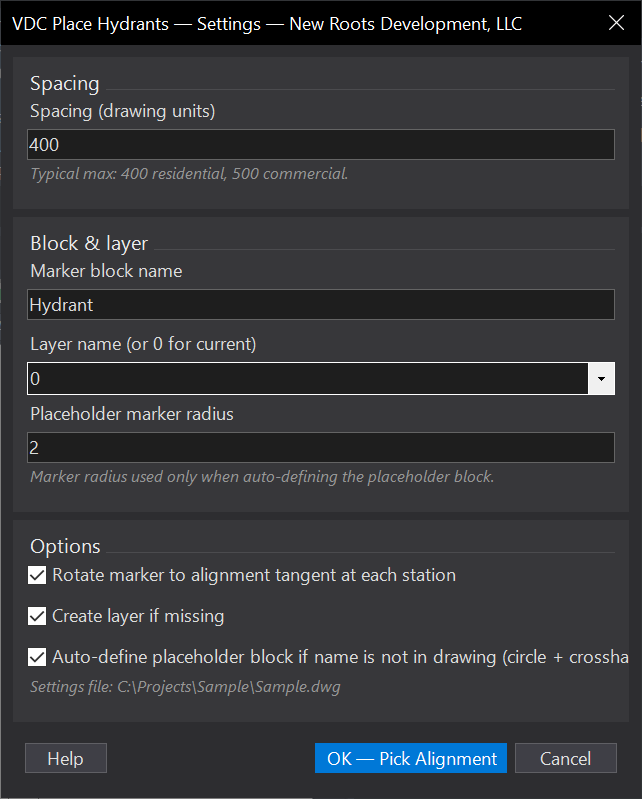
VDCFHSPACEWhen to use it
- Checking or laying out hydrant spacing along roads.
How to run it
- Run VDCFHSPACE and select the road alignment.
- Enter the station spacing.
- Review the hydrant markers placed along the alignment.
Watch out for
- Spacing is along the alignment stationing - confirm the alignment is the road centerline you intend.
Related: Service Lots · Multi-Offset