The fix side of xref health.
What it does
- Make relative: absolute paths on the host's drive convert to the
.\/..\convention so the project can move. - Find missing: unresolved xrefs searched by filename under your search folder (shallowest hit wins), repathed, then relativized.
- Current drawing or every DWG in a folder; CSV of every path old → new.
Good to know
- Drawings locked by another user, and the one open in this session, are skipped, never fought over.
- Preview reports and touches nothing; Apply writes, preserving each file's original DWG version.
- Ribbon: VDC Utilities → Drawing Tools → Xref Fix. Companion to
VDCXREFQC.
Dialog
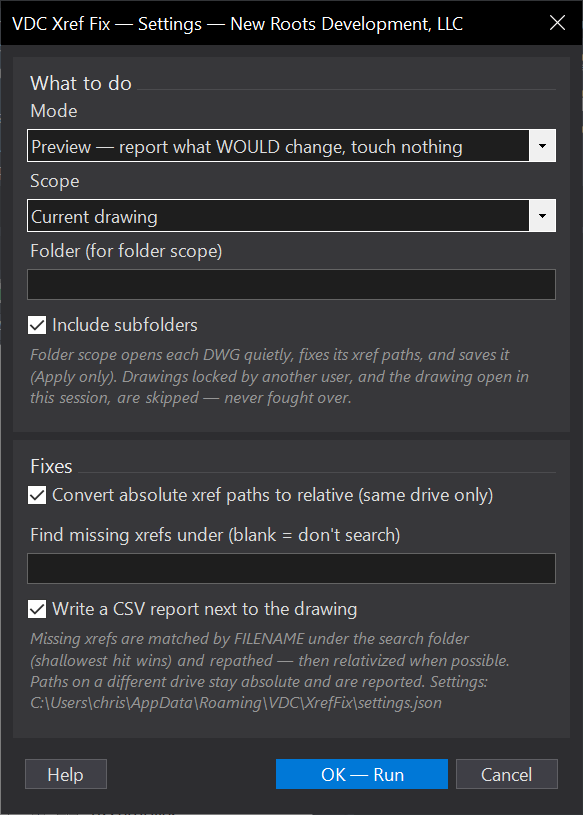
VDCXREFFIXSettings file:
%APPDATA%\VDC\XrefFix\settings.jsonWhen to use it
- After a project folder moves or a server letter changes and half the set opens with missing refs.
- Before archiving or transmitting, to get every reference onto relative paths.
How to run it
- Run VDCXREFFIX; choose current drawing or a folder, and set the search folder for missing refs.
- Preview - nothing is written; read what would change.
- Apply; check the CSV for anything still unresolved.
Options
- Make relative: absolute paths on the host's drive convert to .\ / ..\ form.
- Find missing: searches by filename under your folder, shallowest hit wins, then relativizes.
Watch out for
- Different-drive paths cannot be made relative - they are reported and left alone, not forced.
- Drawings locked by another user (and the one open in this session) are skipped, never fought over.
- Batch saves preserve each file's original DWG version - a 2018 drawing stays 2018.
Related: Xref QC · Clean DWG · Layer Map