
Get one sheet's viewport right - its VP-frozen layers and its per-viewport layer overrides (color, linetype, lineweight, transparency) - then copy that layer state to every model viewport on the chosen sheets. Preview the counts, Apply only what differs, read the sheets changed. A run that changes nothing writes nothing.
Source viewport and what Apply wrote
Target sheets
Already matching - untouched
What it copies
- VP-frozen layers: freeze what the source freezes; optionally thaw what the source leaves on, so the frozen sets become identical.
- Overrides: color, linetype, lineweight, transparency - each on its own switch; optionally clear the overrides the source does not have.
- Targets: every other sheet, a layout-name pattern (
C-1*, *GRAD*), or viewports picked on screen. The source is never a target. - Source drawing: this drawing, or another DWG read side-loaded (never opened or changed) and applied here by layer name; layers this drawing lacks are skipped and listed.
Safety
- Preview counts before anything is written; the summary lists one line per sheet changed.
- Only viewports that differ are written; a run that changes nothing writes nothing (NOTHING CHANGED).
- Settings under
%APPDATA%\VDC\VpLayerSync\(overrideVDC_VPLAYERSYNC_SETTINGS). Plain AutoCAD: ships in both bundles.
Dialog
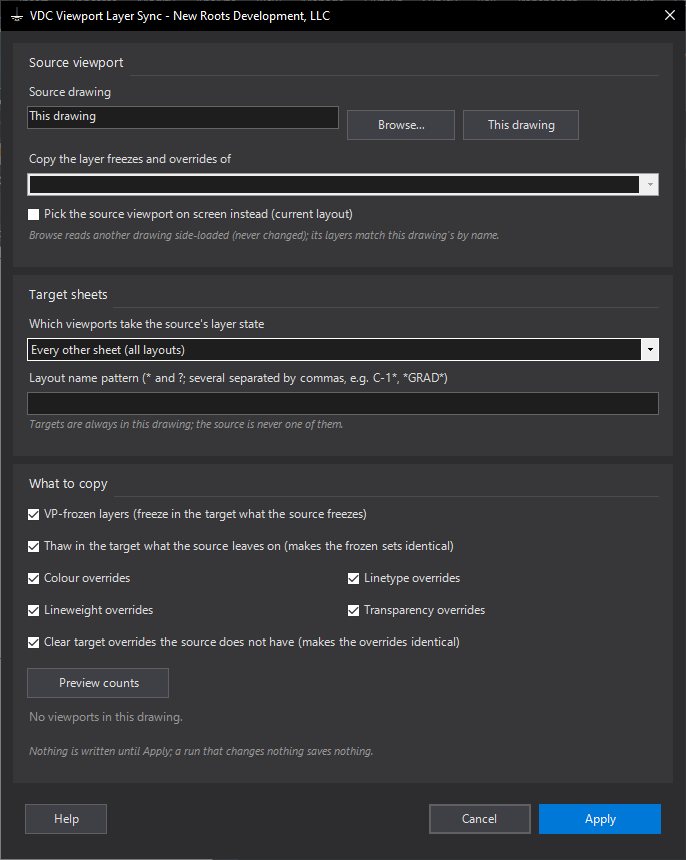
VDCVPLAYERSYNCWhen to use it
- The plan sheets should all hide the same layers and grey the same background, and one sheet is already right.
- A new layer appeared and must be VP-frozen on every plan sheet.
- Grading sheets take one layer state, utility sheets another: run once per family with a layout-name pattern.
How to run it
- Run VDCVPLAYERSYNC and pick the source viewport from the list (or tick Pick on screen, or Browse another drawing and pick one of its viewports).
- Choose the targets: every other sheet, a layout-name pattern (C-1*, *GRAD*), or viewports you pick after Apply.
- Tick what to copy; leave Thaw and Clear on to make the targets identical to the source.
- Preview counts, then Apply. Read the summary: one line per sheet changed.
Options
- Thaw in the target what the source leaves on: off keeps the target's extra freezes.
- Clear target overrides the source does not have: off keeps overrides the source lacks.
- Layout name pattern: * any run, ? one character, several patterns separated by commas.
- Source drawing: this drawing, or another DWG read side-loaded (never opened or changed) and matched to this drawing's layers by name; the last one is remembered.
Watch out for
- The source is never a target, and a sheet with several viewports has every model viewport synced.
- Overrides copy the source's values exactly. From another drawing the match is by layer NAME: source layers this drawing lacks are skipped and listed, and a linetype override needs that linetype loaded here.
- Nothing changes = nothing saved: the drawing is not dirtied by a no-op run.
Related: Sheet Peek · Viewport QC · Phasing