
A small plan-view key on every sheet from the Sheet Gen frames: every frame outlined and numbered, the current sheet's frame hatched, scaled to the size you choose and placed in a corner of each layout's viewport - or as a block in model space. Update rebuilds the key blocks from the frame set so every sheet follows.
Sheet Gen frames and the sheet's viewport
The key block, current frame hatched
What it places
- One key block per frame (
VDC-KEYMAP-<frame>): every frame outlined and numbered, that frame hatched, a title above; drawn in paper inches, north up, scaled to the width and height limit. - Paper mode: inserted in every layout that carries a frame (Sheet Gen tag, or a layout named like the frame) at a chosen corner of its main viewport, inset by the given inches.
- Model mode: one block at a picked point, the chosen sheet hatched, scaled by the plan scale.
Update / Remove
- Definitions carry a signature of the frame set and the settings: Update rebuilds only what changed and every reference follows; keys already in place stay; layouts that lost their frame lose their key.
- Nothing changed = nothing written. Remove erases the keys and purges the unused definitions.
- Settings under
%APPDATA%\VDC\KeyMap\(overrideVDC_KEYMAP_SETTINGS). Plain AutoCAD: ships in both bundles.
Dialog
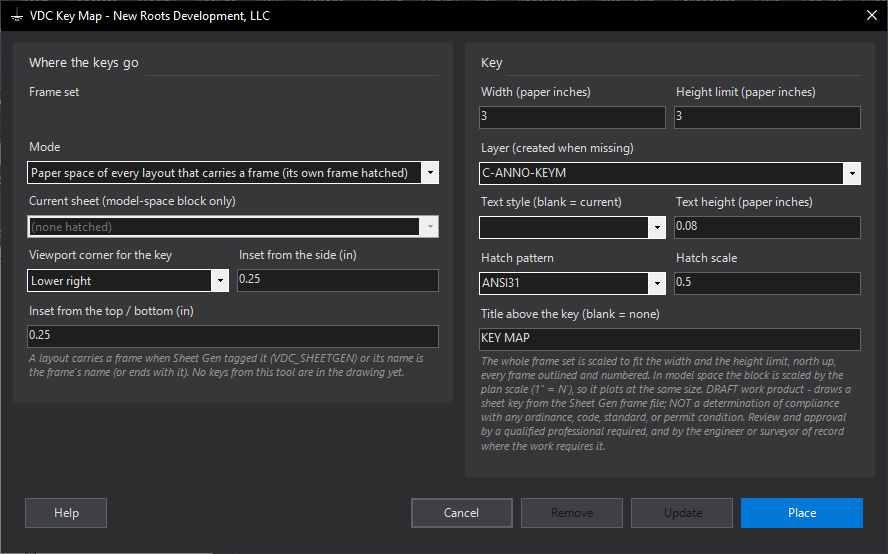
VDCKEYMAPWhen to use it
- The plan sheets need a key map and the frame set is defined.
- Frames moved or sheets were added: run Update and every key follows.
- A presentation drawing wants the sheet layout in model space: place the block there.
How to run it
- Define the frames (VDCFRAMEDEF) and generate the sheets (VDCSHEETGEN) so the layouts carry their frame tags.
- Run VDCKEYMAP, keep paper-space mode, set the size, corner and insets, the layer and text, the hatch pattern.
- Place. Every layout that carries a frame gets the key with its own frame hatched.
- After a frame change: run again and Update. Nothing changed = nothing written.
Options
- Mode: paper space of every layout, or a block in model space at a picked point (choose the hatched sheet).
- Corner + insets: which corner of the sheet's main viewport the key sits in.
- Hatch: ANSI31 by default; SOLID, DOTS, NET or any pattern loaded on the seat.
Watch out for
- A layout with no Sheet Gen tag is matched by name: it must be the frame's name or end with it (PLAN C-3).
- The key sits inside the viewport's corner, so it covers whatever the viewport shows there: pick the corner the title block leaves empty.
- The frame file is the source: a frame moved by hand in the drawing does not move in the key.
Related: Sheet Gen · Match Lines · Sheet Index