
One master general-notes MText per discipline (a heading line such as GENERAL NOTES identifies the blocks; a tag marks the master). Compare counts the lines each sheet's copy differs by - nothing changed. Push writes the master's text into every copy and reports the sheets that still differ. A CSV per run under VDC Reports.
The tagged master
Sheet copies (same heading)
Lines that differ (LCS line diff)
What it does
- Notes block: an MText whose first line matches the heading pattern (
*NOTES*); the heading is the discipline, so GENERAL, GRADING and UTILITY NOTES each have their own master. - Set master: pick the MText; tagged (XData), one master per discipline.
- Compare: per sheet, the lines added and missing against the master (longest common subsequence, so an inserted note counts once). Nothing changes.
- Push: every differing copy takes the master's contents; width, style and position stay; the sheets that still differ are named.
Reports and safety
- A CSV per run under
VDC Reports(discipline, space, handle, role, diff lines, extra, missing, status) with the draft notice. - A discipline with no master or with two is reported, never pushed. A Push with nothing to change writes nothing.
- Settings under
%APPDATA%\VDC\NotesMaster\(overrideVDC_NOTESMASTER_SETTINGS). Plain AutoCAD: ships in both bundles.
Dialog
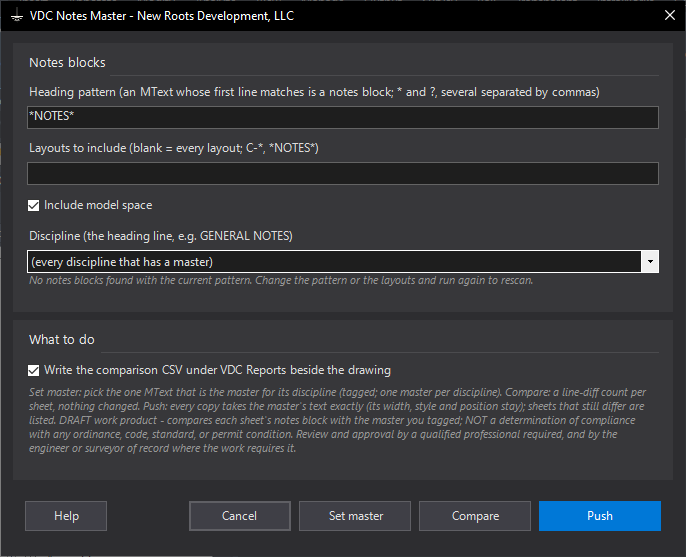
VDCNOTESMASTERWhen to use it
- Before a submittal: find the sheets whose general notes no longer match.
- A note changed: edit the master once, Push, done.
- Several note disciplines (general, grading, utility) each with their own master.
How to run it
- Run VDCNOTESMASTER, click Set master and pick the MText that is the master (its first line is the heading, e.g. GENERAL NOTES).
- Run again and Compare: read the per-sheet line counts (and the CSV).
- Push: every copy takes the master's text; the summary names the sheets pushed and any that still differ.
Options
- Heading pattern: *NOTES* by default; add others separated by commas (*NOTES*, LEGEND).
- Layouts to include: blank = all; a pattern such as C-* limits the sheets compared and pushed.
- Include model space: the master or copies may sit there.
Watch out for
- Push copies the master's MText contents as is - formatting codes included - so the copy's column width does the wrapping; a narrower copy wraps differently but reads the same.
- A discipline with two tagged masters is reported, not pushed: Set master once more to settle it.
- An MText whose first line is not a heading is not a notes block; the pattern decides.
Related: Sheet Stamp · Standards QC · Title QC