
Model space takes a sheet's view: pick a Sheet Gen frame or a layout viewport and the model view takes its centre, twist and window, the viewport's VP-frozen layers are frozen for real and the annotation scale matches - so you see exactly what that sheet sees while you edit. UCS stays World. Restore puts the saved view and layer state back.
The sheet's viewport and what it shows
Model space matched to it
What it does
- One dropdown: the Sheet Gen frames of
VDC-SheetFrames.jsonfirst, then every model viewport on every layout. - Frame: the frame's ground - centre, size, twist = minus the frame rotation (Sheet Gen's convention).
- Viewport: its own view target, DCS centre, view height and twist; the width follows the viewport's aspect; its VP-frozen layers are frozen for real (the current layer is turned off instead).
- Annotation scale and SNAPANG follow, both optional.
Restore
- The first peek saves a named view and a named layer state,
VDC-SHEETPEEK-RESTORE. Later peeks keep that first restore point. - Restore restores both and deletes the saved copies; nothing to restore = NOTHING CHANGED.
- Settings under
%APPDATA%\VDC\SheetPeek\(overrideVDC_SHEETPEEK_SETTINGS). Plain AutoCAD: ships in both bundles.
Dialog
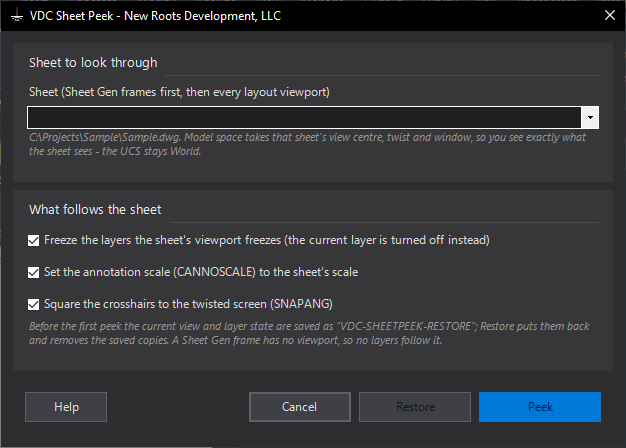
VDCSHEETPEEKWhen to use it
- Editing in model space for one sheet and you want to see its exact ground and its VP-frozen layers.
- Checking why something shows on one sheet and not another: peek each one in turn.
- A Sheet Gen frame with no layout yet - peek the frame itself.
How to run it
- Run VDCSHEETPEEK (from any tab; it switches to Model).
- Pick the sheet from the dropdown: frames first, then layout viewports.
- Leave the three options on (freeze the viewport's layers, match the annotation scale, SNAPANG) and Peek.
- When done, run it again and choose Restore: the previous view and layer state come back and the saved copies are removed.
Options
- Freeze the layers: the viewport's VP-frozen layers are frozen outright; the current layer is turned off instead (AutoCAD will not freeze it).
- Annotation scale: CANNOSCALE takes the drawing scale whose ratio matches the sheet, when one exists.
- SNAPANG: crosshairs, ORTHO and polar follow the twisted screen.
Watch out for
- Peek twice and the FIRST restore point is kept - Restore always returns to where you started, not to the previous peek.
- A frame peek freezes nothing: a Sheet Gen frame has no viewport and so no VP-frozen layers.
- Restore is a layer state restore: layers you changed by hand after the peek go back too.
Related: View Twist · Sheet Gen · Viewport Layer Sync