
The survey linework, drawn from the COGO points already in the drawing. Civil 3D draws field-to-finish linework only through the survey database (Process Linework); points imported straight into a drawing have no database and no figures, so the edges get traced by hand. This connects them by description code and point order, shows the chains first, and draws them as 3D polylines, 2D polylines or feature lines on the right layers.
What it does
- Scan: the points in the scope (whole drawing / point group / layer / window pick) listed by code with their string numbers and counts; codes with two or more points that are not point features (GND, WM, WV, PP, LP, MH, CB, DI, IP, IR, NAIL, BM, SIGN, HYD ... from the catalog) come pre-checked, one-point codes unchecked.
- Chains: each code string's points in point-number order (or nearest neighbor for interleaved numbering), broken on a segment longer than the code's Max ft (200), a point-number gap over 25, or a
B/E/CLOtoken; a bearing reversal over 150 degrees is a WARNING with "split here", and Split at points breaks it on the next run. Curve and join tokens (PC,PT,SMO,JPN...) are ignored and counted. - Layers: the code catalog's layer, else a matching description key (wildcards honored, read through COM since the .NET API has none; a key names the point layer, so it only fills a gap), else
V-<CODE>; Output: 3D polyline at the elevations, 2D polyline at 0, or a siteless feature line, per code.
Modes, seats & caveats
- Preview draws the chains as transient graphics (red circles at the warnings) with the findings palette and the CSV; Draw writes them in one transaction; Clear erases everything the tool stamped. Re-runs replace only this tool's linework for the same codes.
- Code catalog: a generic field-code vocabulary (code, description, linework yes / no, layer) at
%APPDATA%\VDC\PointLinework\codes.json(envVDC_PTLINES_CODES), edited in the grid or by hand and shareable office-wide. Settings at%APPDATA%\VDC\PointLinework\settings.json. - Civil 3D only; ships in the Civil 3D set alone. VDC Survey → Points, in the place of the earlier Figures tool (
VDCFIGURES, retired 2026-10-21). - Not a survey database and not a curve fitter: straight segments, connectivity from the numbering and the codes the crew typed - verify against the field sketch. Every output carries the draft notice.
Dialog
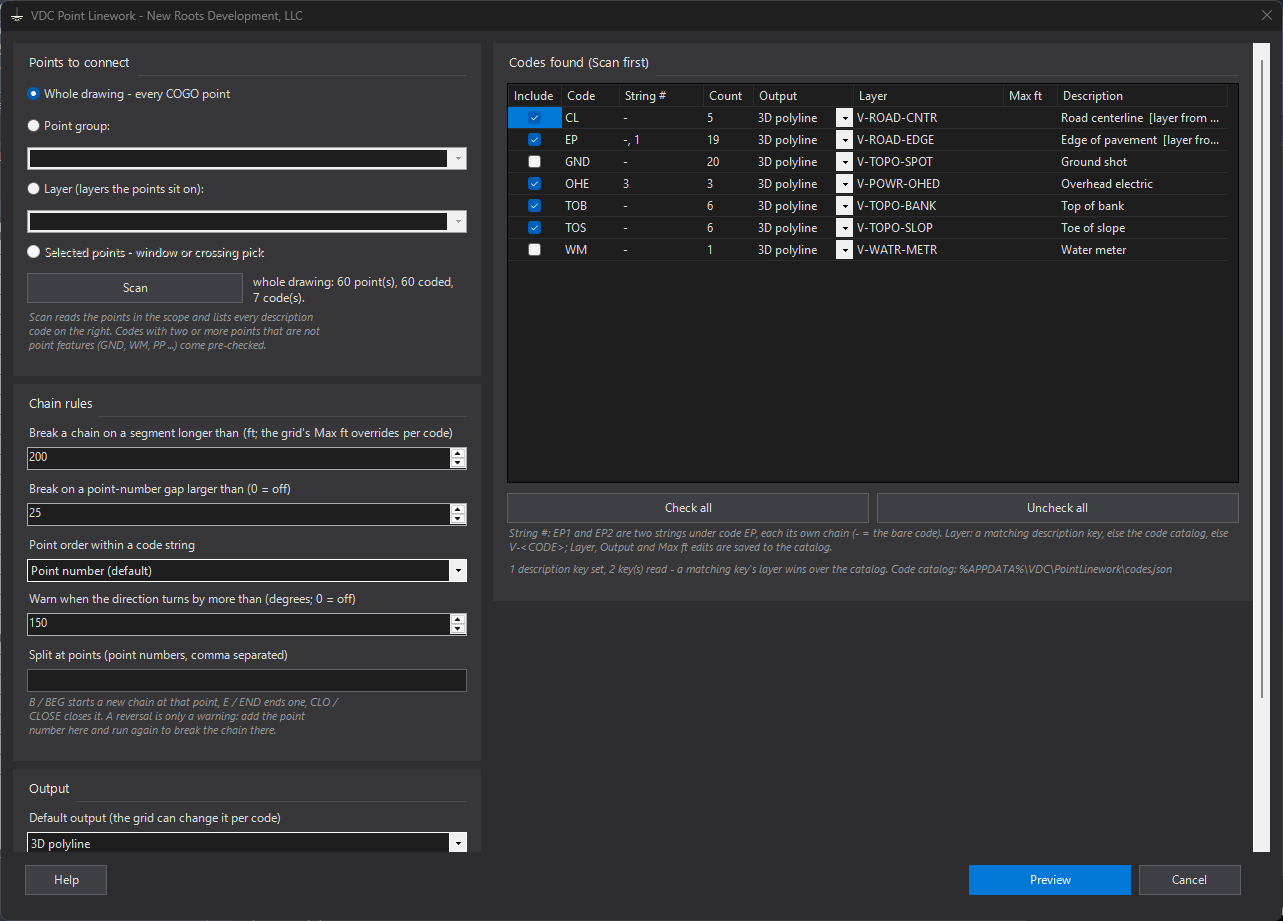
VDCPTLINESWhen to use it
- A topo came in as a point file and the linework has to be built from it.
- A client's drawing has the survey points but no survey database and no linework.
- Three roads were shot under one code in separate runs and need to come out as three lines.
How to run it
- Run VDCPTLINES; pick the scope (whole drawing, point group, layer, or a window pick) and Scan.
- Review the codes grid: Include, String #, Count, Output, Layer, Max ft - uncheck what is not linework, fix a layer or an output per code (saved to the catalog).
- Preview: look at the chains on screen (red circles = reversal warnings) and the findings palette; add any point number the palette names to Split at points.
- Draw. Re-run after a correction: the tool's earlier linework for the same codes is replaced.
Options
- Chain rules: max segment (200 ft, per code in the grid), point-number gap (25; 0 = off), point order (number or nearest neighbor), reversal warning angle (150), Split at points.
- Layers: the code catalog's layer, else a matching description key (wildcards honored; a key names the point layer), else V-<CODE>; edits in the grid save to %APPDATA%\VDC\PointLinework\codes.json.
- Output: 3D polyline at the point elevations (default), 2D polyline at elevation 0, or a siteless feature line, per code.
- Mode: Preview (transient chains + palette + CSV) / Draw / Clear (every entity this tool drew).
Watch out for
- Connectivity comes from the point numbering and the codes the crew typed - verify the linework against the field sketch before it is trusted.
- A reversal is a warning, never an automatic split: the chain keeps going until the point number is added to Split at points.
- Straight segments only: PC / PT / SMO / JPN and the other curve and join tokens are ignored and counted in the report.
- The shipped code catalog is a generic vocabulary, not the firm's list - edit it once (the grid or the file) and share it with VDC_PTLINES_CODES.
Related: Connect Points · FL from Points · Dedupe Points · Code Leaders