
A whole site shaded by what is on the ground - on the surface itself - from the closed polylines already on the plan. Each land-cover layer maps to a material; one run adds a render-only mask per polyline to the surface with that material and hatches the plan from the same map, with the areas in a table. Switch the viewport to Realistic and orbit: that is the picture.
What it does
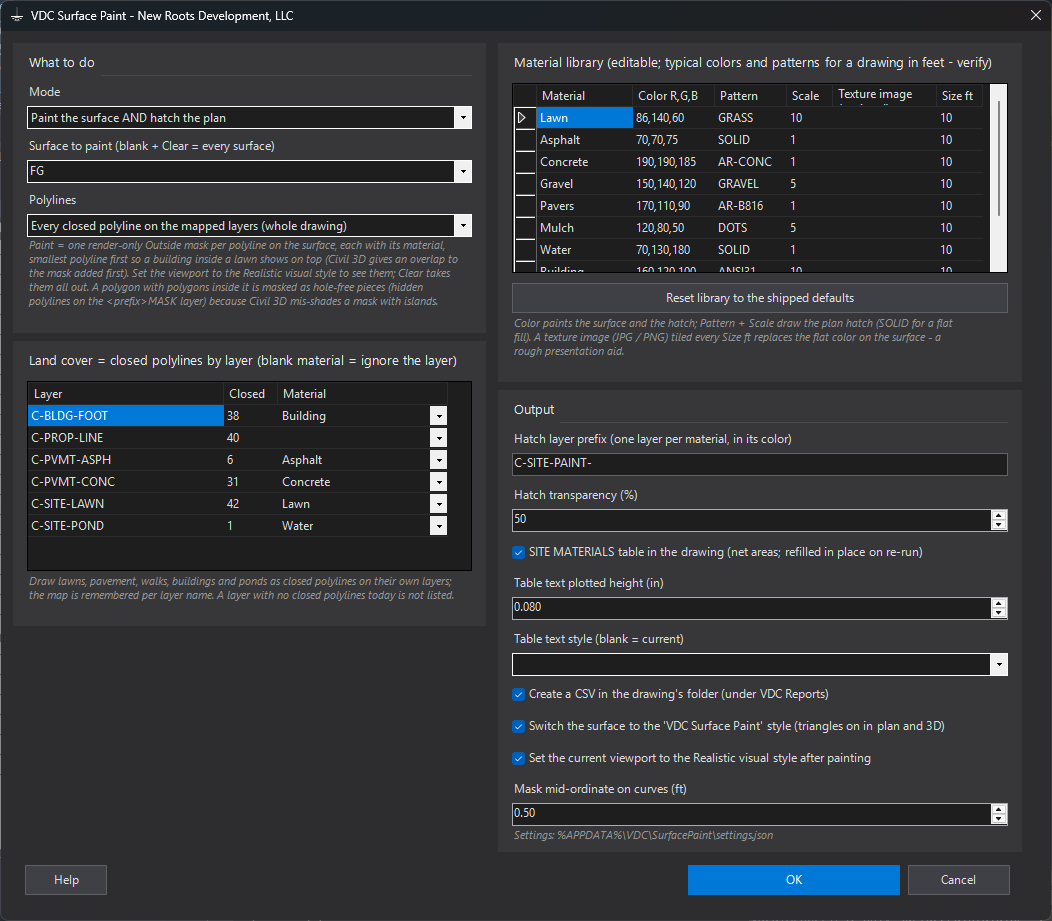
- Paint: one render-only Outside surface mask per closed polyline, each with an AutoCAD render material made from the library (flat color, or a texture image tiled every Size ft), added smallest polygon first (Civil 3D gives an overlap to the mask added first). A polygon with other polygons inside it is masked as hole-free pieces, hidden polylines on the C-SITE-PAINT-MASK layer, because Civil 3D shades a mask with several islands as a fragment. The surface is switched to the VDC Surface Paint style (triangles + border on, in plan and 3D) and the style it had is stamped on it; the viewport is set to Realistic.
- Hatch: a hatch per polyline on
C-SITE-PAINT-<MATERIAL>in the material's color, pattern and scale, associative where AutoCAD allows, 50 % transparent, sent to the back; the SITE MATERIALS table (areas, net sf, ac, percent) placed once and refilled in place; a CSV with the totals and every polygon. - Re-run / Clear: masks are named
VDC Paint - material - handleand hatches are stamped, so a re-run replaces and Clear removes them all, switches the surface style back and purges the unusedVDC ...materials. Polylines and layers are never changed.
Modes, seats & caveats
- Mode: Paint + Hatch (default) / Paint only / Hatch only / Clear. Polylines: whole drawing on the mapped layers (default) / picked / inside a window.
- Library: Lawn, Asphalt, Concrete, Gravel, Pavers, Mulch, Water, Building, Woods shipped as typical values for a drawing in feet - edit, add, reset. The layer map and the library are remembered per seat.
- Civil 3D only (the masks, the surface style and the surface itself); it ships in the Civil 3D set alone.
- Nothing shows in 2D wireframe: masks render only in a shaded visual style and only where the surface style shows triangles. A rough presentation aid from the polylines as drawn - not a rendering, a takeoff or an impervious-area calculation; every output carries the draft notice. Settings at
%APPDATA%\VDC\SurfacePaint\settings.json(envVDC_SURFPAINT_SETTINGS).
Dialog
VDCSURFPAINTWhen to use it
- A proposal, a neighborhood meeting or a client review wants to see the site, not read a hatched plan.
- The design surface is done and a colored plan with material areas is wanted from the same polylines.
- An exhibit needs a quick lawn / pavement / building breakdown with the areas beside it.
How to run it
- Draw (or keep) the land-cover areas as closed polylines, one layer per cover. Run VDCSURFPAINT.
- Pick the surface and the mode; in the Land cover grid give each layer its material; edit the library if a color or pattern should change. OK.
- Picked or window scope: make the pick. Read the summary: masks added, hatches, the table, the CSV.
- Orbit in the Realistic visual style; adjust a color in the library and run again - the earlier masks and hatches are replaced.
- Done with it: Mode = Clear removes the masks, hatches and table and switches the surface style back.
Options
- Mode: Paint the surface and hatch the plan / paint only / hatch only / Clear.
- Polylines: every closed polyline on the mapped layers, the ones you pick, or those inside a window.
- Material library: name, color R,G,B, hatch pattern and scale, an optional texture image tiled every Size ft; Reset restores the shipped nine.
- Surface style: switched to 'VDC Surface Paint' (triangles on in plan and 3D) so Realistic has faces to shade; Clear switches it back.
- Table + CSV: net areas subtract the polygons of other materials nested inside; the CSV lists every polygon.
Watch out for
- Nothing shows in 2D wireframe: the masks render only in the Realistic (or another shaded) visual style, and only where the surface style shows triangles.
- A polyline that crosses the surface edge is masked only where the surface is; an open polyline is not read at all (close it first).
- Overlapping polygons of different materials: the smaller one wins on the surface and is subtracted in the table; a lawn polygon drawn over the whole site is fine.
- A rough presentation aid from the polylines as drawn - not a rendering, a takeoff or an impervious-area calculation.
Related: Auto Hatch · Cover Fill · Terrain · Curve Numbers