Fills the flood-zone note from live FEMA NFHL data: the zone(s) intersecting the property, the F.I.R.M. panel number + suffix, and the panel effective date, swapping only those three spans so the standard wording (including the AS SCALED disclaimer) never moves.
What it does
- Two live queries: the NFHL zones layer (all zones, not just SFHA, a Zone X note is the common case) and the FIRM panels layer, both in the drawing's State Plane WKID.
- Finds every note: matched by its FLOOD ZONE "..." + F.I.R.M. wording, cover sheet, plat sheet, block definitions, wherever it lives in the drawing.
- Surgical swap: zone inside the quotes, panel between
No.and the comma, date afterDATED, the note's formatting and line breaks survive. - Preview first: the dialog shows FEMA's answers plus each note's before/after; nothing is written on cancel.
- Multiple zones or panels join with
&("X & AE"); the newest panel effective date is used.
Notes & settings
- Shares
VDCFLOODQC's settings: WKID (the drawing's zone) and both service URLs; set the WKID once in the Flood QC dialog. - Window the property tight, the envelope query includes every zone it touches, so a loose window can pull in a neighbor's AE.
- The answer is by map intersection; the note's AS SCALED wording is kept on purpose, this is not a flood determination.
- Needs internet; FEMA is public but sometimes slow, the timeout message says to just try again.
- Effective dates print as
DEC. 16, 2021.
Dialog

VDCFIRM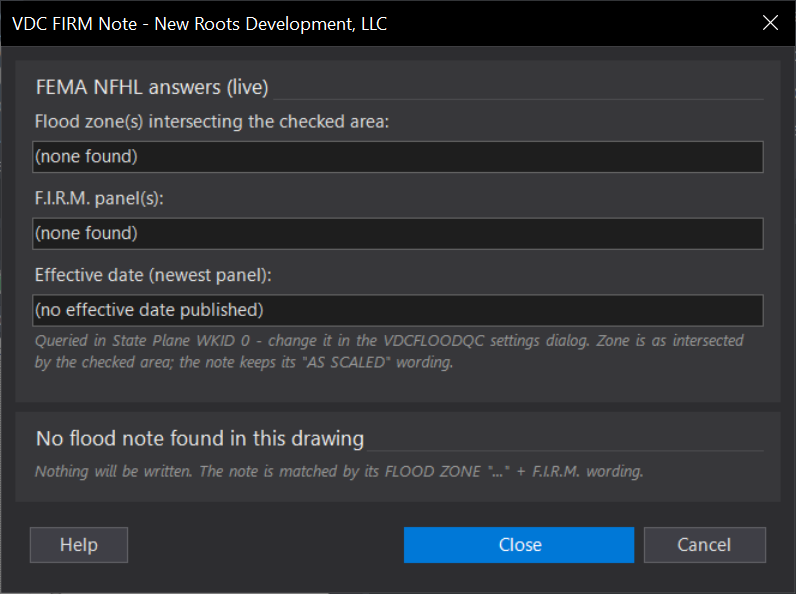
VDCFIRMSettings file:
%APPDATA%\VDC\FloodQc\settings.jsonWhen to use it
- The cover or plat note still reads panel 45051C07?? or an old effective date.
- Confirming the note matches FEMA's current mapping before a submittal.
How to run it
- Run VDCFIRM; at the [Window/Extents] prompt pick the property with a Window (two corners) - the default and the safe choice. Extents is available but runs the FEMA query over the whole envelope, slow on a large drawing (an empty or absurdly large extent is refused).
- The tool queries the NFHL zones + FIRM panels layers in the drawing's State Plane WKID.
- Read the preview: FEMA's answers plus each note's before/after text.
- Click OK - update note(s).
Options
- Area: defaults to a picked Window - keep it tight so neighboring zones don't join the list; Extents is available but queries FEMA over the whole drawing envelope.
- WKID / service URLs: shared with VDCFLOODQC's settings (any NAD83 State Plane zone).
Watch out for
- Needs internet - FEMA's service is public but sometimes slow; try again if it times out.
- An envelope query includes every zone touching the checked area - a loose Window (or Extents) can pull in a neighbor's AE.
- Multiple panels or zones are joined with '&'; reword by hand if the note needs prose instead.
- The zone answer is by map intersection - the note's AS SCALED wording (this is not a flood determination) is kept on purpose.
Related: Flood QC · Cover Sheet Fill · Plat QC