
Public USGS 3DEP lidar for the area you pick, in the drawing's coordinates. Pick a boundary (or a window), pick a dataset from the ones that cover it, check the download size, and the ground points land in a LAS / LAZ file in your State Plane zone and units - with the dataset, URL and retrieval date stamped in the file, in the drawing and in the report. In Civil 3D it can also build a thinned TIN surface.
What it does
- Datasets - every 3DEP collection whose outline touches the boundary, whole coverage first, then newest and densest, with year, estimated quality level and density.
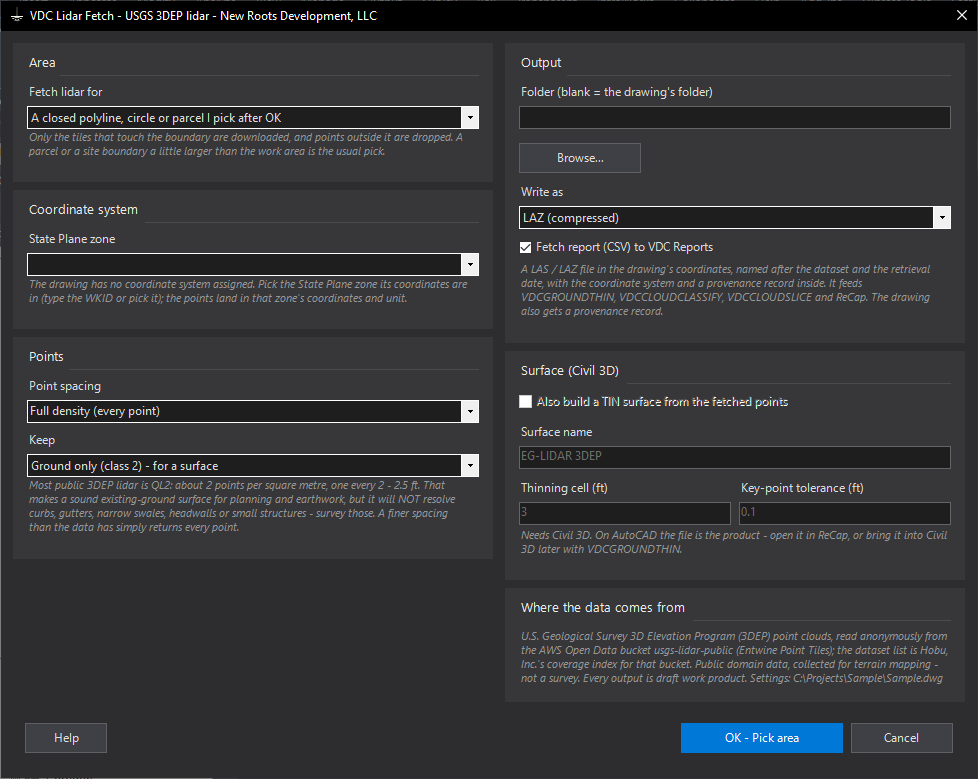
- Spacing - full density or 1 / 2 / 3 / 5 / 10 ft; coarser downloads less. The download size is shown before anything is fetched (hard stop at 2,000 MB).
- Keep - ground only by default; an unclassified collection keeps everything but noise and says so (run VDCCLOUDCLASSIFY on it).
- Output - LAS 1.4 / LAZ in the drawing's State Plane zone and units, NAVD88 heights; provenance in the file, an Xrecord in the drawing and the CSV in VDC Reports.
Good to know
- Live service - the public AWS usgs-lidar-public bucket (anonymous) and a dataset index; tiles are cached under
%LOCALAPPDATA%\VDC\LidarFetch. - Cached - re-runs reuse the tiles already downloaded; ESC cancels and writes nothing.
- QL2 (about 2 points / m2) is planning-grade terrain: it will not resolve curbs, gutters or small structures.
- Not every county is in the public bucket (Horry County, SC is not); the tool says so and points at the National Map download.
- Civil 3D license set - ships in the Civil 3D bundle only since 1.117.1 (not on plain-AutoCAD seats).
Dialog
VDCLIDARFETCH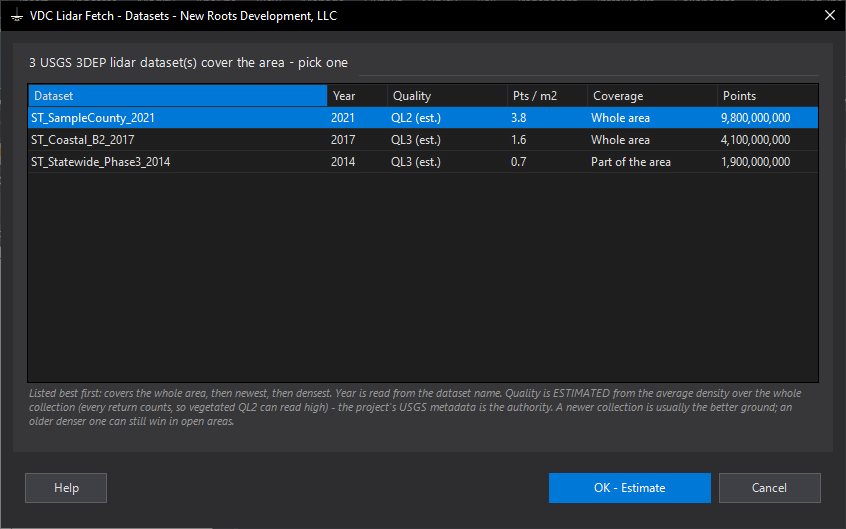
VDCLIDARFETCH
VDCLIDARFETCHSettings file:
%APPDATA%\VDC\LidarFetch\settings.jsonWhen to use it
- A site needs an existing-ground surface for planning, earthwork or a quick pond check before the survey is in.
- You want the actual lidar points (not the 1 m DEM VDCTERRAIN samples) to classify, slice or thin yourself.
- A reviewer asks where the existing ground came from - the source, URL and date travel with the file and the drawing.
How to run it
- Run VDCLIDARFETCH; check the zone (the drawing's, or pick one), the point spacing (3 ft is a typical grading surface) and Keep (ground only).
- Set the output folder (blank = the drawing's folder) and LAZ or LAS; in Civil 3D tick the surface if you want one.
- OK; pick the boundary (or the window).
- Pick a dataset - whole-area coverage, newest and densest are listed first.
- Read the download size; Download (or Back for another dataset). ESC cancels while it runs.
- Read the summary: points kept, elevation range, the file, the surface; open the CSV in VDC Reports.
Options
- Point spacing: full density or a target spacing - coarser reads fewer octree levels and downloads less; finer than the collection returns every point.
- Keep: ground only (default); ground + road, water, bridge decks; everything except noise; everything. An unclassified collection keeps everything but noise and says so.
- Surface (Civil 3D): lowest point per 3 ft cell, despiked, then only the key points a TIN needs within 0.1 ft - the same engine as Ground Thin.
- Download limit: 2,000 MB (MaxDownloadMb in the settings file); tiles are cached under %LOCALAPPDATA%\VDC\LidarFetch for re-runs.
Watch out for
- Public 3DEP lidar is mostly QL2 - about 2 points per square metre. It will NOT show curbs, gutters, narrow swales or small structures; survey those.
- It is planning-grade terrain, not a survey - check it against field shots (VDCCLOUDQC) before design.
- The drawing must be in NAD83 State Plane coordinates and the zone must be right, or the points land in the wrong place.
- Not every area is in the public bucket (Horry County, SC is not) - then download LAZ tiles from the National Map and use VDCGROUNDTHIN.
- The collection year is the flight year - new construction since then is not in it.
Related: Ground Thin (Lidar to Ground Shots) · Cloud Classify (Filter or Classify a LAS or LAZ Cloud) · Cloud Check (LAS / LAZ Doctor) · Terrain (USGS 3DEP Surface)