
Upstream of ReCap: keep only the classes you need, or give an unclassified cloud its classes - and hand Ground Thin a ground-only file with no ReCap round trip.
What it does
- Filter: scan the file (or a window / boundary), a table of ASPRS classes with counts, write the checked ones - one LAS / LAZ, or one per class.
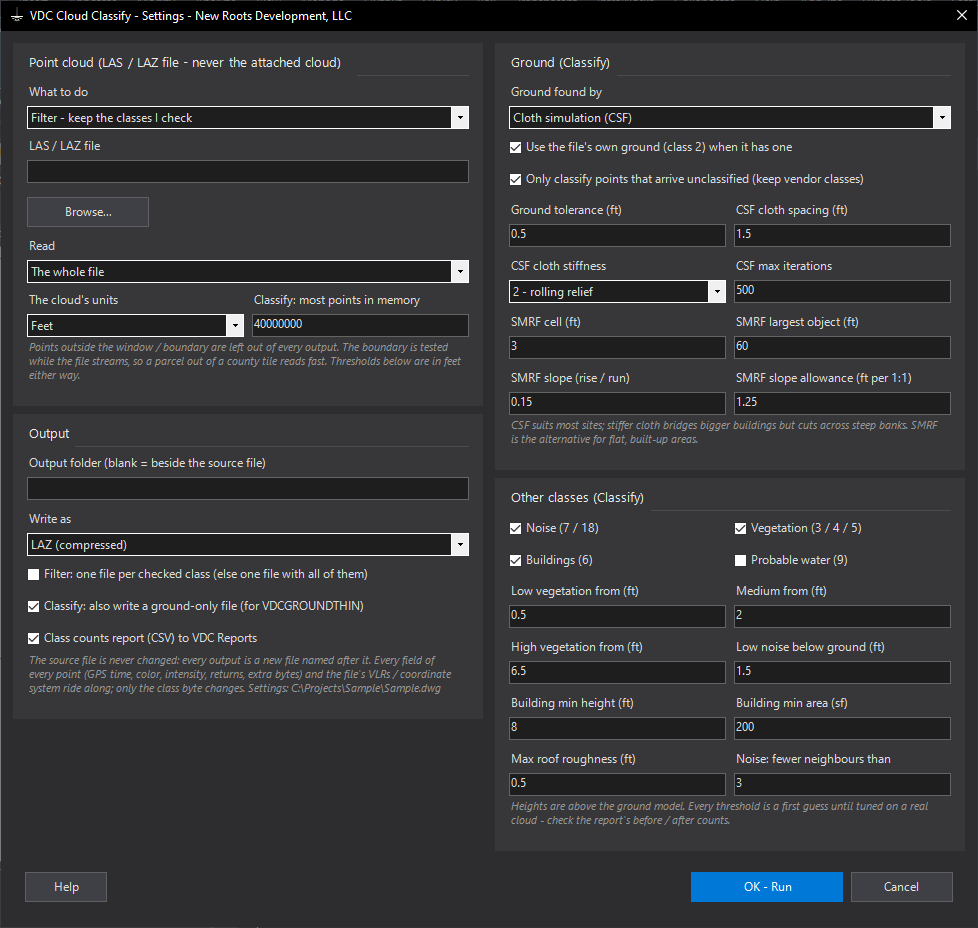
- Classify: isolated points to noise; ground by cloth simulation (CSF, default) or SMRF - or the file's own class 2 when it has it; roofs = high + smooth (plane fit) + mostly last returns; the rest by height above ground: low 0.5-2 ft, medium 2-6.5 ft, high above 6.5 ft; optional probable water.
- Writes a classified copy and a ground-only file; only the class byte changes - GPS time, color, intensity, returns, extra bytes, the VLRs (coordinate system) all ride along.
Watch for
- Derived classes are a classifier's guess - read the before / after counts and look at the result before trusting it.
- Every threshold is a first guess until tuned on a real cloud. Photogrammetry has no multiple returns: big smooth crowns can pass as roofs; cars come out as vegetation.
- Vendor classes are kept by default (only 0 / 1 points are classified).
- Classify holds the area in memory (~14 bytes a point, 40 M default) - clip to the parcel on big tiles.
Settings file:
%APPDATA%\VDC\CloudClassify\settings.jsonDialog
VDCCLOUDCLASSIFY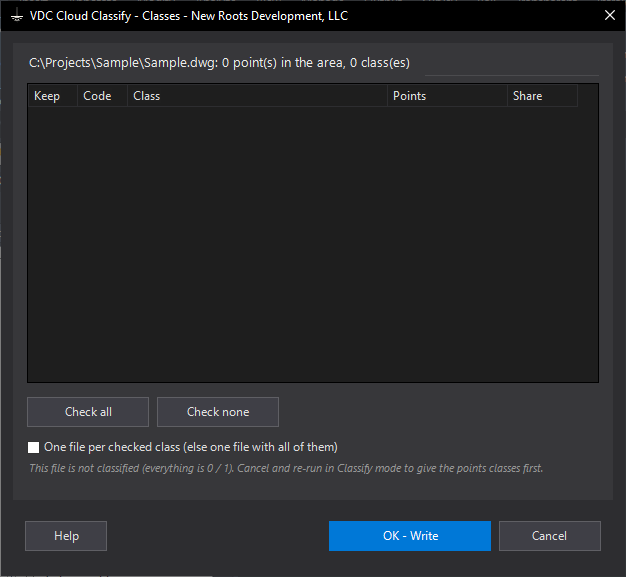
VDCCLOUDCLASSIFYWhen to use it
- A vendor LAS is classified and only the ground (or only the buildings) should go into ReCap / Civil 3D.
- A drone cloud arrived all class 1 and the surface wizard keeps picking up trees and roofs.
- A county tile is far bigger than the site - clip it to the parcel and keep only the classes needed.
- Ground Thin needs a ground-only file from an unclassified cloud.
How to run it
- Run VDCCLOUDCLASSIFY; pick Filter or Classify, the LAS / LAZ file (Browse), and what to read (whole file, a window, or a boundary).
- Set the cloud's units (feet / metres), the output folder (blank = beside the source) and LAZ or LAS.
- Classify: check the ground method (cloth simulation by default) and which other classes to find; the thresholds are in feet.
- OK; pick the window or the boundary if asked.
- Filter: check the classes to keep in the table (one file, or one per class); OK writes them.
- Read the summary - class counts before and after, the files written - and open the CSV in VDC Reports.
Options
- Only classify unclassified points: on by default - a vendor's classes are kept; off reclassifies everything.
- Use the file's own ground: when 5 % or more of the points are already class 2 the ground model is built from them and no filter runs.
- Cloth (CSF): 1.5 ft cloth, stiffness 2 (1 steep slopes, 3 flat terrain), 500 iterations; ground within 0.5 ft of the cloth.
- SMRF: 3 ft cells, largest object 60 ft, slope 0.15; tolerance grows with the local slope.
- Vegetation bands: low from 0.5 ft, medium from 2 ft, high from 6.5 ft above the ground model.
- Buildings: 8 ft min height, 200 sf min area, roof plane fit within 0.5 ft RMS.
- Noise: fewer than 3 neighbours in the box around a point = isolated; 1.5 ft below the ground = low noise.
- Probable water: off by default - flat, sparse ground patches of 1,000 sf or more; always labelled probable.
- Ground-only file: on by default in Classify - feeds VDCGROUNDTHIN straight away.
Watch out for
- These classes are a classifier's guess, not a survey - check the before / after counts and look at the result in ReCap before using it.
- Every threshold is a first guess until it is tuned on a real cloud of the kind you fly.
- Photogrammetry has no multiple returns, so canopy and roofs are told apart by roughness alone - big smooth tree crowns can pass as roofs.
- Cars, people and equipment come out as vegetation by height - there is no vehicle class.
- A big area at full density can exceed the memory limit - clip to the boundary you need.
- The cloud must be in the drawing's coordinates for a window or boundary to find it.
Related: Ground Thin (Lidar to Ground Shots) · Cloud Assets (Poles, Signs, Trees, Hydrants) · Cloud Slice (Point-Cloud Slabs to Linework)