Moves an approved design drawing toward the record-drawing deliverable in four independent, individually-skippable actions: ghost the design layers, stamp every layout, compute as-built-vs-design deltas, and drop an SCM certification table stub, leaving the judgment calls (and rev clouds) to the certifying engineer.
Ghosted design linework
As-built point in tol (INFO)
WARNING >1×
ERROR >2× / record stamp
Design surface & SCM table
What it does
- Ghosting (reversible): screens design layers to a muted color + transparency; each layer's original color/transparency is stored on the layer itself, so Restore un-ghosts exactly, any session later, no state file.
- Never-ghost: as-built/record layers,
0,DEFPOINTSand xref layers are excluded; an already-ghosted layer is never re-ghosted. - Stamp: tagged red MText on every layout; re-running replaces the prior stamps, Remove wipes them.
- Deltas: matches as-built COGO points by description wildcard (
AB*, ASB*, *ASBUILT*), samples the design surface at each point XY, reportsas-built − design; points off the surface are counted, not flagged. - SCM stub: ITEM/DESIGN/AS-BUILT/DELTA/NOTES table at a picked point, rows seeded from settings, number columns left blank on purpose.
Settings & options
- Ghosting: ghost/never-ghost wildcard lists, screen color (ACI), transparency %.
- Stamp: DRAFT/FINAL status, date of as-built survey, survey source line, one PERMIT NO. line per permit, height/position/text style.
- Deltas: as-built description wildcards, design surface (dropdown), tolerance in feet.
- Settings persist at
%APPDATA%\VDC\AsBuilt\settings.json(overrideVDC_ASBUILT_SETTINGS). - Notes: transparency plots only with Plot transparency checked in the page setup; a hand-moved stamp snaps back on the next run; rev clouds stay manual.
Dialog
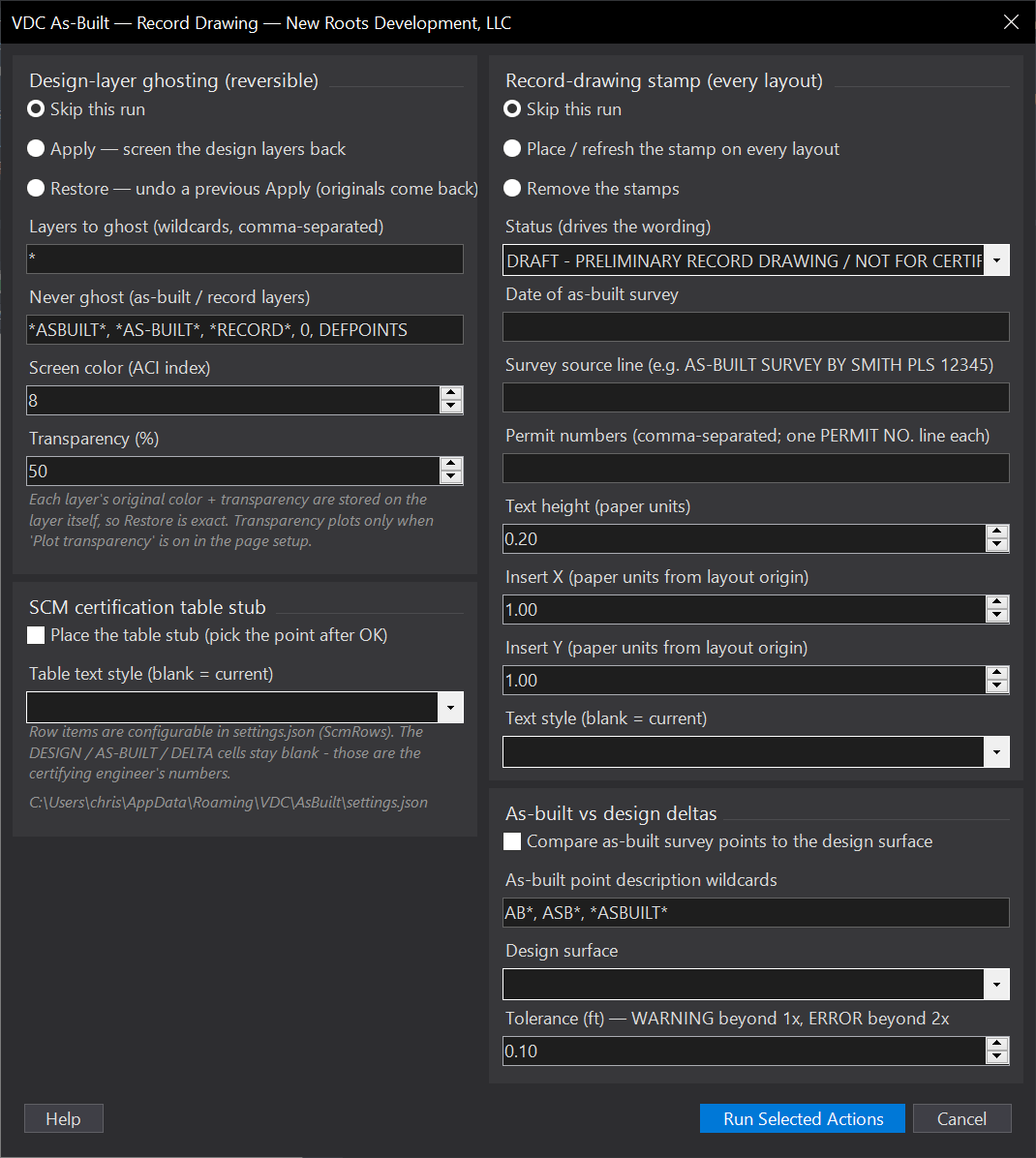
VDCASBUILTWhen to use it
- Construction is done and the record-drawing set is due.
- Checking the contractor's as-built survey against the design surface before certifying.
How to run it
- Run VDCASBUILT; pick this pass's actions (everything defaults to skip); click Run.
- Typical: Apply ghosting -> import as-built points -> delta check -> SCM stub -> stamp DRAFT.
- When certified: re-run, stamp FINAL. Restore un-ghosts exactly, any session later.
Options
- Ghosting: layer wildcards to ghost + never-ghost exclusions, screen color (ACI), transparency %.
- Stamp: DRAFT/FINAL dropdown, date of survey, source line, permit numbers, height/position/text style.
- Deltas: as-built description wildcards, design surface dropdown, tolerance (ft).
Watch out for
- Layer transparency PLOTS only when 'Plot transparency' is checked in the page setup.
- A hand-moved stamp returns to the configured position on the next place/refresh run.
- The stamp wording is boilerplate - the certifying PE/PLS's required certificate language governs.
Related: Plat QC · Rev Table · Viewport QC