
Typing field notes into a design network for a record drawing, one structure at a time: rim, sump (depth or elevation) and each pipe invert @ the structure on one small dialog, Enter to apply and walk down the run (the view follows, in plan or in a profile view). The design values stay in each part, so the model becomes the as-built and the Design vs As-built table can still show both.
Typed as-built values
Pipes / table
Deltas & flags
What it does
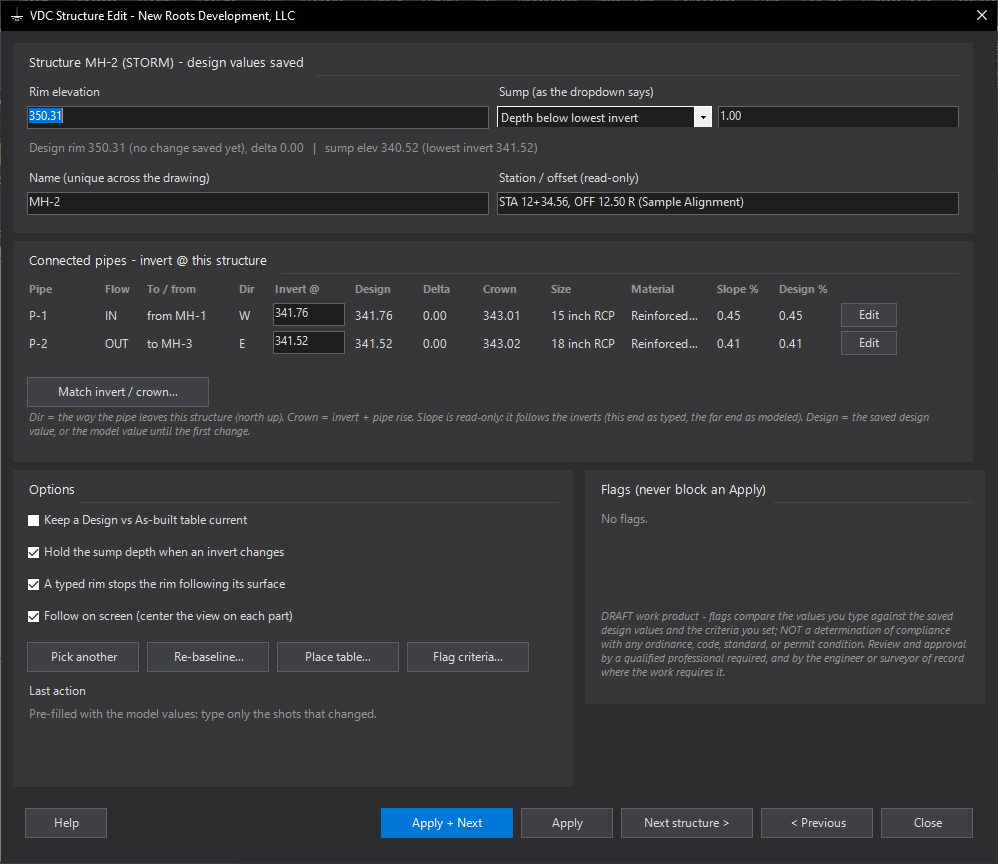
- Structure: name (unique drawing-wide, checked first), rim, sump as a depth below the lowest invert or an elevation (dropdown, remembered), every connected pipe's invert @ this structure with the far structure, its compass direction and its crown live; station / offset, size, material read-only; slope live. Match invert / crown... types another pipe's invert, or the invert that levels the crowns, into a pipe's box.
- Pipe: name, start / end invert with delta vs design beside each, Move both ends by (slope holds); slope derived (read-only), length / size / direction read-only; Match @ start / end against the other pipes at that structure.
- Pick in plan or in a profile view; the model part is edited and the profile view redraws. Follow on screen centers the view on each part as the editor moves along the run.
- Design kept: the first write to a part (this tool, Set Inverts, Build Structs, Build Pipes) saves its design values in the part; Re-baseline... drops them on purpose.
- Read-back: anything Civil 3D moves after Apply (a surface-driven rim, a depth-controlled sump) is reported as a warning.
Settings & options
- Design vs As-built table on / off (remembered); hold sump depth; typed rim stops following the surface; follow on screen (on by default); sump shown as depth or elevation.
- Flag criteria: invert / rim tolerance 0.10 ft, minimum slope = the size table, seeded 0.40 % for every size (editable; empty it for Manning full flow 2 ft/s, n 0.013), decimals, table text height.
- Sump keeps its depth below the lowest invert when an invert moves - from either editor (the pipe editor carries it to the structures at both ends).
- Settings at
%APPDATA%\VDC\StructEdit\settings.json(overrideVDC_STRUCTEDIT_SETTINGS), shared with the VDC.AsBuilt import commands.
Dialog
VDCSTRUCTEDIT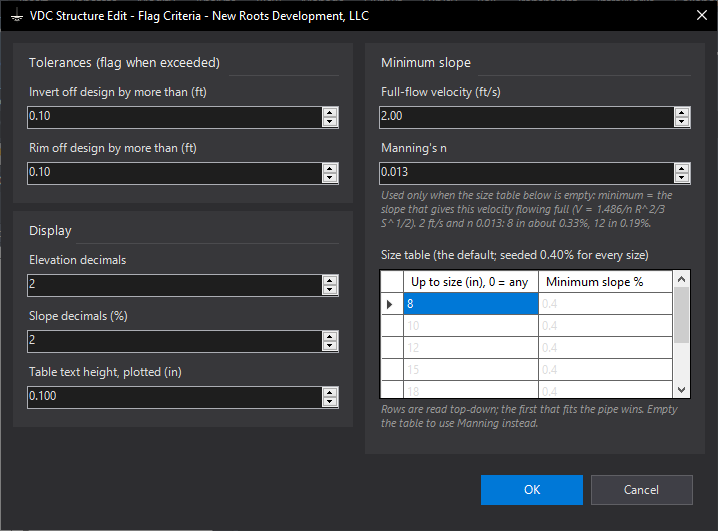
VDCSTRUCTEDIT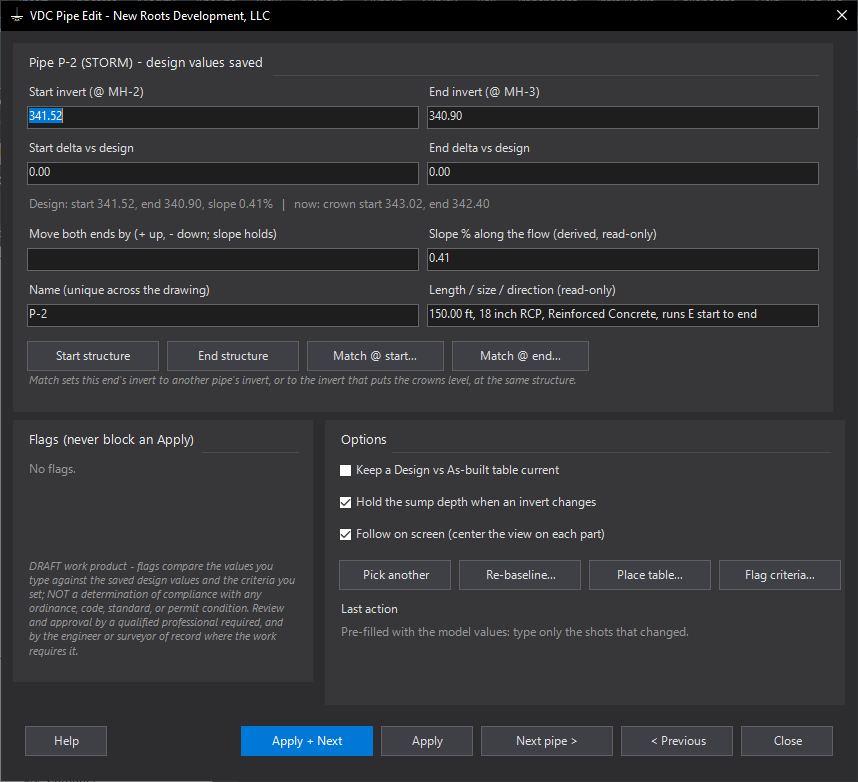
VDCPIPEEDITWhen to use it
- Working up a record drawing from field notes (rim, inverts, sump depth per structure) with no COGO points.
- Fixing one shot after VDCSETINVERTS, or renaming a structure while you are there.
- Any time Civil 3D's Properties panel (two tabs, one property per double-click) is the alternative.
How to run it
- Run VDCSTRUCTEDIT and pick the first structure of the run (or type N and its name).
- Type the rim, Tab, the sump (depth or elevation, as the dropdown says), Tab, each pipe invert that changed. Untouched fields stay as they are. Match invert / crown... fills a pipe's invert from another pipe at the structure.
- Watch the slope, crown and the flags update as you type, then press Enter: the values are written (one Undo) and the next structure down the run opens, with the view following it (plan or profile view).
- Optional: Place table... once; from then on every Apply keeps the Design vs As-built table current.
- Close when the run is done. Flags are in the QC findings palette (double-click to zoom).
Options
- Sump as depth or elevation: the dropdown beside the box (remembered). Depth is measured from the lowest connected invert (after the inverts you typed); switching converts the value. With no pipe connected the field is the sump elevation.
- Follow on screen: on by default - Next, Previous, Enter and Edit center the view on the part, in plan or in the profile view it was picked in.
- Hold the sump depth when an invert changes: on by default - moving the lowest invert moves the sump with it (it keeps its depth, not its elevation); the pipe editor does the same for the structures at its ends.
- A typed rim stops the rim following its surface: on by default - otherwise a surface-driven rim would snap back.
- Re-baseline...: drops the saved design values (this structure and its pipes) so the current values become the design. For redesigns, not field data.
- Flag criteria...: invert and rim tolerances (0.10 ft), minimum slope from the size table (seeded 0.40 % for every size, editable; empty it for Manning 2 ft/s, n 0.013), decimals, table text height.
Watch out for
- Names are unique across the whole drawing (every network) - the dialog refuses a taken name before anything is written.
- Gravity networks only. Parts in a data-shortcut reference are read-only here.
- If Civil 3D puts a value back after Apply (a surface, a depth-controlled sump), the dialog shows a WARNING with the value it now reports.
- Flags compare against the criteria you set; they are not a compliance check.
Related: Pipe Quick Edit · Set Inverts from Survey Points · As-Built Record Drawing · Pipe QC