
Lot, pipe and structure tables whose cells are AutoCAD object fields bound to the Civil 3D objects - the Paper Labels mechanism - so the table reads the live value and updates on regen and plot. {#Property} static columns cover what a field cannot reach and are re-read by Update, which also adds and drops rows in place. Columns chosen in the dialog; every cell centre-justified.
Live object fields
Static values (Update re-reads)
Civil 3D objects and the table frame
What it builds
- Lots (every site's parcels), pipes or structures (every gravity network): every one, the ones inside a window, or picked.
- Columns ticked in the dialog: live
{Name},{Length2D},{Slope},{RimElevation}... and static{#Area},{#StartInvert},{#InvertIn},{#Station},{#NetworkName}... - Title row, header row, one row per object in natural order; table style, layer, plotted text height, decimals from the dialog.
Update
- The tag carries the settings, the scope (window or handles) and a signature of rows + static values + columns: Update re-scans each table with its own scope and refills it in place; a current table is left untouched.
- Fields update by themselves (
FIELDEVAL/FIELDDISPLAY);####= a property the field cannot read. - Settings under
%APPDATA%\VDC\FieldTables\(overrideVDC_FIELDTABLES_SETTINGS). Civil 3D only.
Dialog
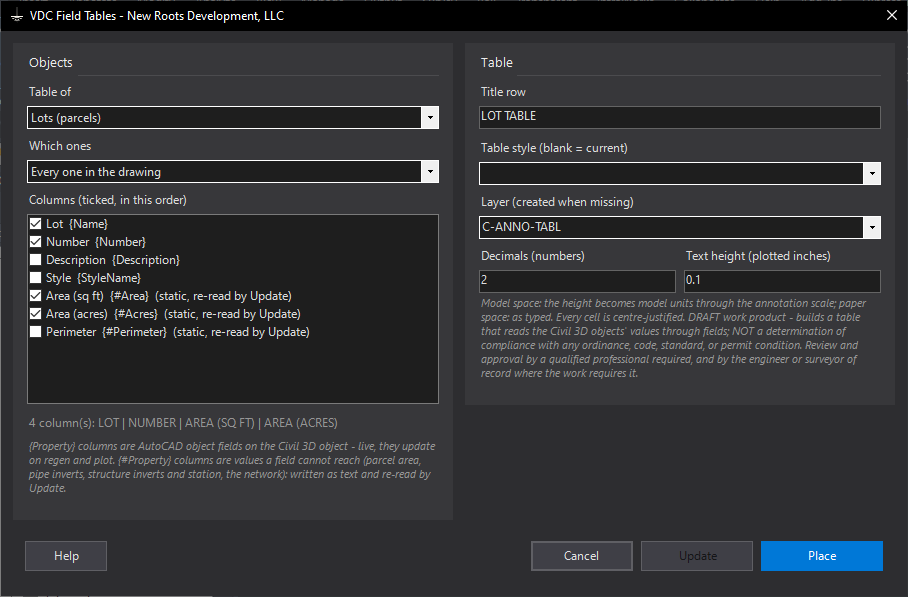
VDCFIELDTABLESWhen to use it
- A lot table, pipe schedule or structure schedule that must stay current through design changes.
- A sheet-by-sheet table: window scope keeps the rows to the objects the sheet shows.
- A table for a hand-picked set of pipes or structures.
How to run it
- Run VDCFIELDTABLES; pick Lots, Pipes or Structures and the scope.
- Tick the columns (live {Property} fields and static {#Property} values), set decimals, style, layer, text height and the title.
- Place; pick the window or the objects when asked, then the table's upper-left point.
- After a design change: run again and Update. Tables already current are left alone.
Options
- Columns: any mix of live fields and static values, in catalog order; the first is the name.
- Scope: every object, a window (stored with the table), or a pick (the handles are stored with the table).
- Decimals: the number format on every numeric field and static number.
Watch out for
- Live cells are fields, not text: FIELDEVAL / FIELDDISPLAY are AutoCAD's own switches; a #### cell means that property is not readable on that object.
- Static columns are only as current as the last Update.
- A table whose columns were changed by hand no longer matches its tag and is reported, not rebuilt.
Related: Pipe Table · Lot Table · Paper Labels