“How far up or down does the whole site move to balance?”: answered before anyone regrades.
What it does
- Grid-samples proposed − existing over the whole overlap or a window; only cells on BOTH surfaces count (the funnel says how many weren't).
- Cut is discounted by your usable-cut factor (0.85 = 15% shrinkage), then the uniform shift where usable cut meets fill is bisected.
- Reported signed:
+0.42' (raise the site), with the cut/fill rollup.
Worth knowing
- The answer is a UNIFORM shift, use it as the datum move, not the final design.
- A small surface overlap makes a misleading answer; watch the excluded-cell count.
- Settings:
%APPDATA%\VDC\Balance\(envVDC_BALANCE_SETTINGS).
Dialog
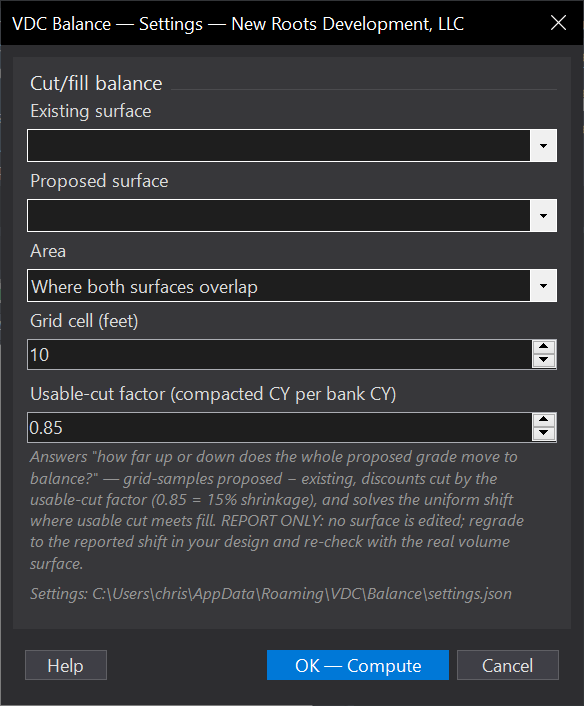
VDCBALANCEWhen to use it
- Early grading - set the pad/road datum so dirt balances before detailed design.
- An import/export estimate says move the site - by how much, exactly.
How to run it
- Run VDCBALANCE; pick the proposed and existing surfaces.
- Set the grid spacing and the usable-cut factor; whole overlap or window the area.
- Read the shift and the cut/fill rollup; apply the shift with your grading tools if you take it.
Options
- Usable-cut factor: bank-to-compacted discount (0.85 default) - matches the haul tool's swell/shrink thinking.
- Scope: the whole surface overlap, or a picked window.
Watch out for
- The answer is a UNIFORM shift - real sites balance with selective regrades; use it as the datum move, not the design.
- Cells off either surface are excluded and counted - a small overlap makes a misleading answer.
Related: Earthwork Haul · Auto-Grade Lots · Surface QC