Is the data-shortcut web healthy? One read-only run over the project's published shortcuts and this drawing's data references: missing sources, broken and out-of-date references, orphaned shortcuts, in the QC palette, a CSV and the QC run log. Every fix stays in Prospector.
OK
WARNING (out of date / no source recorded)
ERROR (missing / broken / orphan)
What it does
- Shortcuts on disk: every
.xmlunder the project's_Shortcuts(read tolerantly: type = subfolder, name = file, first.dwg= source, first handle-like value = handle), source missing = ERROR, no source recorded = WARNING. - Orphans (optional, slower): each source drawing side-loaded once, read-only and shared; a handle that no longer resolves = ERROR. The open drawing is checked live.
- References in this drawing: alignments, surfaces, pipe and pressure networks that are data references, source missing or broken = ERROR, stale = WARNING (synchronize), with the key's source drawing.
Modes & output
- One mode, read-only: nothing is repaired, synchronized or deleted, fixes stay in Prospector.
- Palette rows for ERROR / WARNING (zoom on double-click); CSV with every row and the notes;
QcRunLoglineVDCDSQC | Audit. - Project folder preset from
DataShortcuts.GetWorkingFolder()+ current project; type another folder to audit a different project. - Civil 3D only (
VDC.All.bundle); no settings file.
Dialog
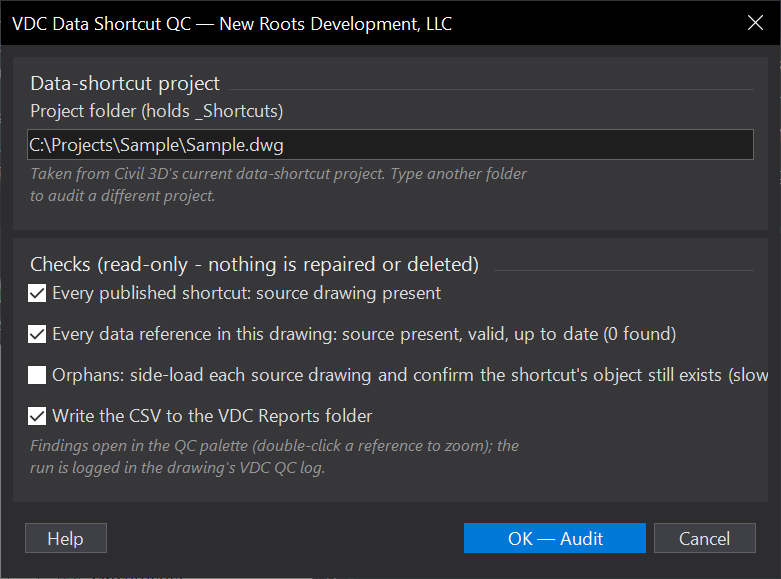
VDCDSQCWhen to use it
- Before a submittal or a plot set: a stale surface or alignment reference means the sheets are wrong.
- When Prospector shows broken references or a project folder was moved / renamed.
- Periodic project hygiene - orphaned shortcuts pile up when source objects are deleted.
How to run it
- Run VDCDSQC - the dialog shows the current project folder (or type one) and the checks; OK.
- Read the palette and the summary: ERROR for missing sources, broken references and orphans; WARNING for out-of-date references and shortcuts with no source recorded.
- Fix in Prospector (synchronize, repair, republish, delete the orphan) and re-run; the CSV and the QC log keep the record.
Options
- Project folder: preset from Civil 3D's working folder + current project; type another to audit a different project.
- Checks: shortcuts on disk, references in this drawing, orphans (side-loads each source - slower), CSV.
Watch out for
- Orphan checking opens every source drawing read-only - on a big project give it a minute; drawings open exclusively elsewhere are reported as not checked.
- A shortcut .xml the tool cannot read is listed with no source and flagged, not skipped silently.
- Nothing is changed - the fix is always in Prospector.
Related: Xref QC · GeoRef · Sheet Set QC