
Deed Plot - calls to figure. The reverse of Legal Description: paste a deed's calls as written and the figure draws from the point of beginning as one polyline with true arcs, every course labeled, the LINE / CURVE tables at a picked corner, and the closure (perimeter, area, misclosure, 1:N) in the summary and a CSV. Pieces it cannot read are listed by line number before anything is drawn.
What it does
- Reads the deed as written: N 45°30'15" E, N45-30-15E, N 45 30 15 E, N45d30'15"E, S 12°E, due north, azimuths; feet by default with chains / poles / rods / varas / links / meters converted; curves from radius plus arc, chord or delta with the chord bearing; thence, commas, wrapped lines, "more or less" and the BEGINNING / containing sentences all tolerated.
- Check calls: every call as read, and every piece it could not read marked
!!with its paste-box line - shown before anything is drawn. - Draws: one polyline with true arc segments (or chords) from a picked / typed point of beginning on the chosen layer, linetype and color (ByLayer pinned first); closed or left open.
- Labels + tables: bearing over distance per course (R / L / chord for curves), the LINE / CURVE tables in Deed Table's shape at a picked corner, centre-justified and tagged for Update.
- Closure: perimeter, area (sq ft + acres), misclosure distance and bearing, precision 1:N - summary +
{drawing} - Deed Plot.csv.
Worth knowing
- A curve with no chord bearing is drawn tangent to the course before it; no left / right stated and it follows its chord - each case is listed as ASSUMED in the summary.
- Re-run on the same figure: Replace (erase and draw again, tables where they were) or Update in place (vertices on the same polyline, labels re-placed, table cells refilled). Nothing changed = NOTHING CHANGED, nothing written.
- The figure is in drawing units from the point you give it - rotation to grid and the grid factor stay with the surveyor. Draft work product.
- Settings:
%APPDATA%\VDC\DeedPlot\settings.json(envVDC_DEEDPLOT_SETTINGS). The deed text is stored on the polyline, not in settings. - Companions:
VDCLEGAL(figure to narrative),VDCDEEDTABLE(drawn parcel to tables),VDCPLATQC(closure audit of a plat).
Dialog
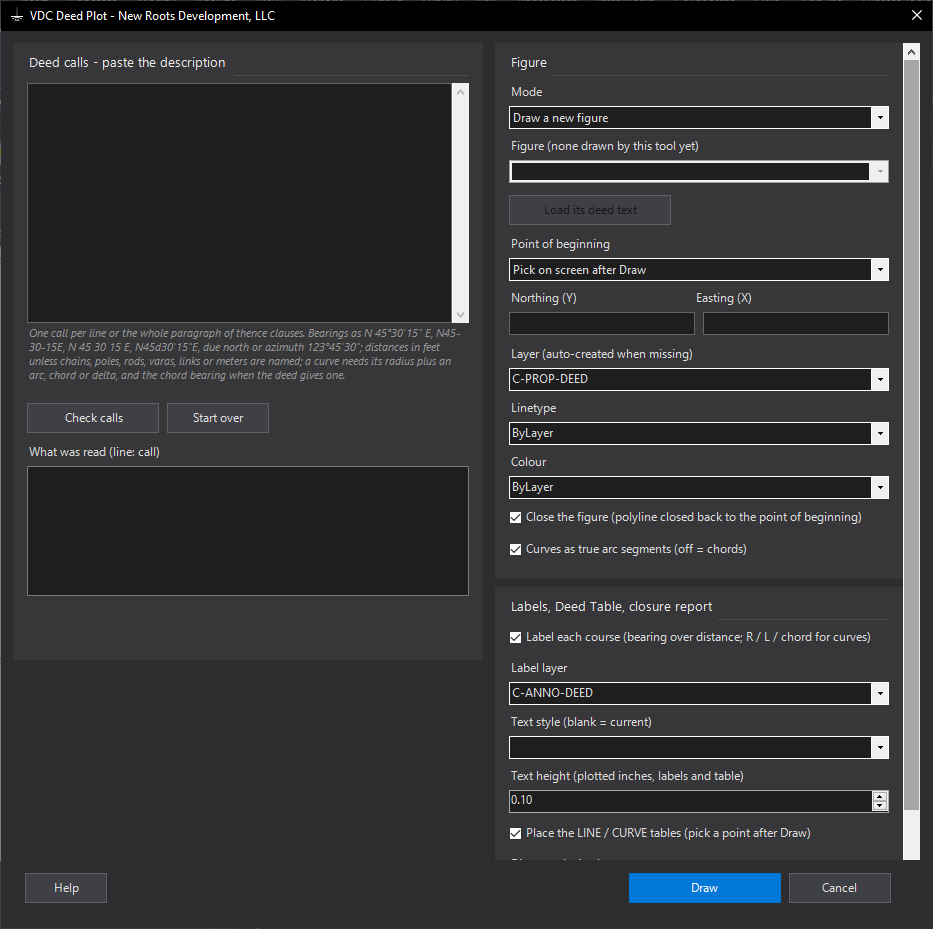
VDCDEEDPLOTWhen to use it
- A deed or an old plat's calls need to be on the drawing to check a boundary, a closure or an overlap.
- A client sends a legal description and wants to see the shape before survey work starts.
How to run it
- Run VDCDEEDPLOT and paste the description (one call per line or the whole paragraph).
- Click Check calls. Fix anything marked !! (the line number is the paste box's), or leave it to be skipped.
- Choose the layer, linetype and color, labels, text height, tables and the report; pick or type the point of beginning.
- Draw. Pick the point of beginning and the table corner when asked; read the closure in the summary.
- To change the calls later: run again, choose Update (or Replace) and the figure, Load its deed text, edit, Draw.
Options
- Mode: Draw a new figure, Replace a figure this tool drew, or Update it in place (polyline vertices, labels, table cells).
- Point of beginning: pick on screen after Draw, type Northing / Easting, or keep the selected figure's.
- Close the figure: closed polyline (on) or left open so the misclosure shows as a gap (off).
- Curves as true arcs: bulge segments on the polyline; off draws the chords.
- Distance decimals: tables, labels and CSV.
Watch out for
- A curve with no chord bearing is drawn tangent to the course before it, and one with no left / right follows its chord - the summary says ASSUMED on each.
- Meters, chains, poles, varas and links are converted to feet (the factor is in the summary); a deed in survey feet vs international feet differs by far less than the rounding of the text.
- Update sees geometry, layer / linetype / color, label text and table cells - not a text-height or style change on its own; use Replace for those.
- The figure is plotted in drawing units from the point you give it: rotation to grid and grid factor are yours.
Related: Legal Description · Deed Table · Plat QC