The plan reviewer's walk around every lot, read from the finished-grade surface: ground falling away from the house, side swales falling from their high point along the side lines, the pad above the street, and no ponding spot in the rear yard. Read-only; every threshold editable.
Grade away from the house
Side swales
Pad-to-street fall / lot line
Findings
The four checks
- Grade at the house: every footprint wall sampled every 5'; a 10' probe outward must fall ≥ 2% (IRC R401.3: 6 in / 10 ft). Falls TOWARD the house = ERROR.
- Side swales: along each side lot line, from the profile's high point every stretch must fall ≥ 1% toward the street and toward the rear. Adverse = ERROR.
- Pad-to-street: pad (VDCGRADELOTS stamp, else the surface at the house) − surface at the front-line midpoint ≥ 0.5'.
- Rear yard: a 5' grid behind the house; an interior sample lower than all eight neighbours is a ponding spot (a low point on the lot line is an outlet).
Inputs & output
- FG surface; lots via the shared parcel picker (host / xref, Back / Stop-all); front edge from the VDCLOTFRONT stamp → ROW auto-detect → a pick.
- House footprints: closed polylines on a layer (centroid inside the lot); pad elevation from the VDCGRADELOTS stamp.
- QC palette (double-click to zoom), red flags per finding (re-run replaces a lot's flags; Clear removes all),
<drawing>_LotDrainageQC.csv, VDC QC log + status stamp. - Thresholds are common graded-lot practice, the jurisdiction governs. Settings
%APPDATA%\VDC\LotDrainQc\settings.json.
Dialog
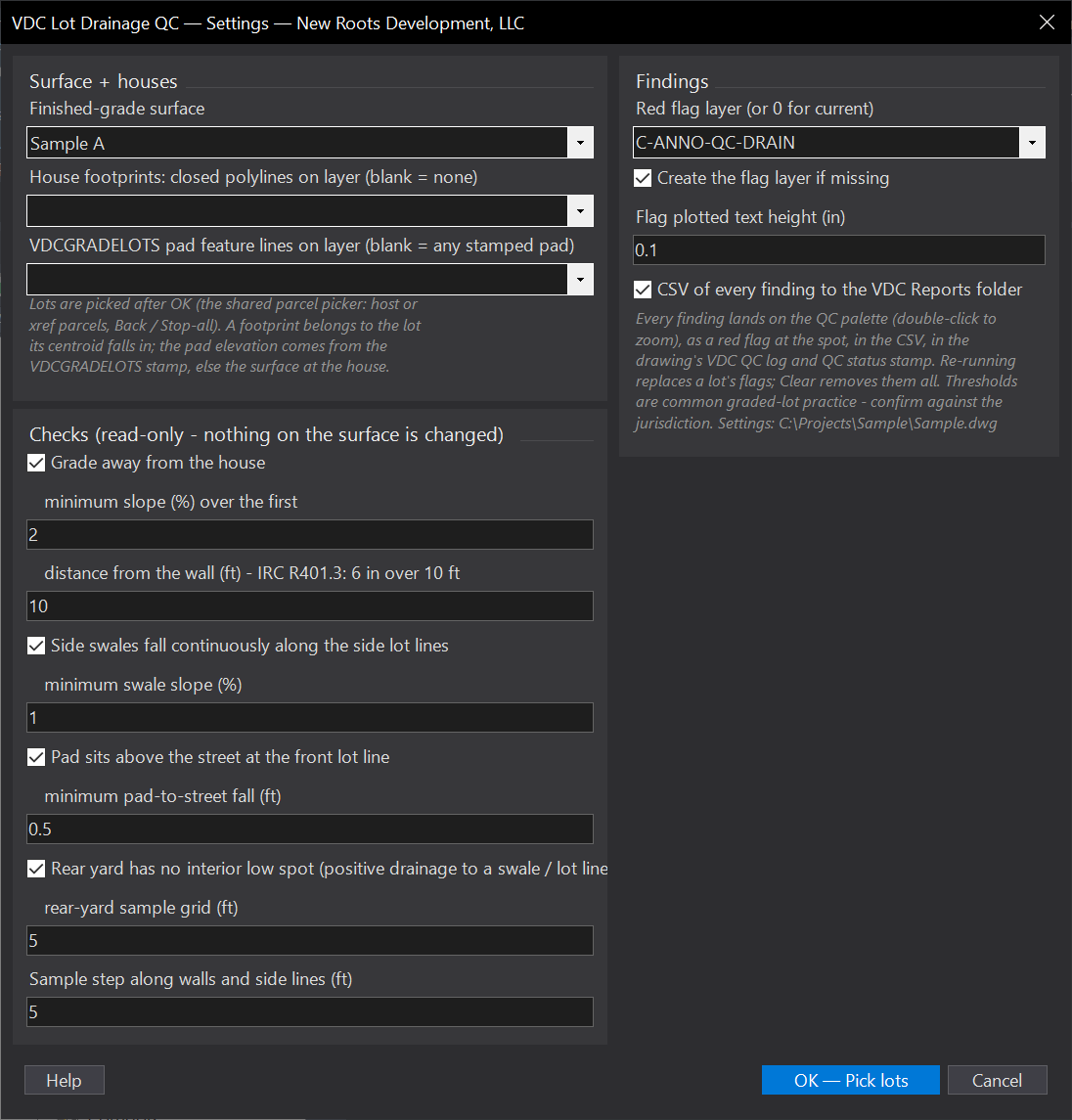
VDCLOTDRAINQCWhen to use it
- Before the grading plan goes out: catch the lot that drains toward the house or ponds behind it.
- After VDCGRADELOTS or a regrade - run it on the whole block in one pick.
How to run it
- Run VDCLOTDRAINQC - Run mode; pick the surface, the footprint layer, the pad layer, the checks and thresholds; OK.
- Pick the lots (window the block; Back / Stop-all as usual). Front edges come from VDCLOTFRONT stamps or the ROW auto-detect; the tool asks only when neither works.
- Read the palette - double-click a finding to zoom to its red flag. Fix, re-run; the flags refresh per lot.
Options
- Grade at the house: min slope over the first N ft outward from every footprint wall (2 percent over 10 ft default); a probe that leaves the lot (narrow side yard) is skipped.
- Side swales: sampled along each side lot line; from the high point toward the street and toward the rear every stretch must fall at least the minimum (1 percent); adverse stretches are ERRORS.
- Pad-to-street: pad elevation (VDCGRADELOTS stamp, else the surface at the house) minus the surface at the front-line midpoint - min 0.5 ft.
- Rear yard: a sample grid behind the house; any interior point lower than all eight neighbours is a ponding spot (a low point ON the lot line is an outlet, not a finding).
Watch out for
- The checks read the SURFACE - a lot graded only with feature lines that are not in the surface reads as ungraded.
- Side lines are checked as straight lines from front corner to rear corner; a bent side line is sampled along the chord.
- Thresholds are common graded-lot practice - the jurisdiction's number governs; change it in the dialog, it is remembered.
- Without footprints and without pad stamps the house checks fall back to the lot centre and the rear half of the lot.
Related: Lot QC · Auto-Grade Lots · Pad Labels