
How good is the cloud? Tested elevation vs surveyed check shot at every shot; RMSEz and the ASPRS figures, outliers and shots outside the data flagged.
What it does
- Tests a TIN surface, a LAS / LAZ cloud (TIN of the nearby points or nearest point, within a radius), or both.
- Statistics: dZ = tested - surveyed; mean, std dev, RMSEz, min / max; headline ASPRS 2023 RMSEz incl. the check shots' error (default since 1.117.1); ASPRS 2014 NVA 95% = 1.96 x RMSEz as the secondary line (or pick 2014 as the headline).
- Flags: outliers (> 3 sigma, still counted), shots outside the data (not counted), constant bias, a 3.28 Z ratio.
- Output: findings palette (double-click zooms), report + CSV, optional summary table.
Watch for
- Non-vegetated shots on hard, open ground only.
- Reprojection on read is planning grade - no datum shift, no geoid.
- Statistics, not certification: the surveyor of record decides what they mean.
Dialog
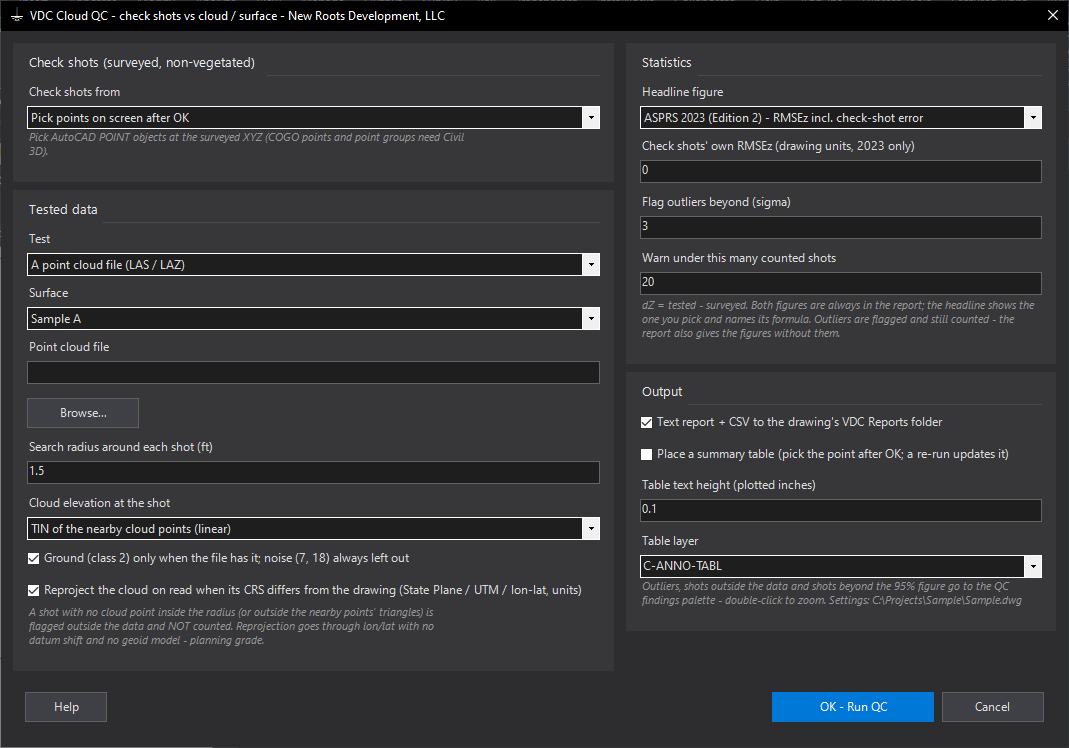
VDCCLOUDQCSettings file:
%APPDATA%\VDC\CloudCheck\settings.jsonWhen to use it
- A drone / lidar topo has to be tested against field shots before anyone stamps a surface built from it.
- Comparing a VDCGROUNDTHIN surface with the crew's check shots.
- Deciding whether a delivery's error is noise (spread) or an offset (bias) before calling the vendor.
How to run it
- Run VDCCLOUDQC; choose the check shots (a point group, or pick on screen after OK).
- Choose what to test - a surface, a point cloud file, or both - and the search radius and interpolation for the cloud.
- Check the headline edition (ASPRS 2023 by default; 2014 if the client asks for the 95% NVA), the outlier sigma and the minimum shot count; tick the summary table if you want one.
- OK; pick the shots if asked (and the table point); read the summary.
- Double-click palette rows to zoom to outliers and to shots outside the data; the full report is in VDC Reports.
Options
- Test: a surface in the drawing (Civil 3D), a point cloud file, or both in one report.
- Search radius: 1.5 ft around each shot; no cloud point inside it = outside the data, not counted.
- Cloud elevation at the shot: the TIN of the nearby points (default; what a surface from the cloud would say) or the nearest point.
- Ground only: class 2 when the file has it near the shots; noise (7, 18) is always left out.
- Reproject on read: when the file's coordinate system differs from the drawing's (zone, UTM, lon / lat, units, Z unit) - planning grade, no datum shift, no geoid.
- Headline figure: ASPRS 2023 RMSEz incl. the check shots' own RMSEz (default), with the ASPRS 2014 NVA at 95% (1.96 x RMSEz) as the secondary line; or 2014 as the headline. Both are always in the report.
- Outliers / minimum shots: 3 sigma and 20 shots by default.
Watch out for
- Use non-vegetated shots on hard, open, level ground; a shot on a curb edge or under a tree measures the shot, not the data.
- Outliers are flagged and still counted - check the field book before dropping one; the report gives the figures both ways.
- A large constant bias is a datum, geoid or control problem; fix the offset, do not average it away.
- The numbers are statistics of the shots you chose; they do not certify the data to an accuracy class.
Related: Cloud Check (LAS / LAZ Doctor) · Ground Thin (Lidar to Ground Shots) · Surface QC