Jurisdiction
State, county, municipality and the planning authority the boundaries imply, with the coordinate system the queries ran in.

Type an address, drop a pin or enter a parcel ID. In a moment you have the jurisdiction, the parcel, the flood zone, soils, terrain, the watershed, the nearest roads and constraints, the nearest survey control and the permitting path a project will follow, every row with the service it came from and the time it was pulled. Standing on the dirt, across the table from a developer, or on a broker’s call, with no drawing open. Sign in and the same page becomes the project record: phases, permits and review cycles, the agencies and their turnaround, the pipeline and the people.
Free to use, no account for the lookup. Works in any browser and installs to a phone’s home screen like an app. Every result has a share link, so the page you pulled in the field is the one the office opens.
Tap the map or type an address. The app asks the public services what sits at that point, draws the parcel outline, and lists what each one said. Rows are grouped the way a designer reads a site: jurisdiction first, then the parcel, then flood, soils, terrain, water, roads and the rest.
A service that does not answer becomes one plainly marked row, never a failed page. Nothing is typed in by hand: the coverage statement and the permitting path are generated from the jurisdiction match, and both say so.
The sample at right is a shared result for a parcel in Myrtle Beach. Open any result’s share link and you see the same page, with no sign-in.
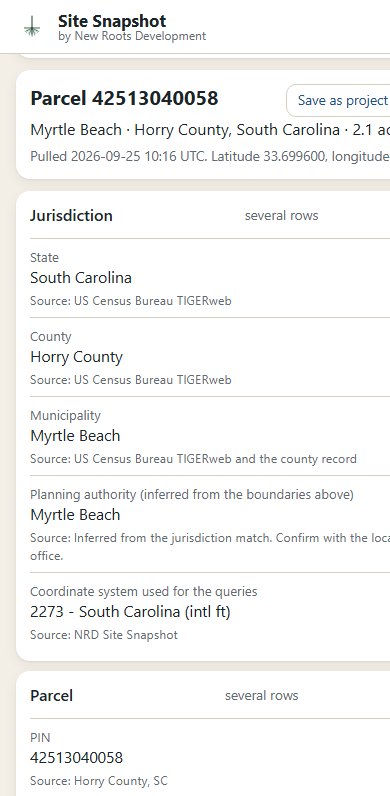
State, county, municipality and the planning authority the boundaries imply, with the coordinate system the queries ran in.
Parcel number, acreage, deed and plat references, zoning where the county serves it, and the outline on the map.
FEMA flood hazard zone, special flood hazard area yes or no, FIRM panel and its effective date, base flood elevation where published.
Soil map unit, hydrologic soil group, drainage class, flooding frequency, hydric rating and the annual minimum water table from the USDA survey.
Ground elevation at the point and the elevation range across the parcel, sampled from the national lidar elevation program.
The watershed the point drains to, and wetlands mapping from the national inventory and from the county where it keeps its own.
The nearest state route with its traffic count, the nearest transmission line with owner and voltage, and the nearest airport, each with its distance.
The nearest published survey marks with their distance, elevation and datum.
The state stormwater or erosion control program, the likely review authority, the checklist the reviewer applies and any coastal overlay, named from the jurisdiction match for you to confirm with the office.
Federal records answer everywhere in the United States. State records answer in North Carolina and South Carolina. Parcel and county records answer in Brunswick County, NC, Georgetown County, SC and Horry County, SC. Everywhere else you get the federal and state tiers and a result that says so. The statement is built from the catalog each time, so it is never behind the app.
Counties are added the same way they are added to the Civil 3D suite: a public parcel layer, a profile, a test record. If your county is missing, tell us which one.
Sign in with an email link, no password, and a snapshot becomes a project. From there the app is the project record for a land development firm: the land, the people around it, the permits and where each one stands. It is built for civil engineers, surveyors and developers, not adapted from a sales tool.
The morning screen: follow-ups due, what is sitting with an agency and for how many days, comments back and owed a response, permits expiring, hearings, what starts soon.
Sites from the snapshot, phases with lots sold and built, plat recorded with book and page, infrastructure complete, bond released, and everyone on the job: owner, engineer of record, surveyor, contractor, attorney.
Every submittal, every cycle with sent and comments-back dates, the comment letter as a checklist you tick off with your response, response due, hearing dates. One tap for comments back today, resubmitted today, issued today.
Each reviewing agency with permits in review, cycles waiting, and the average and longest days to comments, from your own submittals. Numbers no agency publishes.
A developer’s single-purpose LLCs roll up to the developer, so one page answers what you have ever done for them: projects, lots, contacts, open pursuits.
Opportunities by stage with the fee at a probability, a weighted pipeline and a twelve-month forecast, and a six-question go/no-go scorecard before you chase the wrong job.
A record address to copy on any email so it files itself under the contact and the project, and a Log to Site Snapshot button inside Outlook on the web and desktop.
Pipeline, forecast, agency turnaround, workload per person, bonds outstanding and hearings on one page; a project sheet and a qualifications package as PDFs for the next proposal.
Every table exports as CSV or JSON at any time. Owners and members, a map of every site, search across projects, firms, people and parcel numbers, and a set of sample data to try it all before you add a real project.
Any snapshot can become a branded PDF: an aerial with the parcel outline drawn on it, the owner of record from the county, every row with its source numbered and dated, the permitting path, the coverage statement and the notice. A KML of the parcel comes with it. Reports are included for accounts; a single report can also be bought from the result page by card, and the link comes straight back.
Owner names appear in the report only, never on the free page, and results are for single sites, not for building lists.
Site Snapshot runs on the same site-data catalog as VDCSITESNAPSHOT and VDCSITEDATA in VDC Custom CAD Tools, down to the same source files. The page on your phone and the note in the drawing agree, and a county added to one is a county added to the other.
Site Snapshot reports what the public record says about a point, as published by the services named on each row on the date shown. It is not a survey, a title search, a flood determination or an opinion on whether a site can be developed. Confirm every item with the issuing agency before relying on it. Owner names do not appear on the free page, and results are for single sites, not for building lists. What the app keeps is in the privacy policy.