VDCSETBACK is part of ParcelSetback; the full section follows.
Generates building setback line (BSL) polylines around parcels with distinct Front / Rear / Side offsets. Distance-based front classification works on parcels built any way. Straight + curved boundaries supported (cul-de-sac arc fronts handled).
Parcel boundary
Setback polyline (HIDDEN, ACI 8)
Frontage reference
Capabilities
- Multi-parcel batch: select many lots at once, run in a single transaction.
- Straight or curved boundaries: arc-bounded parcels (cul-de-sac, eyebrow, pie-slice) handled.
- Distance-based topology classifier, works on irregular pentagons and wedge lots; doesn't depend on Civil 3D frontage metadata.
- Output to layer
C-PROP-STBK(AIA standard), HIDDEN linetype, ACI 8 grey. Layer auto-created if missing. - Frontage reference is user-picked: alignment, ROW polyline, line, or arc.
Workflow
- Type
PARCELSETBACK. - Select parcels (labels or boundaries).
- Pick the frontage reference curve.
- Confirm or edit Front / Rear / Side distances in the dialog (Save as Default to persist).
- OK. Tool draws the setbacks and reports Created / Skipped / Failed.
Front / Rear / Side classifier
- Front: segment(s) closest to the frontage reference (within 2 ft of the minimum distance).
- Rear: segments roughly opposite the front (dot product < -0.5).
- Side: everything else.
Dialog

PARCELSETBACK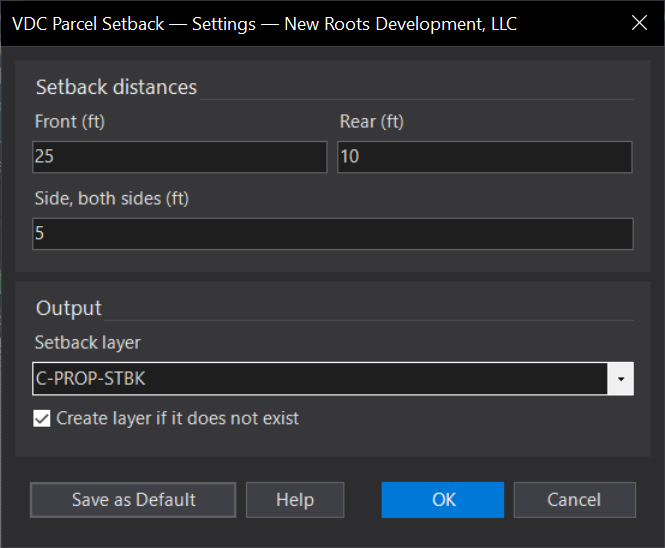
VDCSETBACKWhen to use it
- Drawing building envelopes / setback lines on the plat or site plan.
How to run it
- Run VDCSETBACK (or PARCELSETBACK) and select the lots.
- Enter the front, side, and rear setback distances.
- Review the generated setback lines.
Watch out for
- Front-edge designation determines which setback is the front - designate fronts first.
- Xref lots appear in the picker but are processed in the host drawing only.