
FILEDIA = 0 turns every file dialog (Open, Save As, Xref attach) into a command-line prompt, and CMDDIA = 0 does the same to a few command dialogs. Scripts, LISP routines and an interrupted run can leave either at 0. Since 1.117.0 the suite keeps both at 1.The guard - automatic
- After every command or LISP expression ends, is cancelled or fails, on drawing switch and at startup, the suite looks once, at the next idle moment.
- Resets
FILEDIA/CMDDIAto 1 only when nothing is running (CMDACTIVE0 - no command, script or LISP) and no VDC tool is holding the value at 0 on purpose. A script that setsFILEDIA0 keeps it until it finishes. - First reset of a session prints one line:
VDC: FILEDIA was 0 - set back to 1 so file dialogs open (VDCFILEDIA to change). - Export to AutoCAD, Clean DWG and Style Update put back 1 after their own runs, even when a run fails (they used to put back the 0 they found).
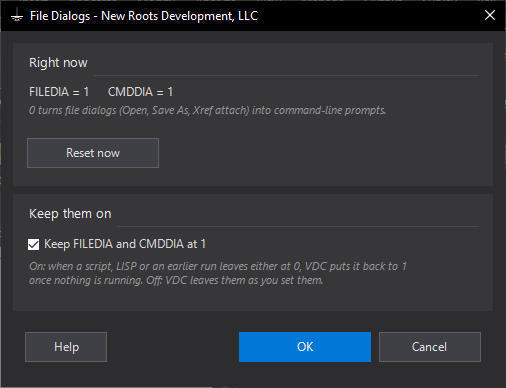
VDCFILEDIA - the dialog
- Shows
FILEDIAandCMDDIAas they stand; Reset now sets both to 1 at once. - Keep FILEDIA and CMDDIA at 1 - on by default. Untick it if you work with
FILEDIAat 0 on purpose: the guard leaves both alone and the VDC tools put back the value they found. - Settings: env
VDC_FILEDIA_SETTINGS, default%APPDATA%\VDC\FileDia\settings.json. Kill switch:VDC_FILEDIA_GUARD=0on the workstation. - Ribbon: Help panel → Command Reference drop-down → File Dialogs. Runs with or without a license.
Dialog
VDCFILEDIA