The office's HP / LP call-outs in plan: every high and low point of an alignment's profile gets a two-line multileader,
HP: 44+25.00 over ELEV: 45.47, with the arrow on the alignment point and the text offset to a chosen side. The alignment may be invisible or frozen.
Design profile
High point label
Low point label
Alignment in plan (any visibility)
What it does
- Points: crest / sag vertical curves (symmetric, asymmetric, circular) whose grades change sign contribute their own high-low point; a tangent break with a sign change is labeled at the PVI; flat-through and same-sign PVIs are skipped; a PVI inside a curve is not double-counted.
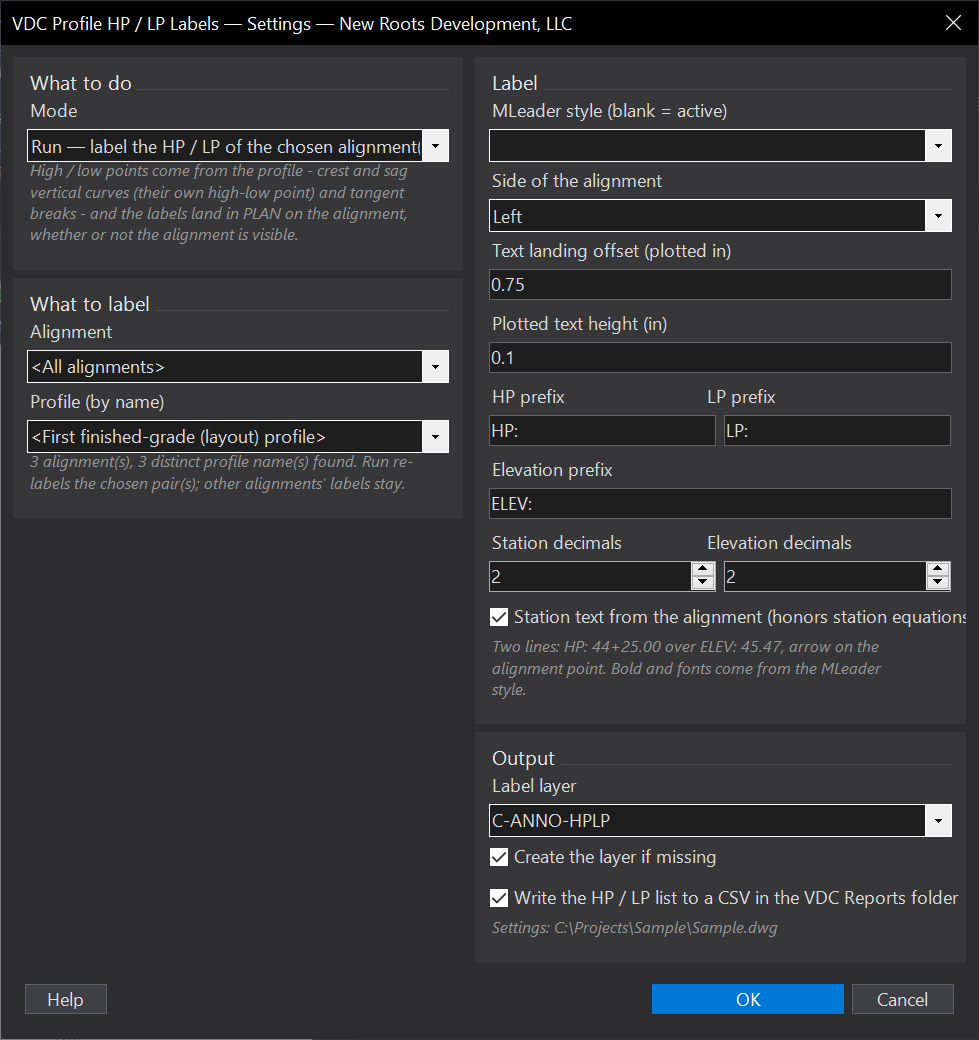
- Label: two-line MLeader (style dropdown, blank = active; bold and font from the style), arrow on the alignment point, text at the plotted landing offset on the chosen side, Left, Right, or Alternate.
- Text: HP / LP / ELEV prefixes, station and elevation decimals; station from the alignment (equations honored) or plain
##+##.##. - Profile: by name, or the first finished-grade (layout) profile of each alignment.
Modes & output
- Run: the chosen alignment or all; replaces that alignment / profile pair's previous labels. Refresh: re-runs every pair that has labels from its current profile. Clear: erases everything the tool placed.
- Summary lists every HP / LP with station, elevation and source (curve / PVI); CSV
<drawing>_ProfileHpLp.csvin the VDC Reports folder with the plan XY. - Layer
C-ANNO-HPLP(auto-created). Settings%APPDATA%\VDC\ProfileHpLp\settings.json(envVDC_PROFHPLP_SETTINGS). - Civil 3D only (
VDC.All.bundle).
Dialog
VDCPROFHPLPWhen to use it
- Plan sheets that call out the profile's high and low points at the road centerline.
- After a profile edit - Refresh moves and re-texts every label from the current profile.
How to run it
- Run VDCPROFHPLP - the dialog opens with the mode (Run / Refresh / Clear), the alignment (or all), the profile by name (default: the first finished-grade profile), style, side, offsets and text options.
- OK. Each HP / LP is placed at the alignment point for its station; the summary lists every point with station and elevation.
- Move any label by hand as usual; re-run only when the profile changes (Refresh re-places from the profile).
Options
- Alignment / profile: one alignment or all; the profile by name, or blank for the first finished-grade (layout) profile of each alignment.
- Label: MLeader style (blank = active), side (Left / Right / Alternate), text landing offset and plotted text height, HP / LP / ELEV prefixes, station and elevation decimals, station text from the alignment (honors station equations) or plain ##+##.##.
- Output: label layer (C-ANNO-HPLP, auto-created), CSV of every HP / LP with station, elevation, source and plan XY in the VDC Reports folder.
Watch out for
- Labels are multileaders, not live labels: re-run Refresh after a profile edit.
- Only profiles with a grade sign change produce points - a one-grade profile reports none.
- Bold and fonts come from the MLeader style; pick a style with the office's label font.
Related: Band Profiles · Surface Profiles · Pipe Views